Community resources
Community resources
Community resources
How to spot workflow rework in Jira: Status Count + Transition Count (with Report Summary)
Why your workflow “looks busy” (and still delivers late)
You may notice that while Jira activity is high, with tickets moving and statuses changing, releases are still delayed, and retrospectives often repeat the same feedback:
“We just need to… communicate better.”
Sometimes the issue is not time management, but workflow behavior:
- work repeatedly re-entering the same status
- work bouncing between two stages like it’s trying to win Wimbledon
- work moving a lot… without moving forward
That’s exactly what Status Count and Transition Count are for:
- Status Count shows how many times a task has been in different statuses.
- Transition Count displays how many times a task moved between statuses, with columns indicating each transition pair.

Can you check this in Jira without third-party apps?
Kind of… but it’s like trying to do a workflow health check using only a flashlight and vibes.
What Jira gives you natively
- Issue History or changelog: effective for individual issues, but inefficient for analyzing multiple issues.
- Control Chart: shows cycle time/lead time trends, but doesn’t answer “how often did we bounce?”
- Cumulative Flow Diagram: useful for monitoring work in progress and overall flow stability, but not for identifying rework loops or frequent transitions.
The “DIY” workaround (and why it doesn’t scale)
Atlassian documents a method for creating a custom field and an automation rule to count how many times an issue passes through a specific status. However, this requires a separate field and rule for each status and uses automation resources.
So yes, you can build something—if you enjoy:
- maintaining a little automation zoo,
- explaining it to every new admin,
- and discovering later that you needed “Testing,” “Ready for Testing,” and “QA Blocked” as separate counters.
Most teams want a faster path.
The smooth solution: Time in Status by SaaSJet (because Jira already knows the truth)
Time in Status analyzes Jira issue history to generate time-based and flow metrics, enabling teams to identify bottlenecks, detect rework loops, and minimize unnecessary status changes.
For identifying workflow inefficiencies, two reports are most valuable:
- Status Count: how many times each work item entered each status (great for loops/rework)
- Transition Count: tracks how many times work moved between specific status pairs, which is useful for identifying frequent transitions and handoff issues.
A new feature now makes these reports significantly easier to use in practice:
New: Report Summary (a.k.a. “show me the pattern first”)
Most teams misread workflow data because they start at the most granular level (individual issues) rather than the pattern layer.
The report summary is that the missing layer:
- Items count → how big the problem is
- Sum → how much impact it has
- Average → whether it’s consistently happening or just a few weird cases
The practical effect is huge: you stop hunting for problems issue-by-issue… and the problem starts waving at you.
Status Count: where work accumulates
What it tells you
Status Count calculates how many times a task has been in different statuses. If an issue entered “In Progress” three different times, Status Count for “In Progress” will be 3 (hello rework loop).
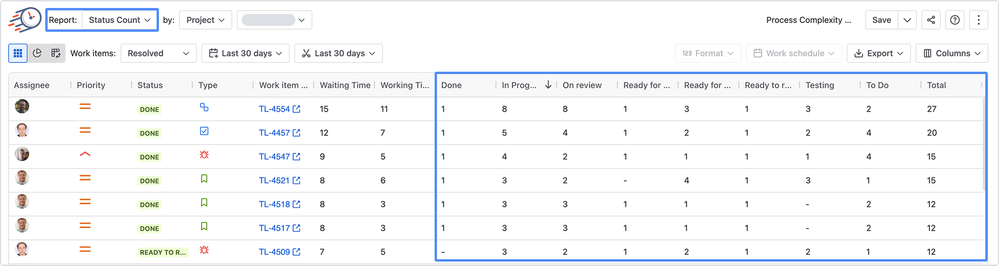
What to look for in the Summary
At this stage, the Average column is especially valuable. For Status Count, Avg > 1 is a classic smell:
- work re-entering a status
- QA failures
- “not actually ready” handoffs
- review rejects
- reopened work
Not always bad. Always worth asking “why?”

3 common patterns (with real fixes)
- The Storage Status
A status has high Items count and high Sum → it’s acting like a queue.
Fix: add clear entry/exit criteria, WIP limits, or explicit “triage owner.” - The Rework Magnet
Avg noticeably > 1 in statuses like Review / Testing → work is returning.
Fix: strengthen “Definition of Ready,” move checks earlier, tighten acceptance criteria. - The “Waiting Time” monster
If “waiting” statuses dominate, you don’t have a “team speed” problem—you have a dependency/approval policy problem.
Fix: define SLAs for approvals, reduce handoffs, or create a fast lane for small work.
Transition Count: where the workflow becomes messy
What it tells you
Transition Count calculates how many times a task transitioned between statuses, with columns indicating each transition pair. This report highlights activity that appears to be progress but may actually represent costly back-and-forth movement.

What to look for in the Summary
Again: Average is the signal.
For Transition Count, an average greater than 1 indicates that some issues repeat the same transition multiple times, indicating back-and-forth movement.
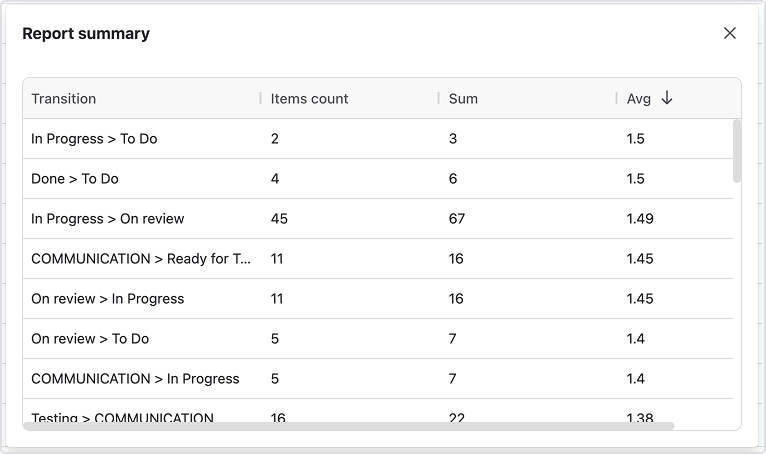
4 patterns that usually explain delivery pain
- Ping-pong pairs
“In Progress → On Review” and “On Review → In Progress” both appear frequently.
Fix: clarify review expectations, add checklists, reduce batch size, shift review earlier. - Backflow transitions
Transitions like “Done → To Do” or “In Progress → To Do” show up.
Fix: define “Done” properly (and stop using “Done-ish”), clarify scope before starting. - Approval carousel
Lots of “Ready for X → X → Ready for X” style patterns.
Fix: simplify statuses or enforce rules for when work is truly “ready.” - Concentrated loops
A transition doesn’t have huge totals, but has high Average: a smaller set of issues looping hard.
Fix: find the issue type/component causing it (then fix that system).
The “Average” column: how to explain it to anyone
Here’s a simple line that works in leadership updates and retros:
If Avg is greater than 1, it means repetition.
Repetition is either an intentional control loop… or accidental rework.
That framing avoids blame. It turns “who messed up?” into:
- “Which part of the system is causing bounce-backs?”
- “What upstream clarity would prevent this loop next time?”
A 10-minute workflow health check (the one you’ll actually do weekly)
- Open Status Count → click Report Summary
- Identify top “Avg > 1” statuses
- Open Transition Count → click Report Summary
- Identify top ping-pong pairs / backflow transitions
- Pick one loop to fix (one!)
- Drill into the grid table to see the actual issues behind it (the “receipts”)
- Run one small experiment:
- tighten entry criteria
- add a checklist
- reduce WIP
- define an approval SLA
- simplify a status
Then repeat next week. If the Avg drops, your workflow just got healthier.
Try it free (without committing to a “reporting project”)
If you want to test this on your own Jira data, do the quickest possible version:
- Start a free trial of Time in Status by SaaSJet
- Run Status Count and click Report Summary (spot where work accumulates)
- Run Transition Count and click Report Summary (spot where work bounces)
If your workflow has a “boomerang” or “ping-pong” problem, you’ll see it in minutes.
What is the most common workflow loop you are currently experiencing: review bounce-backs, QA transitions, approval cycles, or reopen-to-To-Do?
Was this helpful?
Thanks!

Iryna Komarnitska_SaaSJet_
0 comments