Community resources
Community resources
Community resources
How to Track Sprint Costs Accurately in Jira (With Real Formulas & Examples)
In the world of Agile, we often obsess over velocity, story points, and burn-down charts. But there is a critical metric that often stays in the shadows until the end of the quarter: The Actual Financial Cost of a Sprint.
Why track Sprint Costs?
Understanding the "price tag" of your sprint isn’t about micromanagement; it’s about visibility. Without accurate cost tracking, businesses face several pain points:
- The "Invisible" Budget Leak: You see tasks being completed, but you don't realize the sprint has exceeded its financial limits due to overtime or high-rate specialist involvement.
- Inaccurate Client Billing: If you are an agency, "guessing" the cost leads to lost revenue or unhappy clients.
- Value vs. Expense Disconnect: It’s hard to justify a 2-week sprint on a minor feature if you can't show that the cost was lower than the projected value.
The Solution: Time & Cost Tracker for Jira
To bridge the gap between Jira worklogs and financial reality, we use the Time & Cost Tracker app. It automates the calculation by combining logged work, personnel rates, and non-labor expenses.
1. The Real Cost Formulas
The app uses a precise mathematical approach to ensure transparency:
- The Master Formula: Jira Sprint Cost = (Personnel Worklogs × Salary Rates) + Direct Expenses
- Labor Cost: Worklogs (for the sprint period) × Employee Hourly Rates
- Forecasting (Value-based): Value of 1 Story Point (in time) × Number of Story Points × Hourly Rate
2. Step-by-Step Guide to Tracking your Sprint
Step 1: Set Your Financial Baselines before the sprint starts, assign hourly rates to team members in the app. You can set Default rates for new members and configure permissions so sensitive salary data remains restricted to authorized users only.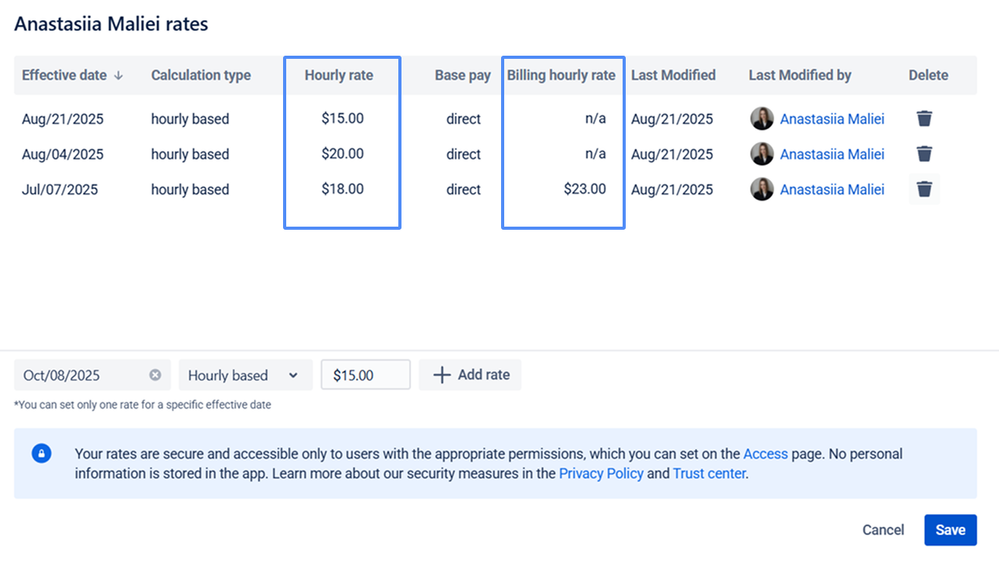
Step 2: Define the Sprint Scope Create a JQL filter to capture all tasks in the sprint. Example: project = "A" AND sprint = 142
Step 3: Generate the Cost Report. Navigate to the Cost Reports tab:
-
Select your Sprint Filter.
-
Set the Start/End dates to match your sprint.
-
Input a Planned Budget to track your "burn" against a limit.
Step 4: Include Non-Labor Expenses. Does the sprint require a specific API license or hardware? Add these in the Expenses tab. You can link them directly to a Jira issue or the project as a whole.
3. Accuracy Examples ($20/hour rate)
- Example A (Labor): A dev logs 10 hours on a bug. Rate: $20/hr. Cost = $200.
- Example B (Forecasting): 1 Story Point = 4 hours. Task = 5 SP. Rate: $20/hr. Forecasted Cost = 4 × 5 × 20 = $400.
- Example C (Actual vs. Planned): Budget: $2,000. Actual Costs (Labor + Expenses): $1,600. Remaining: $400.
4. Analyzing Results
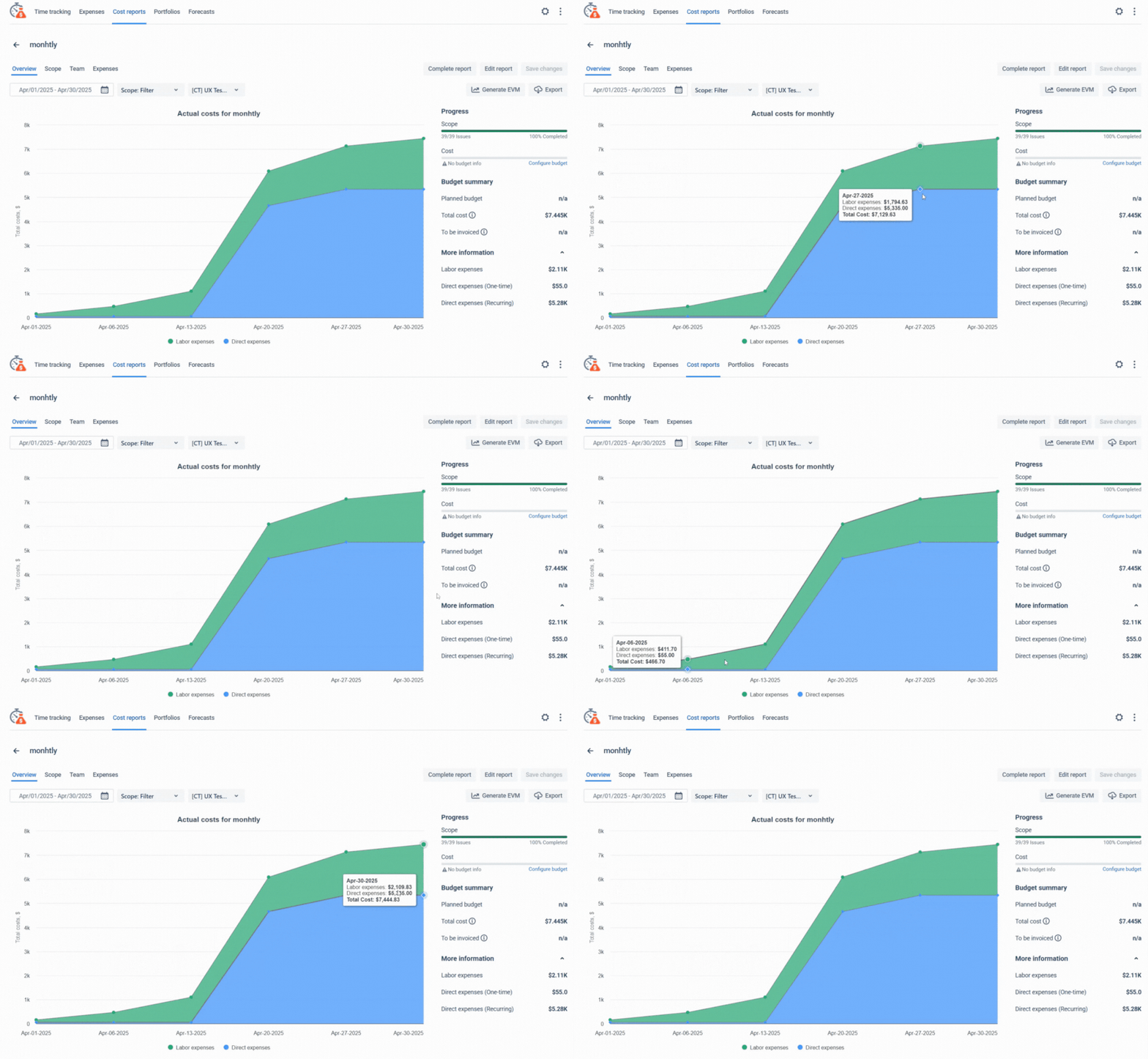
Once generated, you can analyze data through several views:
- Overview: Visual charts of labor vs. expenses.
- Team: Who contributed most to the cost?
- Scope: Line-by-line cost for every single issue.
Pro Tip: Always "Complete" the report once the sprint ends. While in "Draft", the numbers change if worklogs are edited. Completing it freezes the data for stakeholder reporting.
Conclusion
Accurate sprint cost tracking is the key to sustainable growth and transparent communication with stakeholders. By automating this process, you save hours of manual calculations and eliminate human error.
Ready to gain full financial control over your Jira projects? Try Time & Cost Tracker today and transform your project data into actionable financial insights.
👉 Get Time & Cost Tracker on Atlassian Marketplace
Was this helpful?
Thanks!

Anastasiia Maliei SaaSJet
0 comments