If you've ever updated a custom field, a screen scheme, or an issue type in Jira and wondered "wait, what else will this break?" — you're not alone. Configuration changes in Jira can have a ripple effect across projects, screens, and workflows that isn't always visible at first glance.
That's exactly the problem the Impact Analysis Assistant plugin was built to solve. And with its built-in AI agent, you can now go even further — asking questions, getting recommendations, and understanding risk before you make a single change.
What is the Impact Analysis Agent?
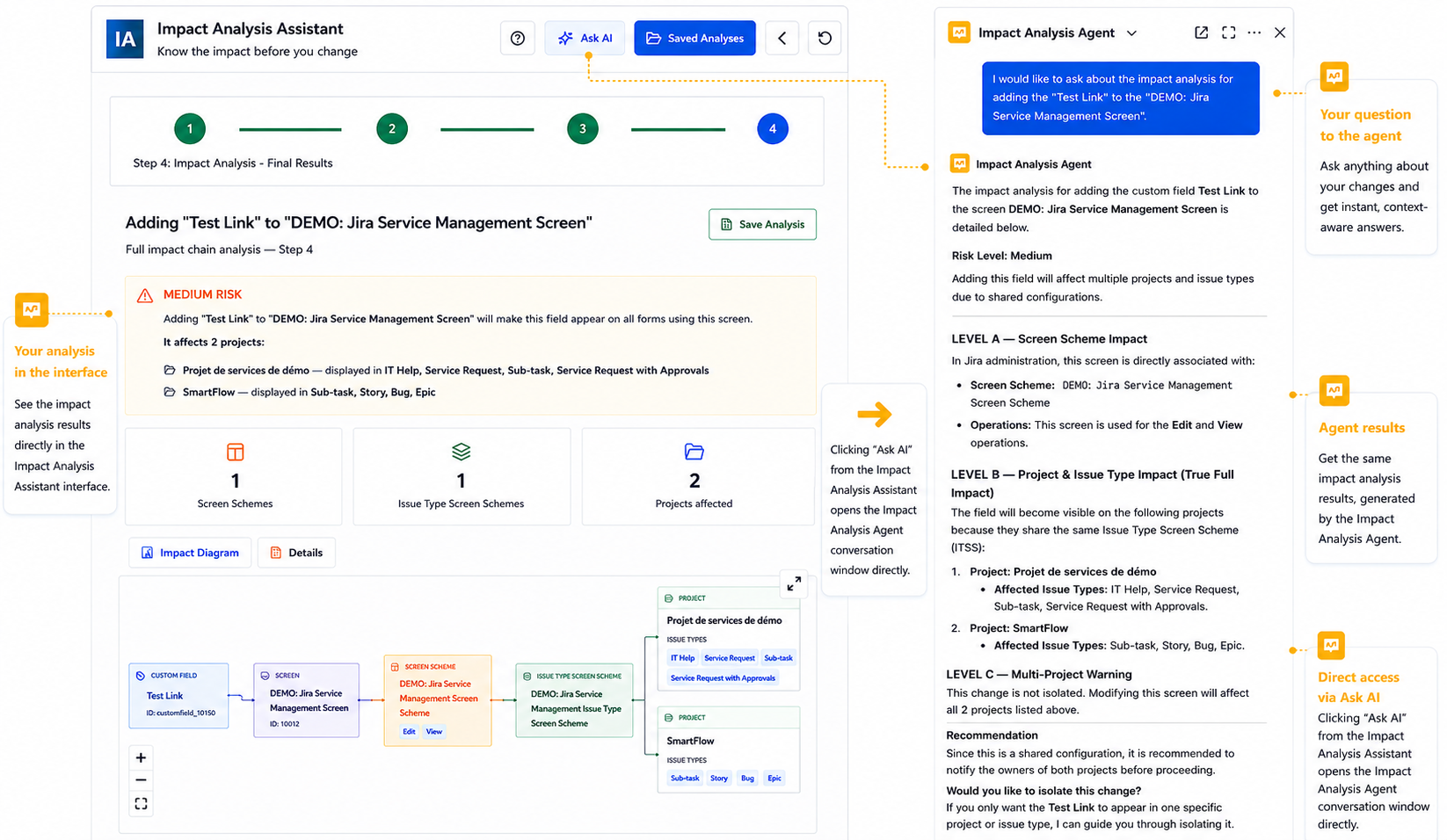
The Impact Analysis Agent is an AI-powered assistant embedded directly in the plugin interface. You access it by clicking "Ask AI" from within the Impact Analysis Assistant.
The agent gives you the same impact analysis results as the tool itself — but in a conversational format, so you can ask follow-up questions and get context-aware answers tailored to your specific change.
It understands the full structure of your Jira configuration: screen schemes, issue type screen schemes, projects, and custom fields. When you describe a change, it traces the full impact chain and flags risks before anything is touched.
A concrete example
Let's say you want to add a custom field called "Test Link" to a screen used in your Jira Service Management project. Here's what the agent does:
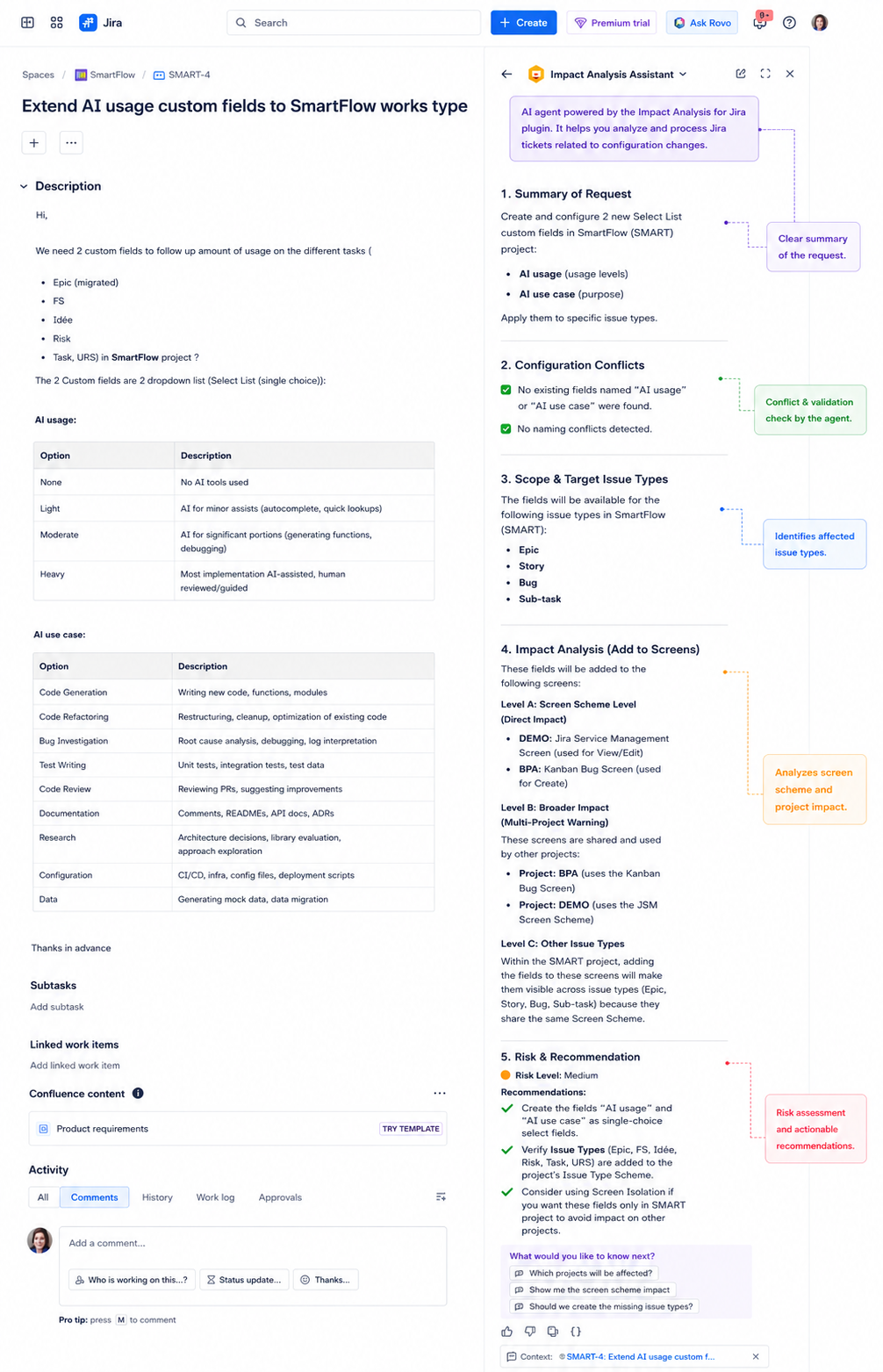
- Summarizes your request — It parses your intent, checks for naming conflicts, and identifies the target issue types and screens.
- Analyses Level A — screen scheme impact — It identifies which screen scheme is directly affected and which operations (Edit, View, Create) are impacted.
- Analyses Level B — project & issue type impact — It lists every project that shares the same Issue Type Screen Scheme, along with all affected issue types.
- Delivers a risk assessment and recommendations — Medium risk? High risk? It tells you — and suggests whether to isolate the change using Screen Isolation.
Why use the agent instead of the standard analysis?
- Ask follow-up questions — Not sure what "Issue Type Screen Scheme" means? Just ask. The agent explains in plain language.
- Get actionable advice — Rather than just showing you the impact, the agent tells you what to do about it.
- Understand cross-project risk — Shared configurations are the #1 source of unexpected side effects. The agent surfaces them automatically.
- Works inside your Jira ticket — The agent panel opens directly in context, next to your ticket — no switching tabs or tools.
Tips for getting the most out of it
- Be specific about what you're changing and where — field name, screen name, project key.
- Use the suggested follow-up questions at the bottom of the agent panel — they're context-aware and often ask exactly what you're thinking.
- If the risk level is medium or above, always check which projects are affected before proceeding.
- Use "Saved Analyses" to keep a record of past impact checks — great for audit trails.
Final thoughts
Jira configuration management doesn't have to be a guessing game. With the Impact Analysis Agent, you get a clear picture of what will change, what the risk is, and what to do about it — all before you touch anything.
It's one of those tools that, once you start using it, you'll wonder how you managed Jira configs without it.
Have you used the Impact Analysis Assistant in your team? Share your experience in the comments — I'd love to hear how others are using it.
Try the Impact Analysis Assistant Available on the Atlassian Marketplace. Free trial available. Works with Jira Software, Jira Service Management, and Jira Work Management. 👉 https://marketplace.atlassian.com/apps/4251492671/impact-analysis-for-jira?hosting=cloud&tab=overview
