Community resources
Community resources
Community resources
Hiring is a Workflow: Measuring HR pipelines in Jira with Time in Status
Some companies run recruitment in ATS tools. Some run it in spreadsheets (brave). And some run it in Jira, where every candidate is a work item and every stage of the hiring process is a status.
If you’re a recruitment agency or an in-house HR team already living in Jira, this approach is weirdly powerful… until you try to answer the simplest question:
“So… how long are candidates waiting between stages, and where do we lose them?”
That’s exactly where Time in Status reporting becomes your HR superpower.
Below is a practical playbook for using:
- Time in Status
- Average Time in Status
- Status Entrance Date
- plus dashboard gadgets like Time in Status Gadget and Burndown Status Tracker
…to turn a “hiring board” into a measurable, improvable process.
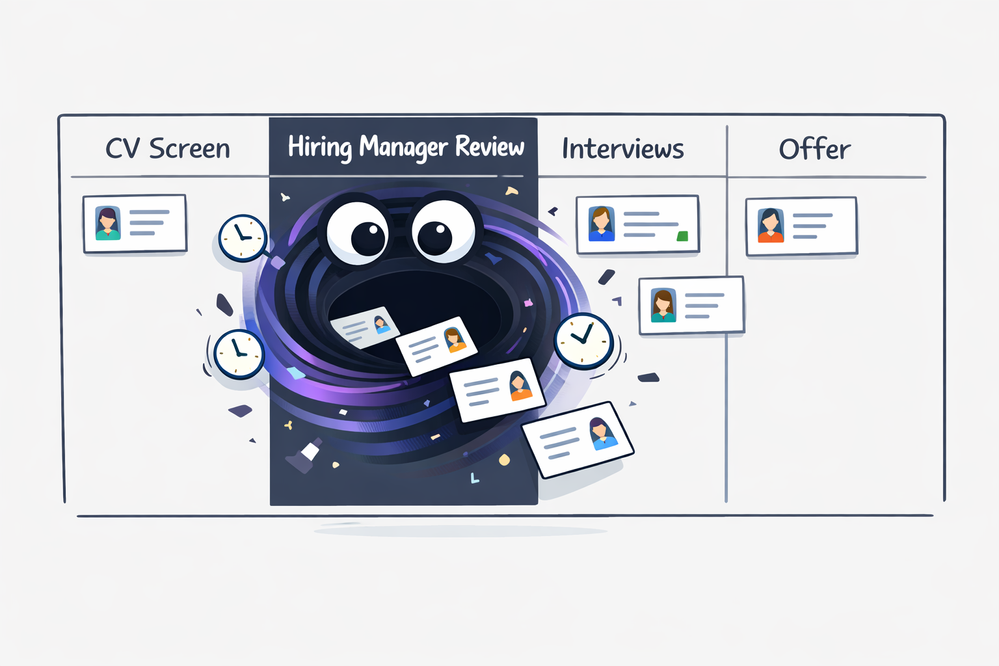
Jira as an HR pipeline: the mental model that makes it click
Recruitment project in Jira
- Work item = candidate (or “application”)
- Statuses = hiring stages
CV Received → Recruiter Screen → Hiring Manager Review → Interview Loop → Offer → Hired/Rejected/Waiting List - Resolution = outcome
Hired / Rejected / Waiting List / Withdrawn
HR Ops / People projects in Jira
- Work items represent:
- performance reviews
- salary changes
- onboarding steps
- internal mobility requests
- performance reviews
- Statuses represent:
“Waiting for manager feedback”, “Employee self-review”, “Calibration”, “Approved”, etc.
This is perfect for Time in Status because HR workflows are basically waiting + coordination + approvals… and those are exactly the things Time in Status makes visible.
The three HR questions you should ask every week (and the reports that answer them)
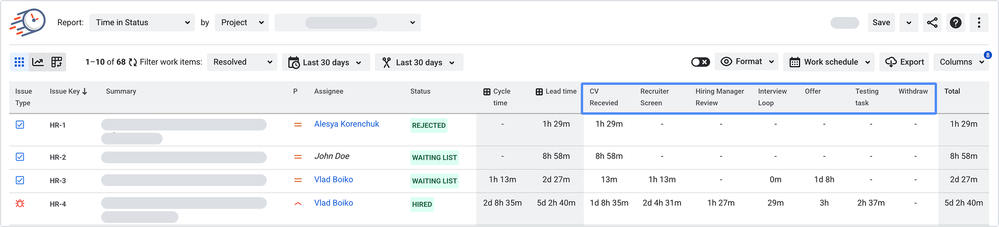
A) “Where do candidates get stuck?”
Use Time in Status.
What it tells you
- How long each candidate spends in each stage (status-by-status).
- Who’s aging in the pipeline.
- Which stage is your “friendly black hole” (the one where candidates enter and never emotionally recover).
Best dashboard visual
- Work Item List (table view) when you need to act (follow-up list).
- Bar chart when you need to explain (bottleneck story for leadership).
- Pie chart when you need a quick “pipeline distribution” snapshot (but beware: pie charts love drama and hide trends).
HR example insight: “Candidates sit in Hiring Manager Review for 6.2 business days on average, but Recruiter Screen is under 1 day. Our recruiter isn’t the bottleneck — our calendar invites are.”
B) “Are we improving or getting worse?”
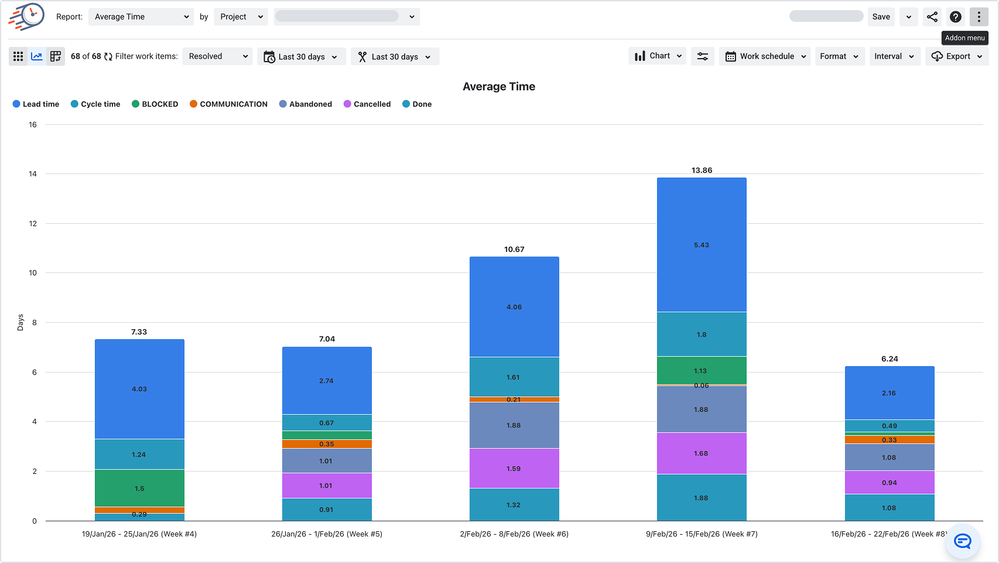
What it tells you
- Typical time spent per status across many candidates, roles, recruiters, or time periods.
- The difference between “one unlucky candidate” and “systemic workflow slowness.”
Best dashboard visual
- Bar chart by status (classic bottleneck heatmap).
- Area chart over time if you want to see whether Interview Scheduling got slower after, say, someone introduced a “fun little approval step.”
HR example insight: “Average time in Offer Approval doubled after we added a ‘Legal review’ transition. We didn’t add quality. We added latency.”
C) “Who needs attention right now?”
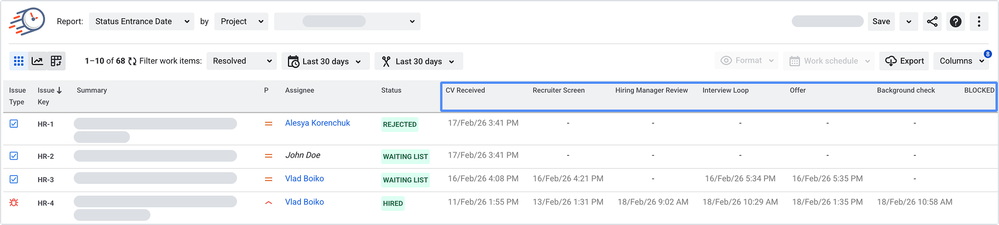
Use Status Entrance Date.
What it tells you
- When each candidate entered a status (aka: “how long have they been waiting since that moment?”).
- Perfect for follow-ups, SLAs, and “please don’t ghost candidates” discipline.
Best dashboard visual
- Table view (this is an action report).
- Pair it with a rule of thumb like:If candidate entered Interview Scheduling > 2 business days ago → nudge owner
HR example insight: “These 12 candidates entered Tech Interview Scheduled more than a week ago, which means: either we scheduled them and didn’t move status, or time is a flat circle.”
Dashboard recipes that HR teams actually use
Here are practical dashboard setups using Time in Status Gadget (Accurate Time in Status by SaaSJet) so HR dashboards stop being “pretty” and start being useful.
Dashboard 1: “Recruitment Command Center” (for agencies & high-volume hiring)
Pin these gadgets:
- Time in Status (Table view) — “Aging candidates: follow-up list”
Filter: active pipeline (exclude resolved “Hired/Rejected”)
Columns: Candidate, Role, Current status, Time in current status, Assignee/Recruiter
Purpose: daily action list to prevent candidate ghosting (accidental or otherwise) - Average Time in Status (Bar chart) — “Bottlenecks by stage”
Purpose: weekly ops review (“what do we fix?”)
What you look for: one or two stages dwarfing the rest - Status Entrance Date (Table view) — “Who entered Interview Scheduling this week?”
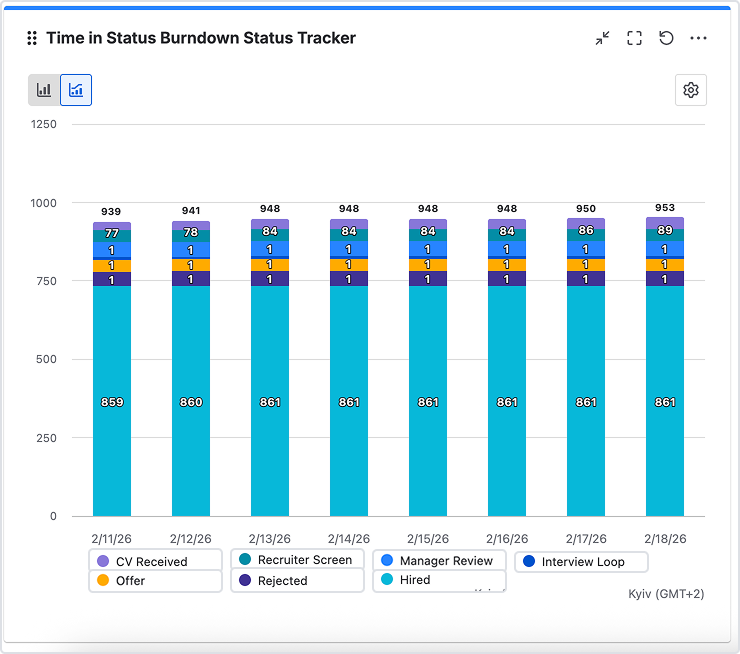
Purpose: catch scheduling delays before they become “candidate withdrew” - Burndown Status Tracker — “Workflow health: movement vs stuckness”
Purpose: see whether work is flowing through statuses or piling up in one stage
Great for: “We interviewed a lot this week but nothing reached Offer.” (classic)
Dashboard 2: “Performance Review Control Room” (for HR Ops)
- Status Count — “How many reviews are in each stage?”
Purpose: executive visibility (“are we on track?”) - Time in Status — “Which reviews are stalled in manager feedback?”
Purpose: unblock the process without blame… publicly… on a dashboard… ok maybe with a little blame. - Transition Count — “How often do reviews move forward?”
Purpose: detect “frozen” weeks where nothing progresses (holidays, leadership offsites, or mysterious calendar events called ‘Deep Work’)
Charts you can use (and what they’re secretly good at)
The gadget supports chart views like Pie, Bar, Area. Here’s when each shines for HR:
- Bar chart: best for comparing stages (“Which step is slowest?”)
- Area chart: best for trends (“Did this get worse since last month?”)
- Pie chart: best for distribution snapshots (“Where is the pipeline right now?”)
Where this gets really fun: HR metrics you can build without inventing new processes
With Time in Status tracking (and, if you use them, board-visible custom fields), HR teams can measure:
- Time to first response
CV Received → Recruiter Screen started - Time in decision
Final Interview → Offer/Reject - Time in waiting states (the silent killer)
Waiting for feedback / Scheduling / Approval - Cycle time to hire
from first active stage → hired - Workload fairness
pair Assignee Time with stage-based averages to see who’s carrying the slowest part of the process
Conclusion: Make hiring measurable (and a little less mystical)
Running HR workflows in Jira is one of those ideas that sounds odd until you realize it solves a very real problem: hiring is a process, and processes deserve measurements. Not vibes. Not “it feels slower lately.” Not “the candidates are just… different this quarter.”
With Time in Status, Average Time in Status, and Status Entrance Date, you stop guessing and start seeing:
- where candidates wait,
- why your pipeline slows down,
- and who needs a nudge before a great applicant turns into a ghost story.
And when you put those reports on a Jira dashboard using Accurate Time in Status (by SaaSJet) and Burndown Status Tracker, your dashboard becomes more than decoration. It becomes a shared source of truth: recruiters, hiring managers, and HR ops can all look at the same numbers and agree on what needs attention—sometimes even without a meeting (a rare and beautiful event).
The best part? You don’t need a new process. You don’t need a new tool stack. You just need to treat your workflow like what it is: a flow of decisions and delays—and then measure it like a grown-up.
Because candidates don’t experience your hiring pipeline as “statuses.” They experience it as silence or momentum.
And with the right reports, you can choose momentum.
Was this helpful?
Thanks!

Iryna Komarnitska_SaaSJet_
1 comment