Community resources
Community resources
Community resources
Discord for product communities: why it works and how to set it up
-
Many people already have Discord accounts,
-
Joining a server takes seconds,
-
It's free for users and for you (without any serious limitations like limited message history on Slack free plan).
ℹ️ Personal example: my "Discord for Jira" app community server has 194 members, and 75% of my last 20 customer Jira tickets started there. And I'm not even counting normal chat discussions with users.
Why Discord works
- It's easy to join and participate. People can join and ask a question in seconds. No onboarding, no "create account".
- It's easy to share feedback. Writing a message is easier than creating a ticket. If it's something you should track, you can turn that message into a Jira/JSM ticket (manually or with a tool). Of course users can still report tickets directly from Discord as well.
- It's free to start. Free for users and free for you (and no Slack-style limits like message history on the free plan)
- It builds a real community. People share use cases, answer each other, and stay engaged. This usually starts working after the server reaches some size.
- It can become one "home" for product feedback. Instead of feedback being scattered across emails, DMs, and random social posts, you can recommend your Discord server to collect it in one place.
When Discord is not the best fit
- You are in a heavily regulated environment where you cannot run a community space at all,
- Your customers strongly prefer traditional enterprise channels only (email-only support, closed ticketing, etc.).
How to set up a Discord community server (simple version)
Recommended channels
#announcements (or #news) |
Product updates, release notes, important changes. Keep it read-only if you want |
#rules |
Short rules (no spam, no ads, be respectful). Usually you can make users accept rules when they join |
#general |
People say hello, ask quick questions, and chat casually |
#support |
This is where "I'm stuck" questions go |
#report-ticket (or #report-bug) |
Good if you want a clearer entry point for "report bug / suggest improvement / technical support" |
#send-feedback (or #ideas) |
Feature requests, UX feedback, "this would be awesome if..." |
#issue-tracker (or #roadmap-updates) |
If you have a public roadmap or public issue tracker, this can be great. You can post updates there automatically (for example "In progress", "Shipped", "Fixed")
|
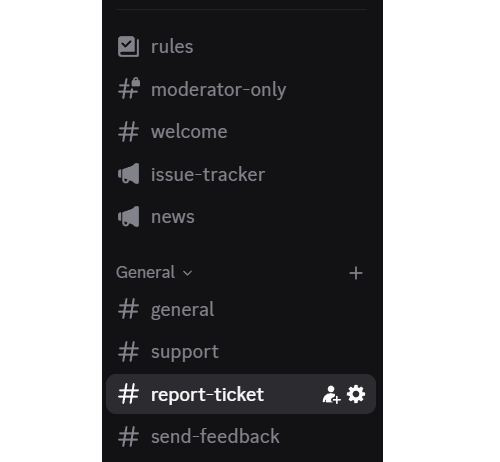
My example: what I run in my Discord community
- #issue-tracker - public issue tracker updates
- #news - release notes about new features, other announcements
- #general - quick questions and discussions (I also use it for major announcements)
- #support - troubleshooting and setup help (most conversations happen here)
- #report-ticket - read-only channel with a ticket panel
- buttons: report a bug / suggest improvement / technical support
-
creates a private support thread per ticket
-
creates a JSM issue automatically
-
#send-feedback - read-only channel with a ticket panel
-
one button: "Send feedback"
-
for feedback that does not need support involvement
-
Example channel list from my server:
Tips and advice from my experience running the server
Hello, welcome to the XYZ server! Is there anything I can do for you? I'd love to hear your feedback about the application 🙂
Jira/Discord integrations
Disclosure: I'm the vendor of Discord for Jira & JSM, but I'm linking the Marketplace search so you can compare alternatives too.
Example ticket panel (buttons users click to report a ticket):

Ending thoughts
Was this helpful?
Thanks!

Łukasz Wiatrak _Firnity_
1 comment