If you've spent any time managing a Confluence Server or Data Center instance, this story will feel familiar. If you're coming straight from Cloud - keep reading, because this is something you probably didn't know you were missing.
The good old days of User Macros
Back in the Server and Data Center era, Confluence had a quiet superpower: User Macros. A user would come to you with a request - "I wish we could show our system status on a page" or "can we display a table of open tickets from internal ticket tracker?" - and as an admin, you could just... build it. Right there, in the admin panel, using Velocity templating. No developers, no deployment pipeline, no waiting weeks for a ticket to get prioritized.
The community shared snippets. Admins copy-pasted and tweaked and iterated. It wasn't glamorous, but it worked beautifully for what it was: quick, custom, admin-driven solutions that made Confluence genuinely useful for the people using it every day.
What happened in Cloud
Confluence Cloud is better in almost every meaningful way. Faster, more reliable, zero infrastructure to maintain. But User Macros didn't make the trip.
In Cloud, if you want a custom macro, there's essentially one official path: build a Forge app. That means a developer, a local environment, the Forge CLI, publishing through Atlassian's developer platform, versioning, maintenance, and if you ever want other customers to use it - a marketplace review process too.
That's absolutely the right approach for something large and business-critical. But what about the simple, specific things your team keeps asking for? The Swagger spec viewer your API team wants. The custom status indicator for your project pages. The "show me all pages for some CQL" macro that would save editors ten minutes a day.
For these, a full Forge app feels like using a sledgehammer on a thumbtack.
As an Atlassian consultant, I've had this exact conversation more times than I can count: "Can't we just add a small macro for this?" And the honest answer was always: "Not without a proper Forge app, no". That friction stuck with me.
Why we built Script Master for Confluence
That frustration is exactly what led our team to build Script Master for Confluence. The goal was to bring back the spirit of User Macros - admin-driven, no deployment required, no external dependencies - but built the right way for the Cloud era.
Script Master is a Forge-native app. Every script you write runs inside Forge, inside your Confluence instance. No data leaves your cloud environment. No external servers are involved. No third-party processing of any kind. Just your code, your data, your instance.
Compared to other tools trying to solve the same problem, Script Master doesn't abstract away Forge with something proprietary. It embraces it - which means everything you write is real, portable, Forge-compatible code.
That last point matters more than it might seem. All scripts in Script Master use Forge-compatible syntax. There are no legacy APIs, no quirky proprietary abstractions. If a macro grows complex enough that it warrants its own standalone Forge app, you can take the exact same code and migrate it - and it'll keep working. No rewrite. No lock-in. You're learning something genuinely useful every time you write a script.
Building macros in minutes, not days
Here's where things get exciting. With modern AI coding assistants, you don't need to be a JavaScript expert to write a working macro. You need a clear idea of what you want - and a few minutes.
Script Master includes a "Build script with AI" feature. You don't send any of your data anywhere - just take the generated prompt to whatever LLM or coding agent your organization has approved (Claude, GitHub Copilot, ChatGPT, Cursor, whatever), paste in your use case, and get back a working macro script. Because the prompt includes a reference to the Macros API documentation, the AI generates code that already follows Script Master's structure and best practices from the start.
Let's walk through a real example.
Example: A Swagger / OpenAPI viewer in under five minutes
Imagine your API teams keep asking for a way to display OpenAPI (Swagger) specifications directly on Confluence pages - rendered beautifully as interactive documentation, not just a raw JSON link thrown into a text block.
In the past, you'd be searching the Marketplace for an app that does exactly this, or kicking off a Forge project with your dev team. Instead, open Script Master.
Image 1: Script Master main window
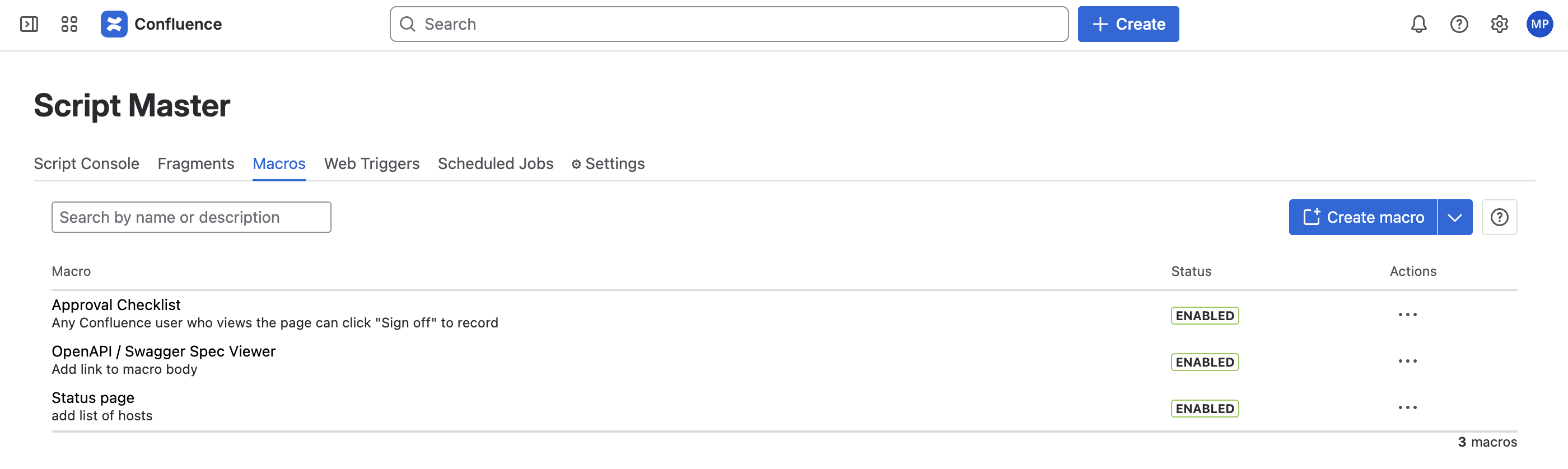
Click Macros in the navigation, then Create Macro. You'll land in the built-in code editor - syntax highlighting, autocomplete, and a library of ready-to-use snippets right there alongside your workspace.
Instead of writing from scratch, click "Build script with AI". You'll get a prompt template to copy. Take it to your AI tool of choice, add a description of what you want - something like:
Here is the Macros API reference for Script Master for Confluence: docs.apportunity.xyz/script-master/code-editor/macros-ai-prompt
Write a Script Master macro that renders an OpenAPI spec as a read-only viewer inside a Confluence page.
Requirements:
The page editor pastes a public spec URL into the macro body
View-only mode: disable try-it-out, authentication inputs, and server selection; keep search enabled
Show a clear message if no URL is configured
Display errors visibly via window.onerror
Because the prompt references the Macros API docs, the result comes back clean and structured. Within seconds you'll have a complete, working macro script:
<!--OpenAPI / Swagger Spec ViewerBuilt for Script Master for Confluence (https://docs.apportunity.xyz/script-master/macros)SETUP:Paste a public OpenAPI spec URL into the Macro Body when inserting this macro.Examples:https://petstore.swagger.io/v2/swagger.jsonhttps://your-api-host/openapi.yamlNOTES:- The spec URL must be publicly accessible (no auth) and served with CORS headers.- This is a read-only viewer — no "Try it out", no auth inputs, no server selection.- Max rendered height is 960px (Confluence macro limit); the viewer scrolls internally.--><link rel="stylesheet" href="https://cdn.jsdelivr.net/npm/@atlaskit/css-reset" /><div id="error" style="display:none;padding:12px 16px;color:#de350b;background:#ffebe6;border-radius:4px;margin:8px;"></div><div id="status" style="padding:12px 16px;color:#6b778c;font-family:sans-serif;font-size:14px;">Loading API spec…</div><script type="module">'use strict';// Surface errors visibly (macros fail silently by default)window.onerror = (msg) => {const el = document.getElementById('error');el.textContent = 'Error: ' + msg;el.style.display = 'block';document.getElementById('status').remove();setHeight('60px');};// Dark/light theme supportconst cm = theme.colorMode; // 'light' | 'dark'document.documentElement.setAttribute('data-color-mode', cm);document.documentElement.setAttribute('data-theme', `${cm}:${cm}`);document.head.insertAdjacentHTML('beforeend',`<link rel="stylesheet" href="https://forge.cdn.prod.atlassian-dev.net/atlaskit-tokens_${cm}.css">`);// Read the spec URL from Macro Bodyconst context = await view.getContext();const specUrl = (context.extension.config?.macroBody ?? '').trim();if (!specUrl) {document.getElementById('status').textContent ='⚙️ No spec URL configured — edit this macro and paste an OpenAPI URL into the macro body.';setHeight('50px');} else {// Dynamically load RapiDoc (lightweight OpenAPI web component, ~350KB)await import('https://cdn.jsdelivr.net/npm/rapidoc/dist/rapidoc-min.js');document.getElementById('status').remove();const viewer = document.createElement('rapi-doc');// Core config — view onlyviewer.setAttribute('spec-url', specUrl);viewer.setAttribute('render-style', 'read'); // clean read layoutviewer.setAttribute('show-header', 'false'); // hide RapiDoc toolbarviewer.setAttribute('allow-try', 'false'); // no "Try it out"viewer.setAttribute('allow-authentication', 'false'); // no auth inputsviewer.setAttribute('allow-server-selection', 'false'); // no server dropdownviewer.setAttribute('allow-search', 'true'); // keep search — useful for large specs// Themeviewer.setAttribute('theme', cm === 'dark' ? 'dark' : 'light');viewer.setAttribute('primary-color', '#0052CC'); // Atlassian blueviewer.setAttribute('bg-color', cm === 'dark' ? '#1d2125' : '#ffffff');viewer.setAttribute('text-color', cm === 'dark' ? '#b6c2cf' : '#172b4d');viewer.setAttribute('nav-bg-color', cm === 'dark' ? '#22272b' : '#f4f5f7');viewer.setAttribute('nav-text-color', cm === 'dark' ? '#b6c2cf' : '#172b4d');// Sizing — fills the 960px iframe with internal scrollviewer.style.cssText = 'display:block;width:100%;height:920px;';document.body.appendChild(viewer);setHeight('960px');}</script>
Paste it into the editor, enable the macro, and save. That's the entire "development" process.
Now create a Confluence page and insert the Custom Macro. From the macro picker, select the one you just created. In the macro body, paste an OpenAPI spec URL - for example, petstore.swagger.io/v2/swagger.json. Save the page.
Image 2: Macro configuration
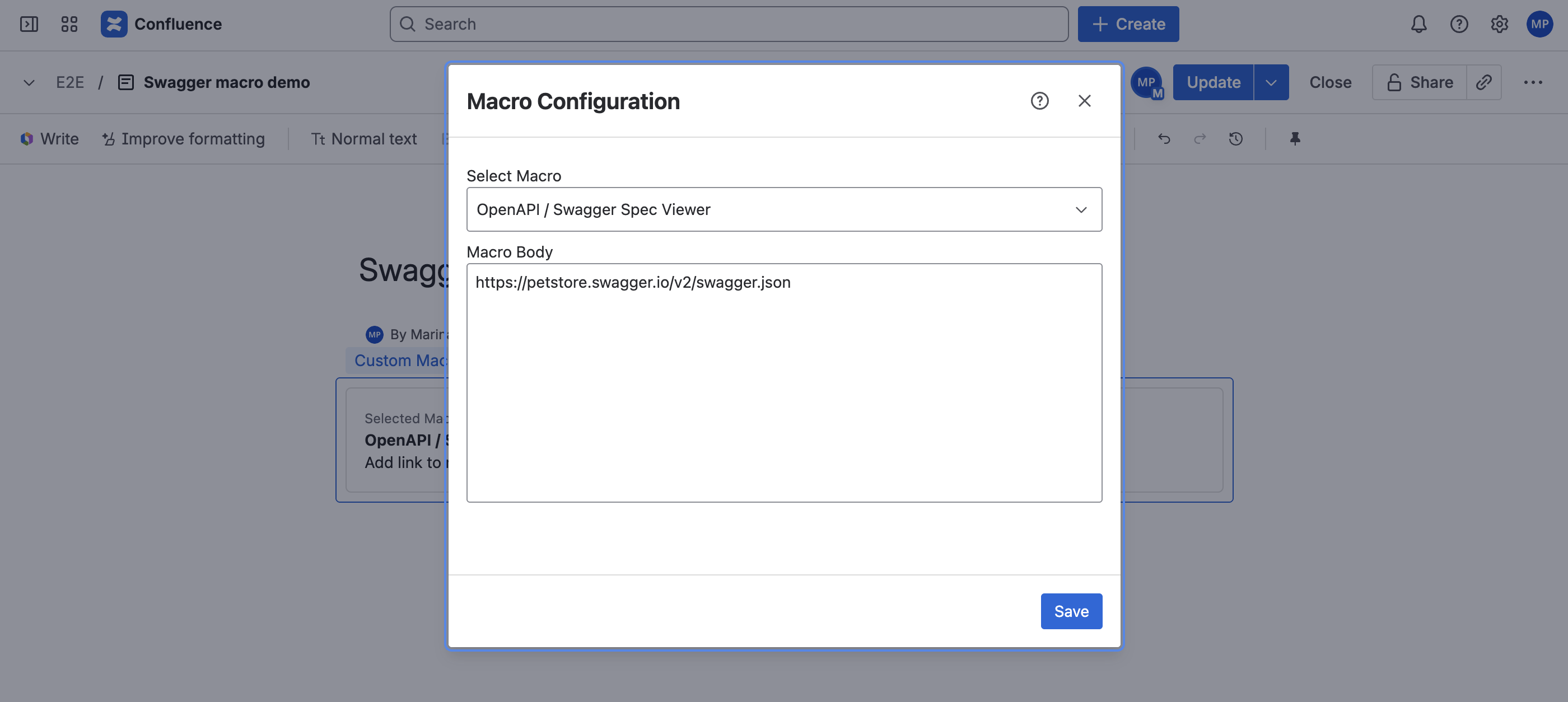
Image 3: Rendered Swagger UI on Confluence page
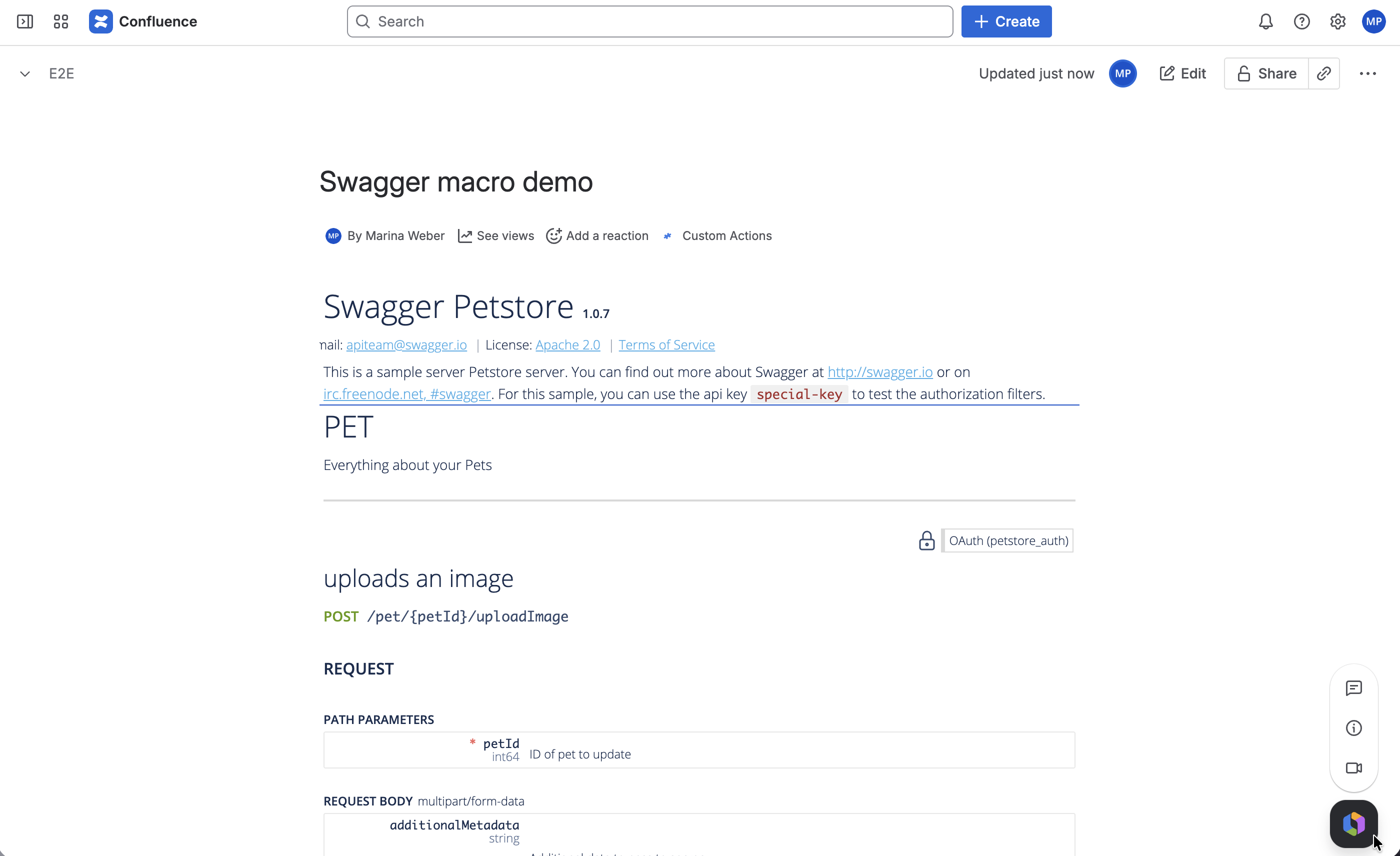
Your users now have a fully interactive API specification viewer, right inside Confluence. Total time depends on how fast your AI responds - but we're talking minutes, not days.
Macros are just the beginning
Script Master is designed as a complete toolkit for admins who want to go beyond what Confluence offers out of the box:
Script Console - Run scripts directly in Confluence for bulk updates, data extraction, REST API calls, and cleanup tasks. No third-party tooling, no extra credentials needed.
Fragments - Extend the Confluence UI itself with custom panels, action buttons, and content that appears exactly where you need it - sidebars, space pages, and more.
Web Triggers - Expose lightweight HTTP endpoints so external systems can communicate with your Confluence instance, enabling integrations without additional infrastructure.
Scheduled Jobs - Automate recurring tasks (reports, cleanups, notifications) on a schedule, running entirely within Forge. No external cron jobs needed.
Everything runs in your instance. Everything respects your existing Confluence permissions. No additional credentials required anywhere.
Give it a try
Script Master for Confluence comes with a 30-day free trial, and stays completely free for teams of up to 10 users. If you have a specific use case you're not sure how to tackle, or just want to see what's possible, we'd love to hear from you - the app is actively developed and your feedback directly shapes what we build next.
→ Start your free trial on the Atlassian Marketplace
P.S. If you're working in Jira too - we have an even more powerful version: Script Master for Jira, with workflow extensions, custom fields, event listeners, and more. Worth a look if you want the same scripting power across your entire Atlassian stack.
