If you manage Jira in a medium or large organization, you've probably experienced this situation before.
A request comes in:
“Can we add this custom field to our issue type?”
“Can we rename this status?”
“Can we update this screen?”
“Can we change the project key?”
At first glance, these requests seem simple.
But in Jira, configurations are often deeply interconnected:
- screens are shared across projects
- workflows are reused between teams
- automations depend on statuses and project keys
- custom fields appear in multiple contexts
- permissions and groups evolve over time
And that’s where things become risky.
A small configuration change can unexpectedly impact:
- other projects
- unrelated issue types
- automations
- dashboards and filters
- integrations
- workflow transitions
- reporting consistency
The real challenge for Jira admins is usually not making the change.
It’s understanding the full impact before making it.
The Visibility Problem in Jira Administration
As Jira instances grow, configuration management becomes increasingly difficult.
Many admins rely on:
- manual checks
- documentation
- tribal knowledge
- spreadsheets
- testing environments
But even experienced Jira admins can miss hidden dependencies.
Typical examples include:
- adding a field to a shared screen
- renaming a status used in automations
- deleting a custom field still referenced somewhere
- changing a project key used in scripts or filters
- deactivating users still present in permissions or groups
- duplicate groups slowly accumulating over time
Jira provides powerful flexibility, but native visibility into configuration impact is still limited.
That’s why impact analysis becomes essential in large Jira environments.
Building Better Jira Impact Visibility
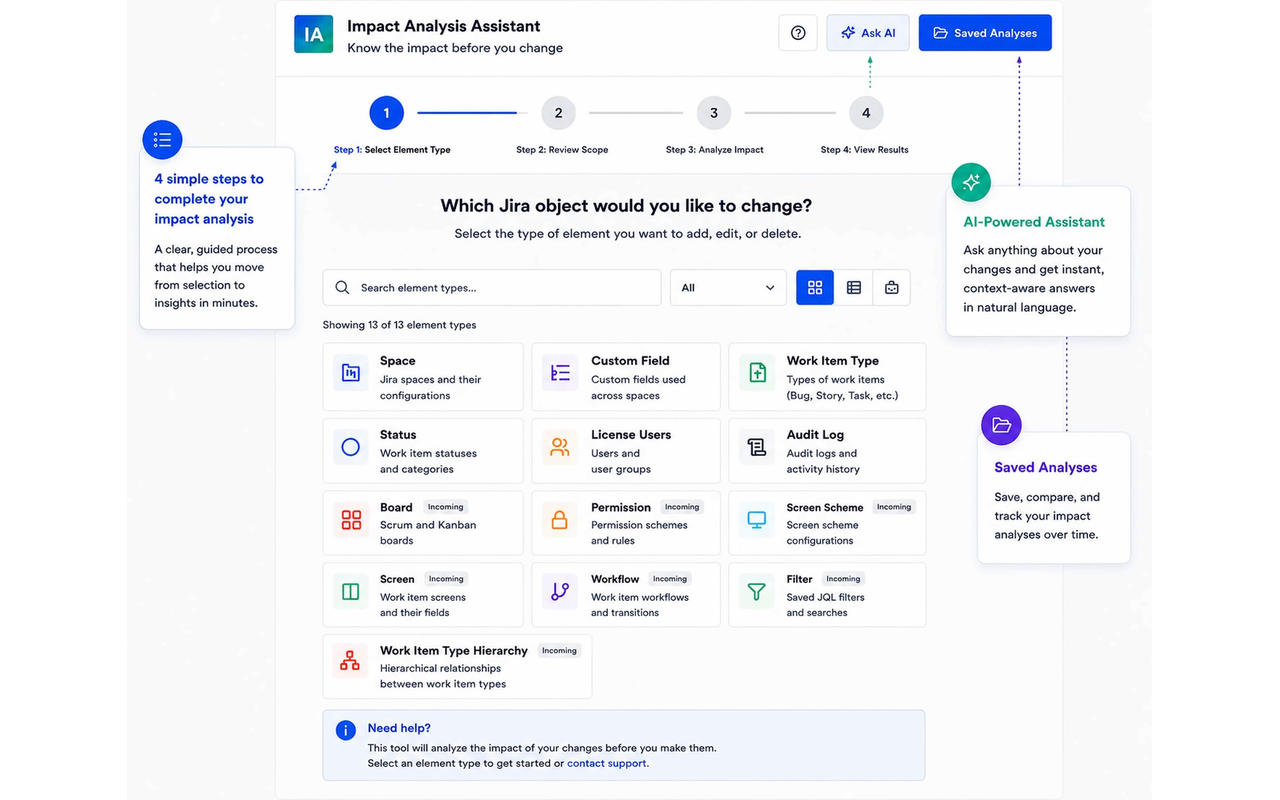
To help solve these problems, we built Impact Analysis for Jira, a Jira Cloud app focused on helping admins understand configuration dependencies and downstream impact before applying changes.
👉 Available on the Atlassian Marketplace:
Impact analysis for jira Marketplace Link
The app helps admins analyze:
- screen usage
- workflow dependencies
- custom field propagation
- automation impact
- project relationships
- status usage
- permission anomalies
- group inconsistencies
The objective is simple:
give Jira admins more visibility and reduce unexpected side effects.
🚀 What’s New in the Latest Release
We recently released several major improvements designed to help Jira admins manage configuration changes more safely and efficiently.
🤖 Rovo Agent — Jira Admin Assistance Directly from Tickets
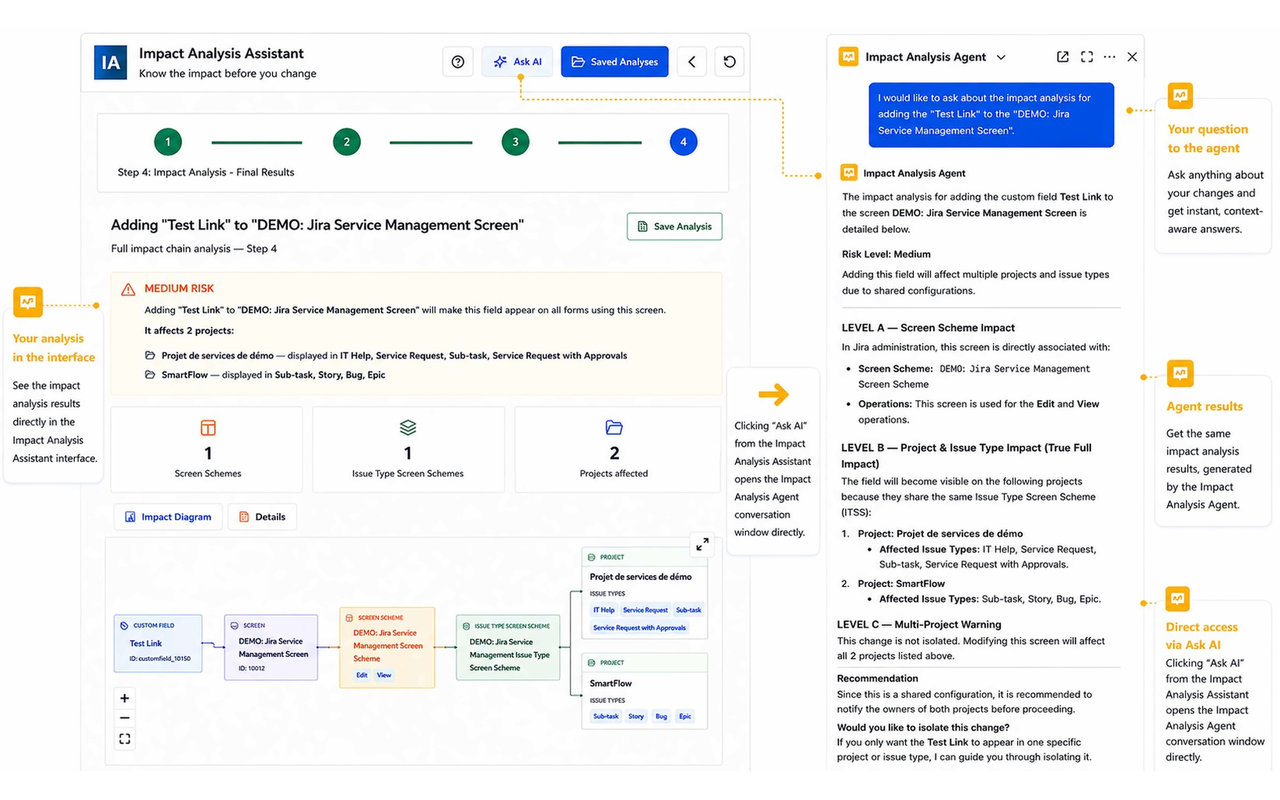
One of the most exciting additions is the new Rovo Agent integration.
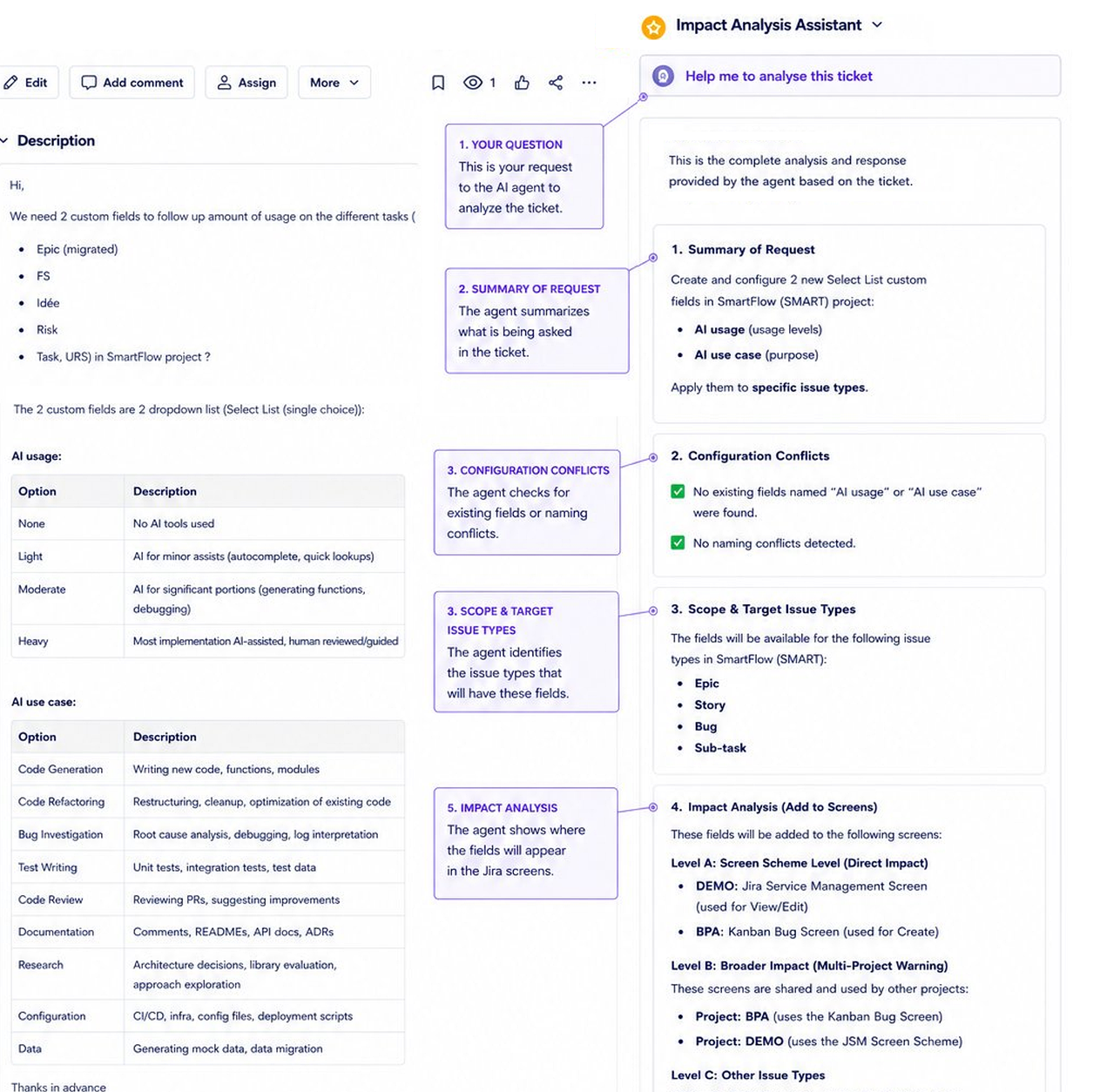
Instead of manually exploring Jira configurations, admins can now ask questions directly from a Jira ticket.
For example:
“What happens if I rename the status ‘In Progress’?”
“Which projects are impacted if I add this custom field?”
“What will break if I change the project key?”
“Where is this screen currently used?”
The Rovo Agent uses Impact Analysis data to provide a detailed dependency breakdown across:
- screens
- workflows
- issue type schemes
- projects
- automations
- statuses
- custom field contexts
This significantly reduces investigation time for Jira admins.
🗂 Audit Log with Configuration Impact Context
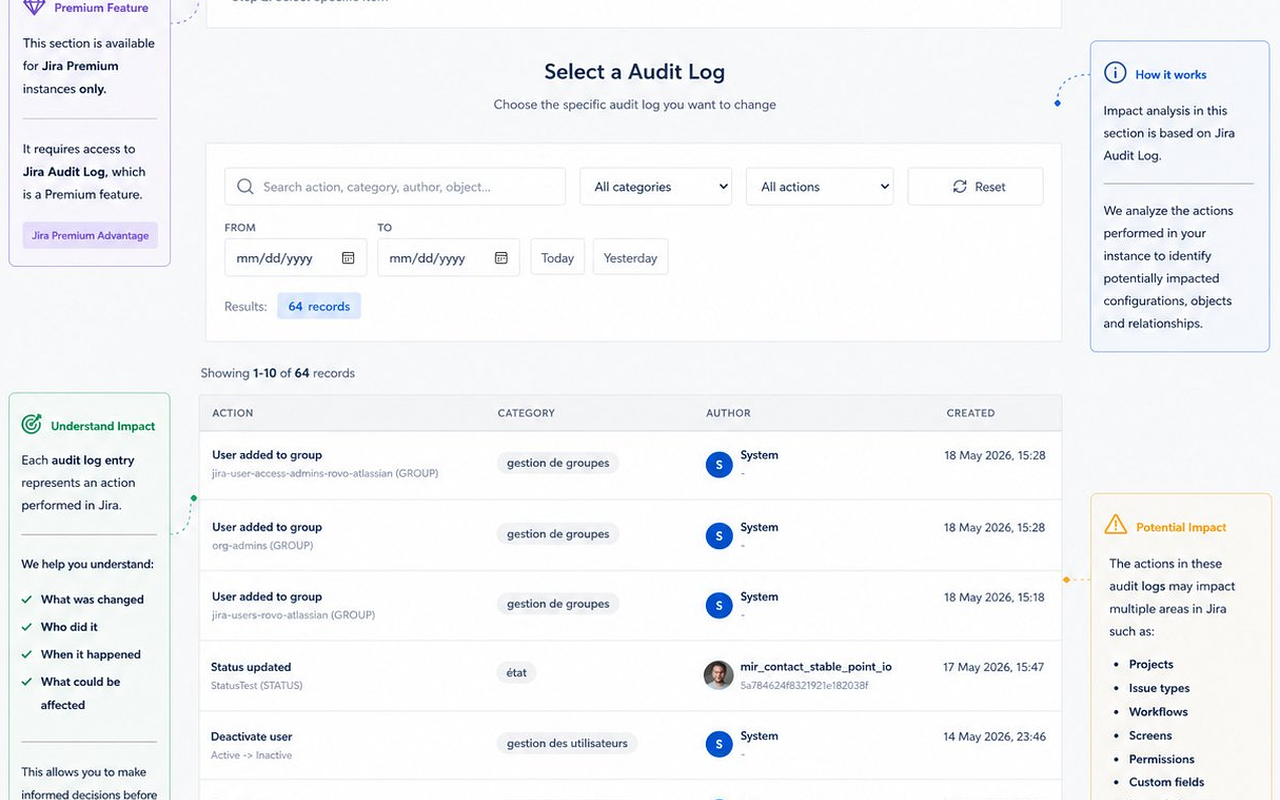
Jira’s native audit log tells you what changed.
But understanding the impact of those changes often requires manual investigation.
The new Audit Log integration inside Impact Analysis for Jira adds configuration visibility directly into admin history.
Admins can now better understand:
- what was modified
- which projects were affected
- which workflows or screens were impacted
- whether shared configurations were involved
This is especially useful for:
- debugging unexpected Jira behavior
- compliance reviews
- onboarding new admins
- understanding historical changes
- troubleshooting incidents faster
🔎 Detecting Jira Configuration Anomalies
The Rovo Agent can also help identify anomalies and governance issues inside Jira instances.
Examples include:
- duplicate groups
- unused groups
- groups without active users
- orphaned configurations
- duplicated custom fields
- inconsistent naming conventions
- obsolete workflows
- screens shared unintentionally across projects
This helps administrators improve Jira hygiene and maintain healthier configurations over time.
🔧 Custom Field Impact Analysis
Custom fields are one of the most common sources of unintended Jira changes.
A simple request like:
“Add the field ‘AI Usage’ to Epic, Story, Bug, and Sub-task”
can affect far more than expected if screens or schemes are shared.
The new Custom Field Impact Analysis feature helps admins evaluate:
- where fields are currently used
- which screens will be impacted
- which projects share those screens
- whether naming conflicts exist
- the overall risk level of the change
The analysis also provides actionable recommendations before modifications are applied.
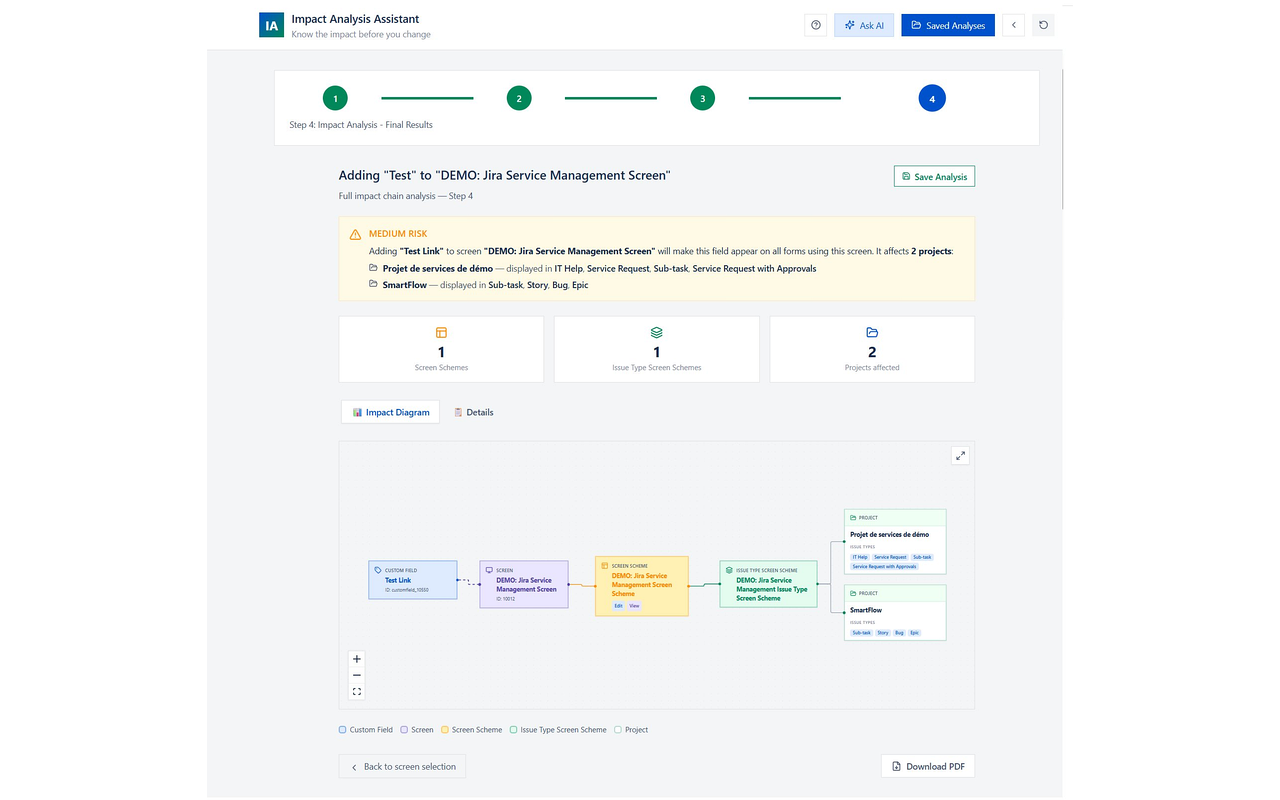
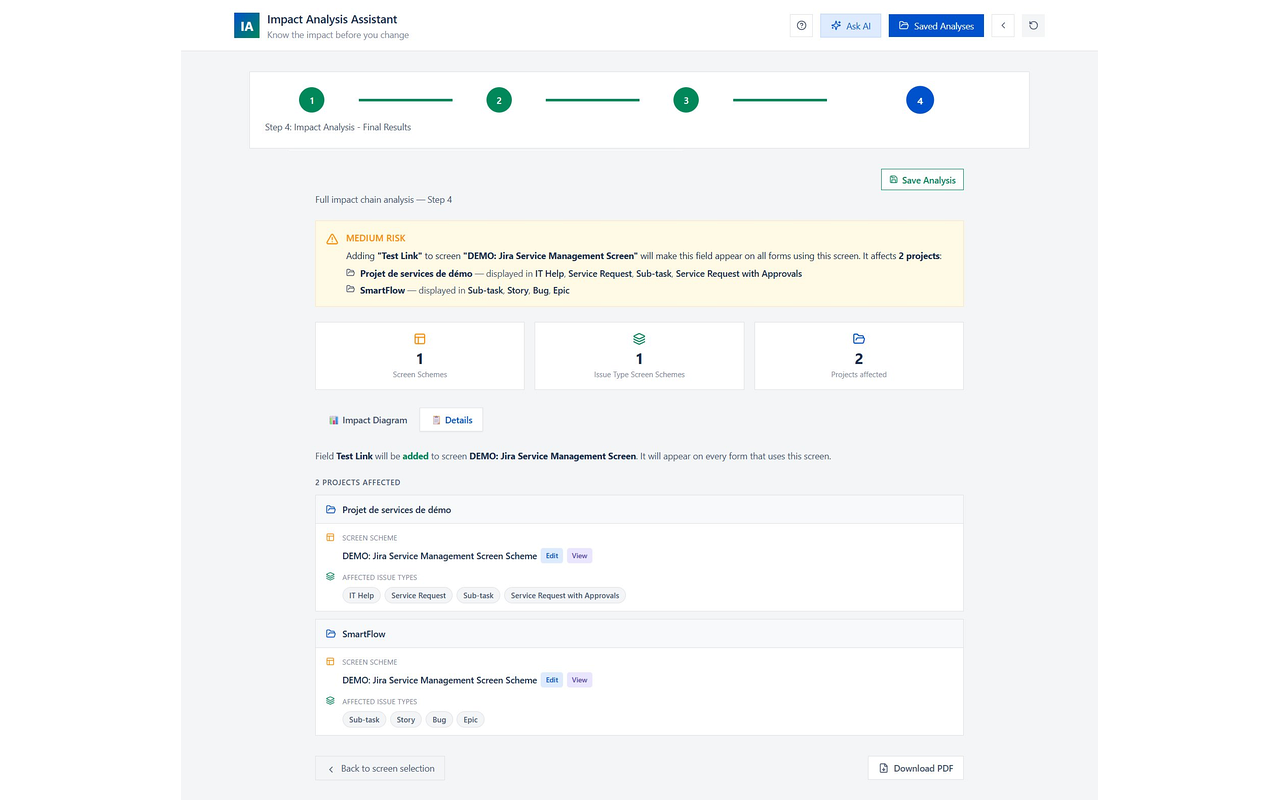
🖥 Screen Impact Analysis
Screen configurations are often reused across multiple projects and issue types.
A change that appears isolated can quickly propagate across an entire Jira instance.
Screen Impact Analysis helps admins visualize:
- screen dependencies
- linked issue types
- associated projects
- screen schemes
- shared configurations
This makes it easier to isolate risky changes before deployment.
🔄 Status Modification Impact Analysis
Statuses are frequently referenced in:
- Jira automations
- workflow conditions
- validators
- scripts
- dashboards
- filters
- SLA configurations
Renaming or deleting a status without visibility can create unexpected disruptions.
Impact Analysis for Jira helps admins understand:
- where statuses are used
- which workflows depend on them
- which automations may break
- which filters or reports are impacted
before any modification happens.
🏷 Project Key Change Impact Analysis
Changing a Jira project key can affect:
- automations
- API integrations
- scripts
- filters
- dashboards
- external tools
- links shared in documentation
The app helps admins identify those dependencies before updating project keys, reducing migration risks and broken references.
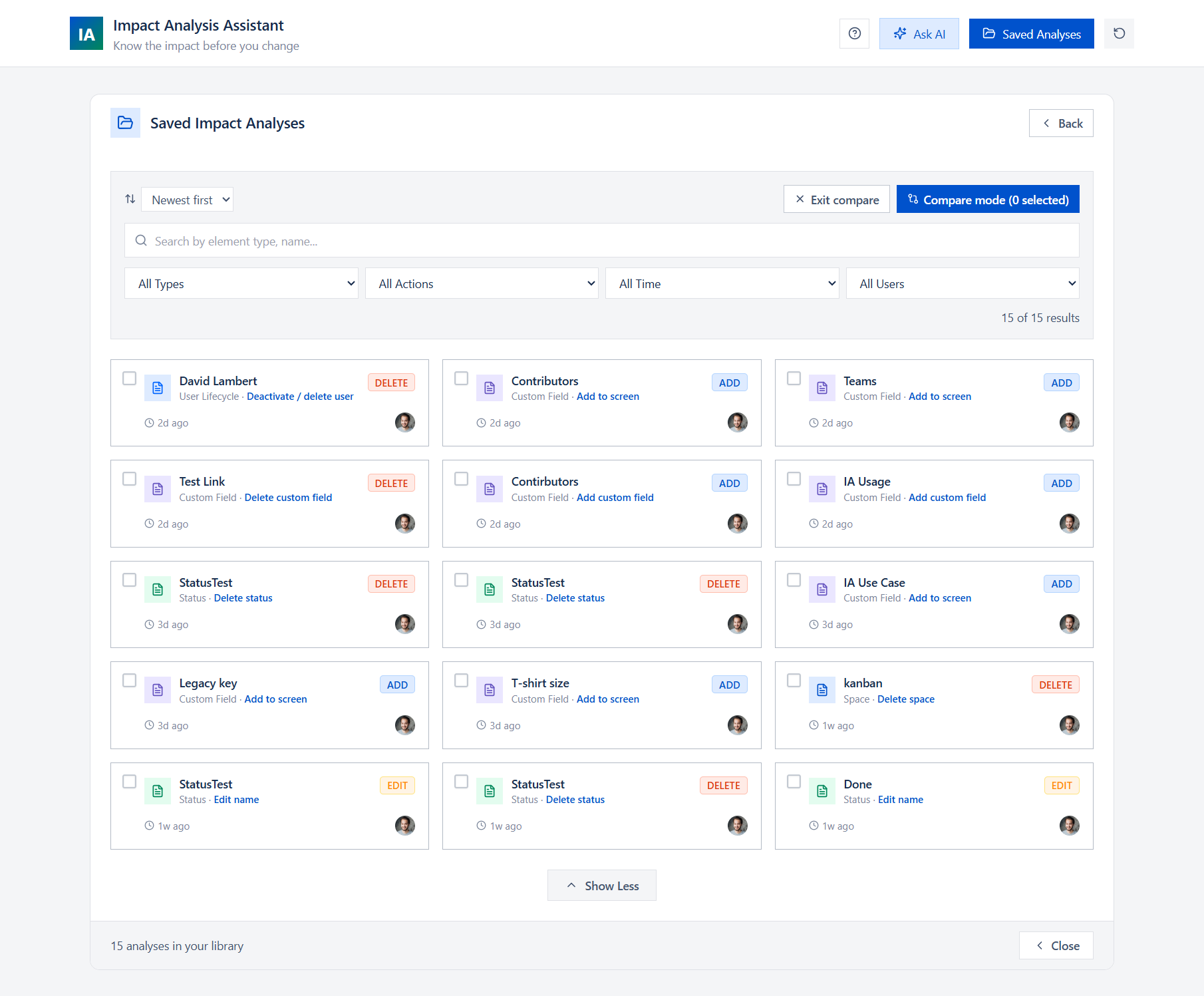
💾 Saved Analysis & Comparison
Jira configuration management is continuous.
Sometimes the most important question is not:
“What is impacted now?”
but rather:
“Did our refactoring reduce the impact?”
With Saved Analysis, admins can:
- save any analysis snapshot
- reload analyses later
- compare two analyses side by side
This is particularly useful when:
- isolating shared screens
- reorganizing workflows
- cleaning configurations
- reducing Jira complexity
- validating governance improvements
It essentially provides a form of historical comparison for Jira configuration impact.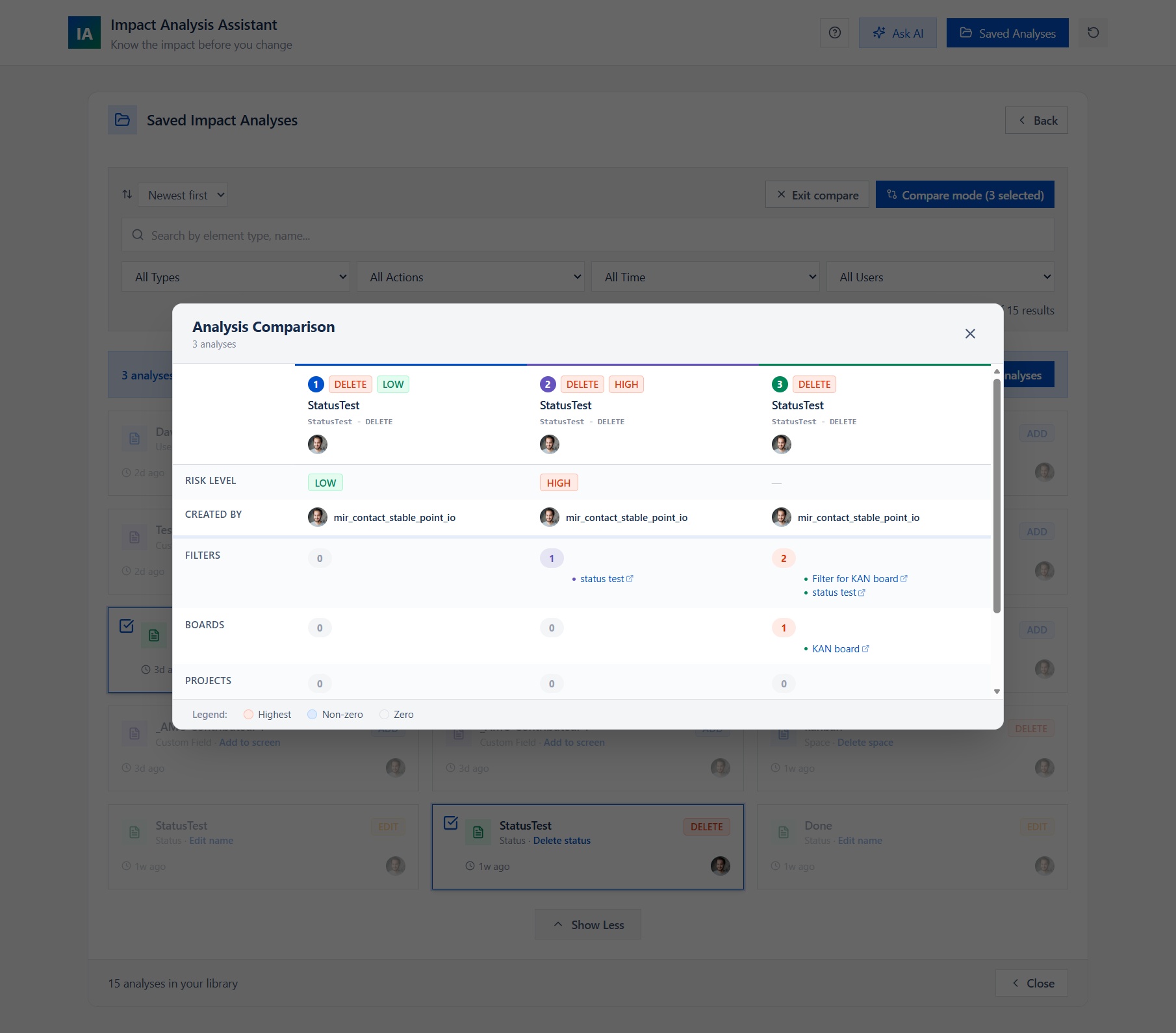
A More Proactive Way to Manage Jira
The overall workflow becomes much simpler:
- A Jira configuration request arrives
- The Rovo Agent provides an initial impact assessment
- A detailed impact analysis is launched
- Admins review dependencies and anomalies
- Changes are implemented with better visibility
- Analyses are saved and compared over time
Instead of reacting to unintended side effects after deployment, admins can proactively understand configuration risks beforehand.
We’d Love Feedback from the Jira Community
How do you currently manage Jira configuration impact in large environments?
Have you ever been surprised by:
- shared screens
- hidden workflow dependencies
- automation failures
- custom field propagation
- project key changes
- duplicated configurations
We’d love to hear your experiences and feedback from other Jira admins managing complex Jira instances 🙌
