Every new hire goes through the same predictable arc: a week of documentation, a handful of "shadow this person" sessions, and then, almost overnight, an expectation that they're contributing. The problem is that knowing where the deploy pipeline lives or understanding the team's sprint cadence isn't the same thing as being productive inside it. Most onboarding programs are built to close the first gap and simply assume the second one closes on its own.
It rarely does. A new hire who has finished all their assigned reading can still be sitting at 10% utilization three weeks in, while a well-meaning manager — working from memory rather than data — assigns them a full sprint's worth of tickets because "they should be ready by now." Neither of these outcomes is visible if learning progress and workload planning live in two completely disconnected systems: a wiki nobody checks after week one, and a sprint board that has no concept of who is actually new.
The goal of a scalable onboarding system isn't just to document things well — it's to connect what someone has learned with what they're actually capable of taking on right now. That means a manager opening their planning tool should be able to see not just available hours, but a realistic picture of a new hire's actual capacity, vacations, ramp-up time, and current load, instead of guessing. This is where structured learning paths and resource planning need to start talking to each other.
Structured learning in Confluence with Smart Courses
When onboarding depends on scattered Confluence pages, shared documents, and informal handovers, every new hire follows a slightly different path; some skip essential topics, others spend hours searching for information they need. Managers have no clear way to know whether someone is actually ready to take on work or has simply clicked through a collection of documents.
A structured learning experience solves this by turning your existing Confluence knowledge into a guided onboarding journey instead of a collection of disconnected pages.
With Smart Courses for Confluence, onboarding becomes a sequence of milestones rather than a space full of documentation. New hires are guided through content in the right order, ensuring they build foundational knowledge before moving on to role-specific responsibilities.
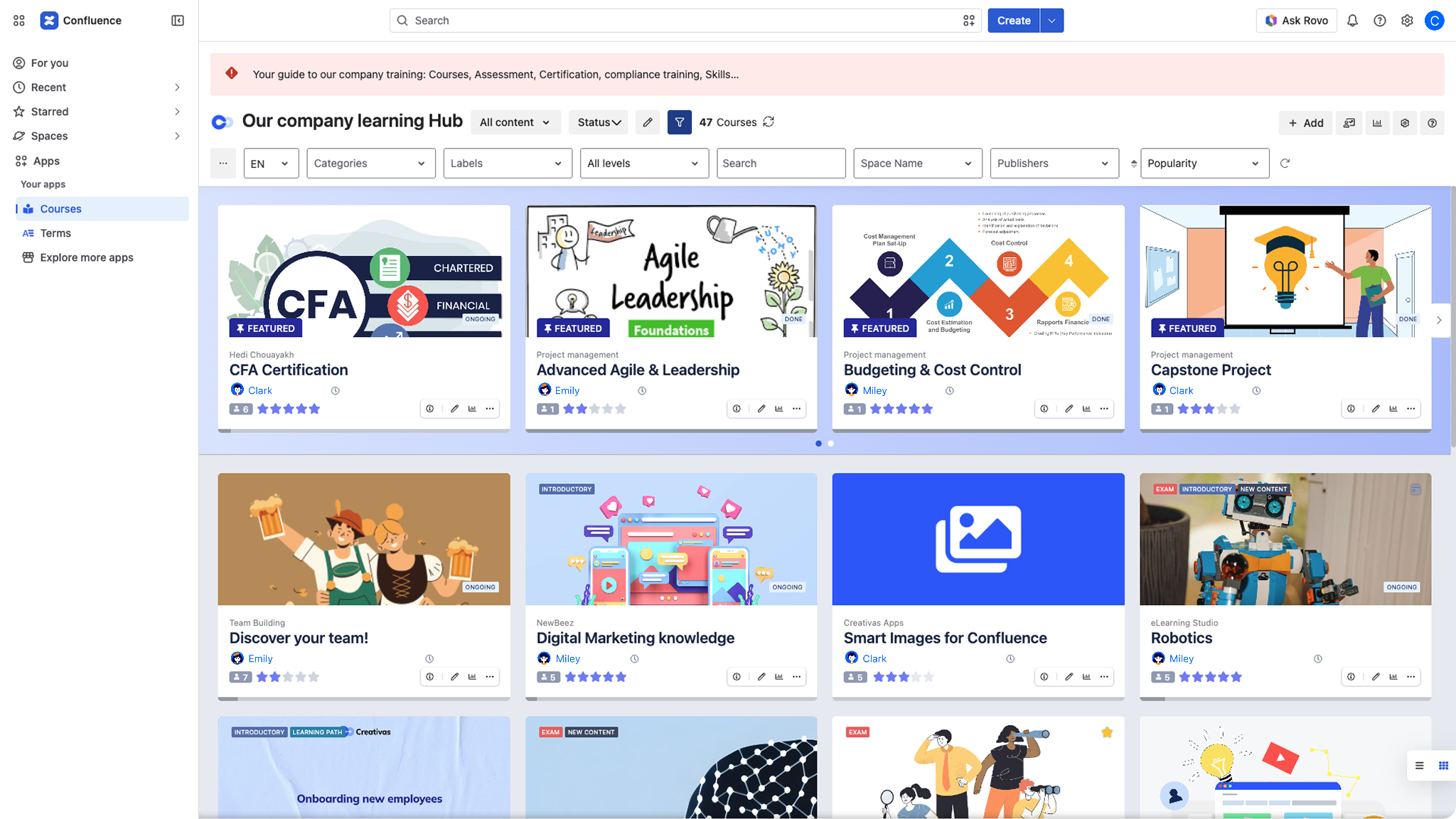
The learning experience can combine everything a new employee needs in one place, including Confluence pages, videos, PDFs, images or SCORM packages. Since Confluence pages remain connected to their original source, any updates made by your team are automatically reflected inside the course, eliminating duplicated documentation and ensuring everyone always learns from the latest updated version.
For organizations with different departments or roles, Learning Paths make it easy to organize multiple courses into complete onboarding programs. A developer, customer success manager, and project manager can each receive a tailored path while still sharing common company-wide training such as security, compliance, and company policies.
Managers can also assign individual courses directly to users or groups, complete with due dates and automatic notifications through the continuous assignment feature. This gives teams the flexibility to deliver mandatory training exactly when it's needed. Whether it's security training before a first login or product knowledge before joining customer calls, assignments help ensure critical learning happens on time while giving managers clear visibility into each one's progress through insights dashboards.
Knowledge isn't just consumed; it can also be verified. Interactive quizzes and exams allow managers to confirm that employees understand key concepts before progressing to the next stage. Combined with prerequisites and skills, onboarding becomes competency-based rather than time-based. Instead of assuming someone is ready after a week, teams can require specific knowledge or completed training before unlocking more advanced material.
Throughout the process, built-in insights provide managers with a clear view of course completion, assessment results, certifications, and overall learner progress. Rather than relying on status meetings or asking whether someone has finished onboarding, they can see exactly where each employee is in their learning journey and identify any gaps before those gaps affect day-to-day work.
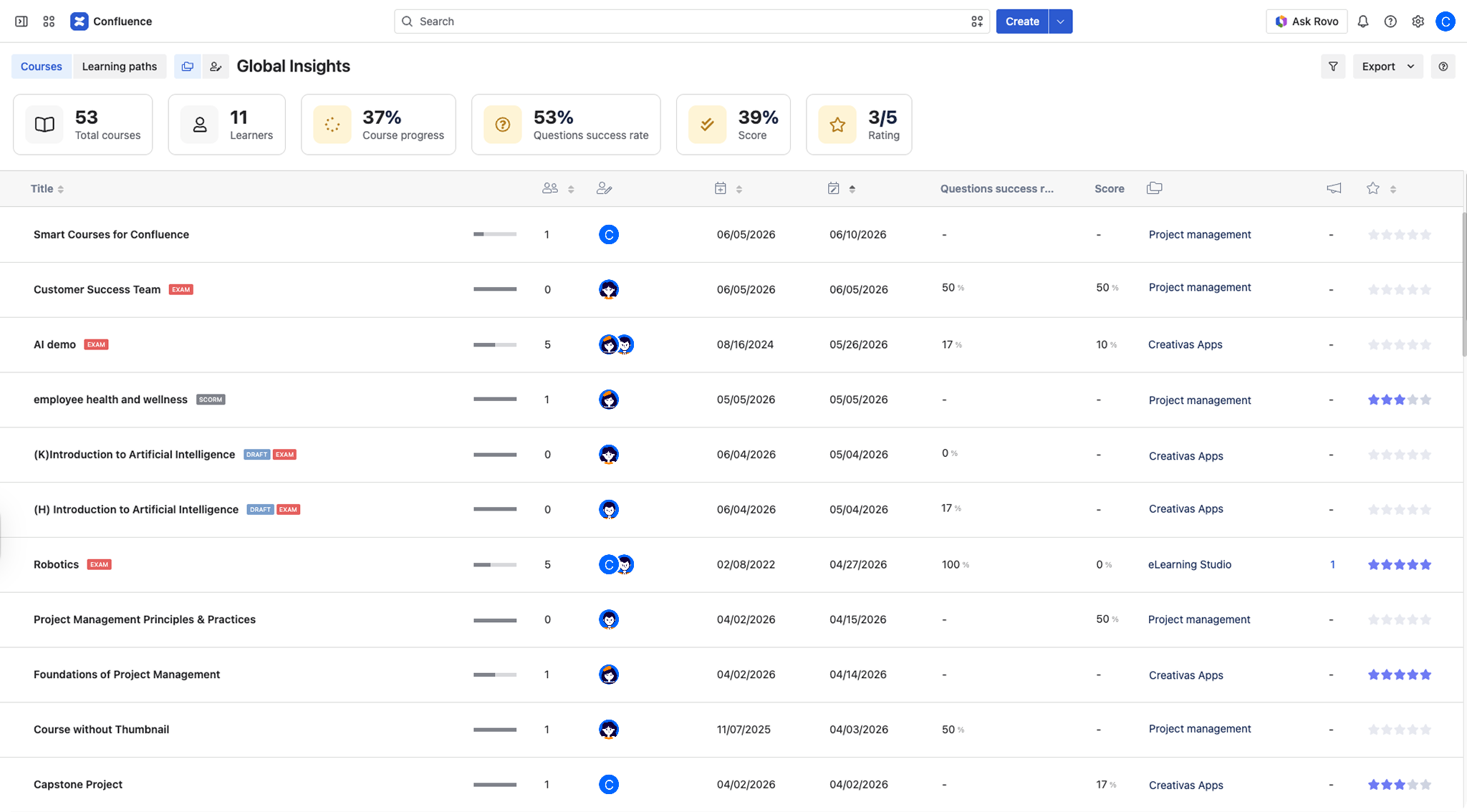
By turning existing Confluence knowledge into structured, trackable training, Smart Courses answers one critical onboarding question: What knowledge has this employee acquired, and are they ready for the next step?
The remaining challenge is equally important. Even when someone is progressing well through onboarding, managers still need to answer another question before assigning work: How much work should they realistically take on right now? That's where Workforce Planning enters the picture.
Workforce Planning in Jira with ActivityTimeline
If Smart Courses solves the "what should this person know" half of onboarding, ActivityTimeline solves the other half: "how much real work can this person actually carry, and when." ActivityTimeline is a Jira and Confluence-adjacent app that adds a capacity-planning layer directly on top of your existing Jira projects, so that onboarding decisions are based on actual scheduled work and availability rather than a manager's gut feeling about how ramped-up someone is.
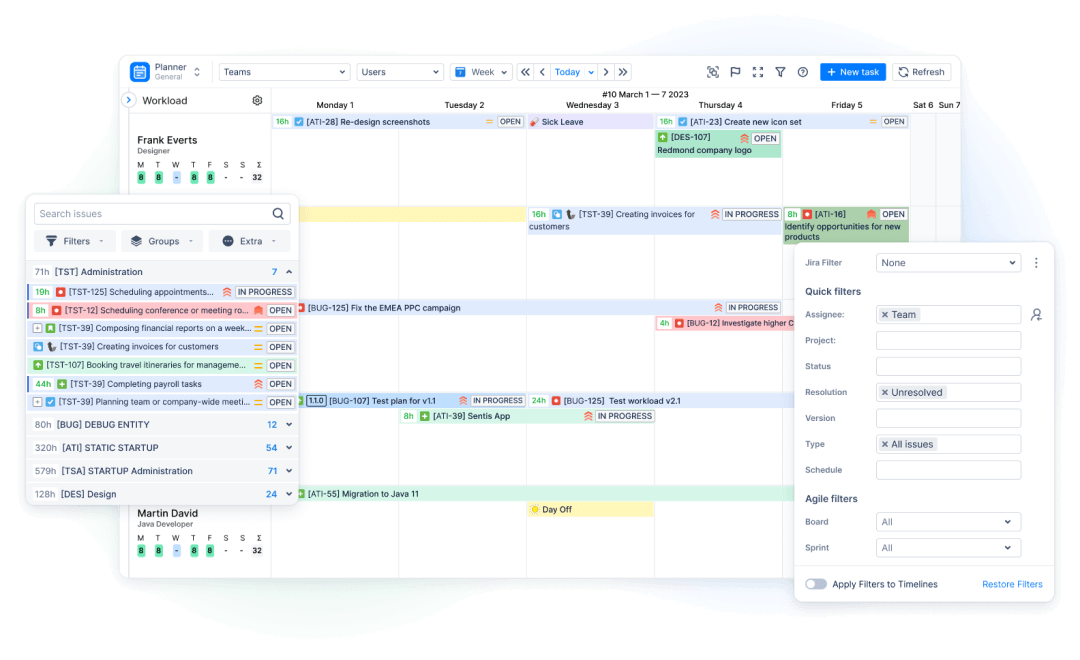
At its core, the app organizes work around two ideas: resources (the people, including new hires) and teams (the groups they belong to), and gives each person a personal timeline showing exactly what's assigned and scheduled to them, alongside a workload indicator that reflects how loaded they are relative to their available capacity. This matters enormously during onboarding, where the temptation is to either under-assign out of caution or over-assign out of optimism — both visible the moment you actually look at the timeline instead of assuming.
A few features make this especially useful for managing new team members:
See real workload distribution. The workload indicator under each person's name shows whether they're balanced, underloaded, or overloaded, color-coded from light green through red, calculated from both Jira issue estimates and custom events like bookings or training blocks. For a new hire, this means a manager can see at a glance whether the "easy onboarding ticket" they assigned is actually filling the person's whole week or leaving them mostly idle — instead of finding out two sprints later during a retro.
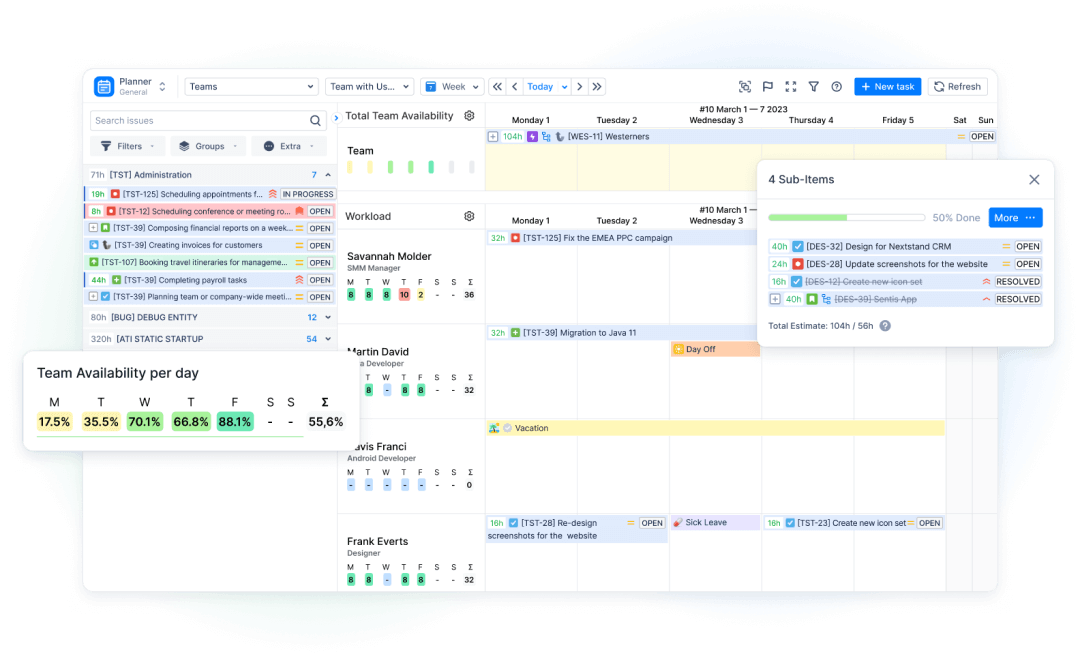
Control allocation for new hires. Rather than assigning tasks the same way you would for a tenured engineer, ActivityTimeline lets you set individual involvement (capacity) per person, for example, configuring a new hire at 4 hours/day of plannable work for their first two weeks while the rest of their time is implicitly reserved for ramp-up, even before they're touching real tickets at full speed. You can also use Booking events to explicitly reserve a new hire's time for shadowing, pairing, or training sessions without needing a Jira ticket for every one of those activities so that time shows up on their timeline and counts against their capacity, rather than disappearing into an invisible gap between onboarding and real work.
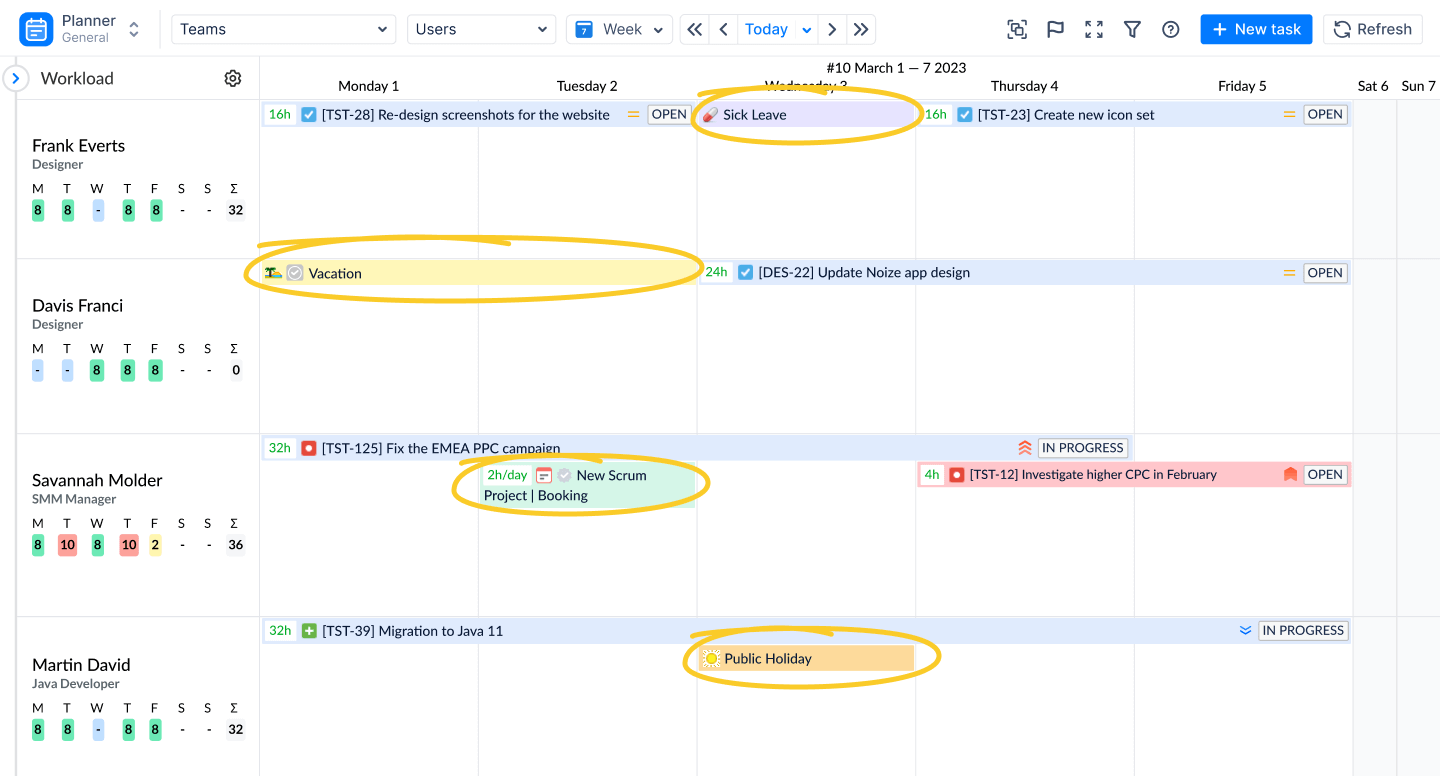
Avoid overloading during onboarding. Because the workload indicator accounts for vacations, partial days, and any custom involvement schedule, it's much harder to accidentally schedule a new hire for more than they can handle. If a manager tries to stack story-pointed tickets onto someone whose involvement is intentionally set lower during their ramp-up period, the indicator will visibly tip into yellow or red well before the team finds out the hard way that the new hire is drowning.
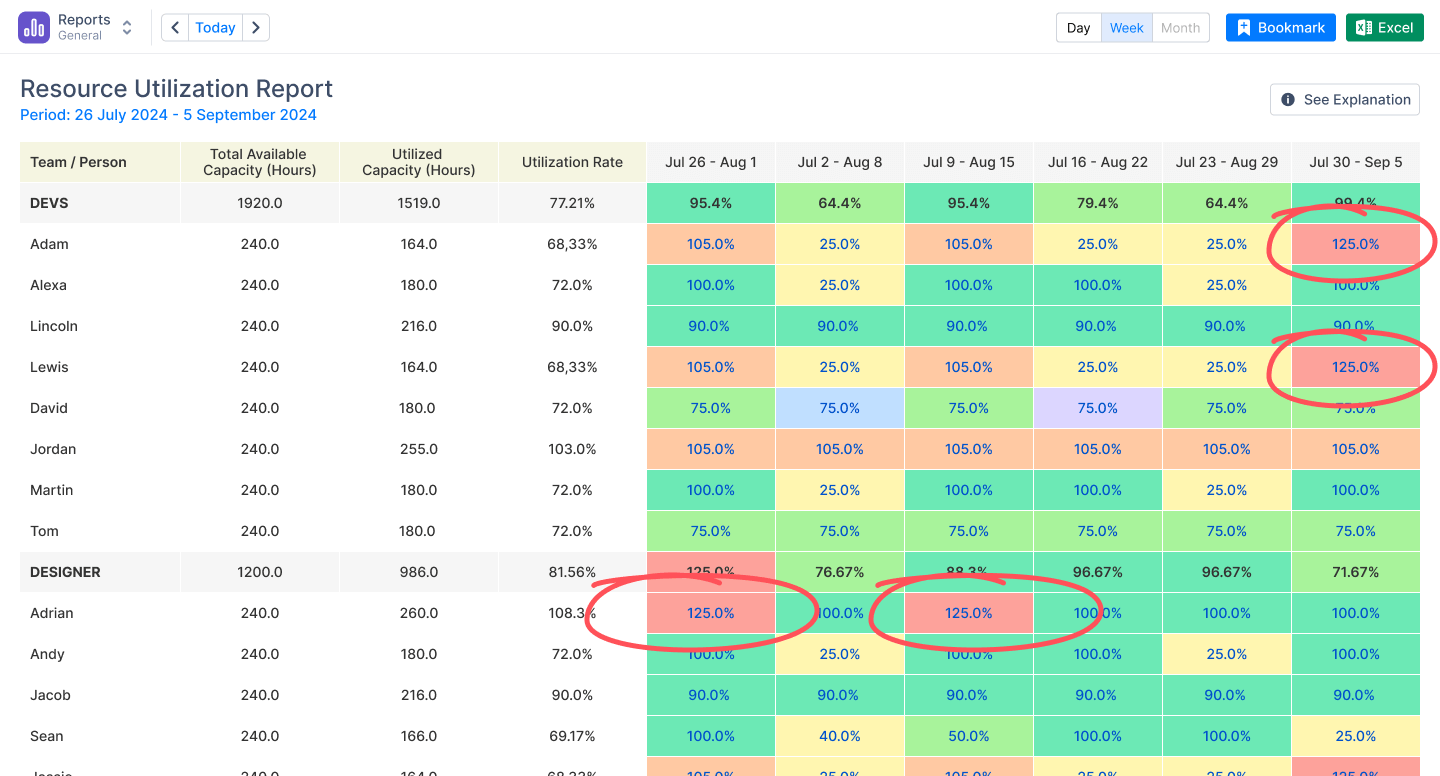
The outcome is realistic planning grounded in actual team capacity rather than assumptions. A manager isn't asking "do I think this person is ready," they're looking at a timeline that already reflects training time, partial involvement, and current assignments, and making a scheduling decision from there — the same way they would for anyone else on the team, just with the constraints turned down appropriately.
Avoiding Common Onboarding Mistakes
Don’t assign full sprint tasks too early. Completing documentation doesn't automatically mean someone is ready to own complex work. Instead of using time alone as a measure of readiness, managers should rely on structured learning milestones. Course completion, assessment results, acquired skills, and certifications provide clear evidence that a new hire has mastered the knowledge required before taking ownership of larger tasks or customer-facing responsibilities.
Don’t treat training and delivery as separate systems. Learning shouldn't stop the moment someone receives their first Jira issue. Documentation, training, and project delivery should reinforce one another throughout the onboarding journey. When Confluence serves as both the team's knowledge base and learning platform, employees continue learning from the same source of truth they use every day, while managers can align training progress with project planning instead of treating them as unrelated activities.
Don’t ignore capacity limits of new hires. It's tempting to treat a new hire's capacity as a soft, informal thing — "we'll ease them in" — without ever encoding that anywhere a manager or teammate can see it. The fix is concrete: set the new hire's individual involvement explicitly (even something as simple as 4–6 hours/day instead of 8 for the first sprint or two), and let that constraint flow through to the workload indicator automatically. This turns an informal intention into a real, visible limit that the whole team's planning respects, instead of relying on every person who schedules work for that hire to remember the unwritten rule.
Use system signals instead of intuition. The biggest failure mode in onboarding isn't bad intentions, it's decisions made from memory instead of data — "I think they're ready for bigger tickets" rather than "their workload indicator has been green for two weeks and their training milestones are marked complete." Pairing a learning system with a capacity-planning view means a manager has two concrete signals to check before increasing someone's load: has the relevant learning path actually been completed, and does the timeline show room for more. Neither signal alone is reliable — completed training doesn't guarantee bandwidth, and free capacity doesn't guarantee competence — but together they replace intuition with something closer to evidence.
Conclusion
Try Smart Courses for Confluence for free during a 30-day trial period
Try ActivityTimeline for Jira for free during a 30-day trial period
This article is a joint effort between Reliex and Creativas – we are happy to share our combined knowledge with you.
