If you are using Jira Cloud and managing multiple Scrum boards, this article maybe relevant to you.
Jira Cloud does not natively support automatic sprint start or sprint completion based on the sprint’s defined start and end dates. Therefore, these actions currently have to be performed manually on each board every time leading to administrative overhead.
This capability has historically been available in Jira Server and Data Center. Sprint Auto Scheduler fills this gap for Jira cloud users by enabling teams to automate sprint actions.
By configuring sprints to start and complete automatically based on defined dates, teams can reduce administrative overhead while maintaining full control and permission compliance.
Key Features & Benefits
Automatic Sprint Start
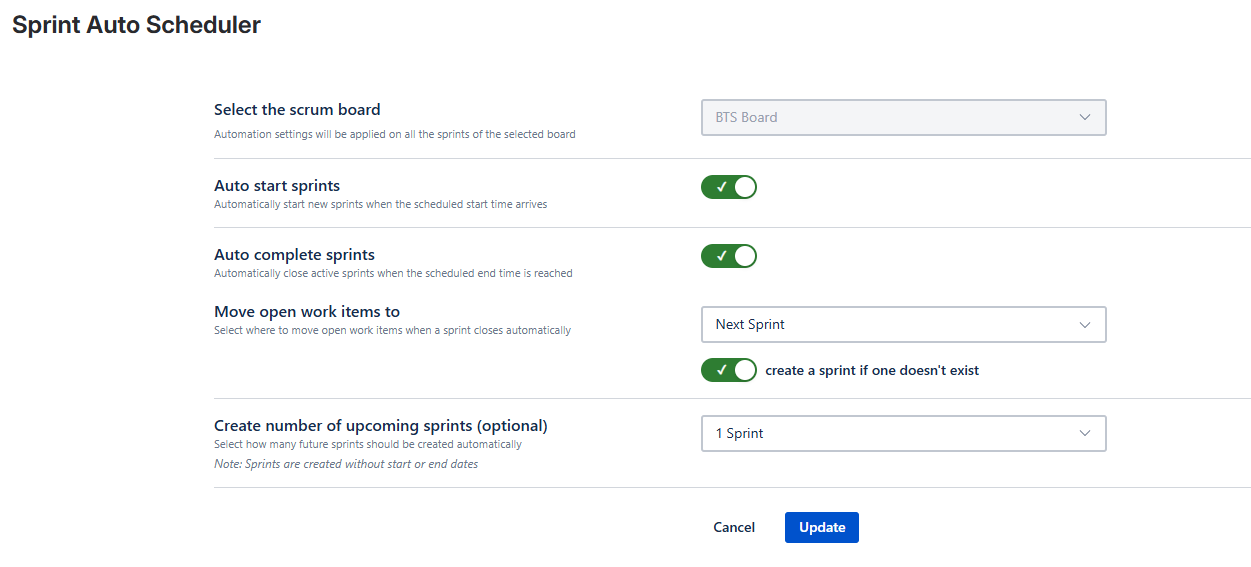
Sprint Auto Scheduler allows sprints to be configured to start automatically on their defined start date.
Once enabled, sprint start occurs without manual action on the board.
Automatic Sprint Completion on End Date
Sprints can also be configured to complete automatically when the sprint end date is reached.
Configuration options include:
These settings can be adjusted per board based on team requirements.
Handling of Incomplete Issues on Sprint Completion
When a sprint completes, Sprint Auto Scheduler provides configurable options for managing incomplete issues:
Automatic Creation of Future Sprints
Sprint Auto Scheduler can automatically create up to five future sprints in advance.
Once configured:
-
When a sprint completes, a new sprint is created to maintain the configured number of upcoming sprints
-
Teams can plan backlog work without manually creating sprints
Permission Enforcement
All automation respects Jira’s native permission model:
Configuration and Control
Sprint Auto Scheduler provides configurable automation:
-
Automation can be enabled or disabled at any time
-
Sprint start, sprint completion, and sprint creation can be configured independently
When to Use This App
| Scenario |
Description |
|---|
| Multiple Scrum boards |
Reduce administrative overhead |
| Migration from Server/Data Center |
Restore familiar sprint behavior |
| Ongoing sprint planning |
Maintain future sprints without manual creation |
Getting Started
To begin using Sprint Auto Scheduler – Sprint Automation for Jira Cloud, install the app from the Atlassian Marketplace:
👉 Sprint Auto Scheduler – Sprint Automation for Jira Cloud (Atlassian Marketplace)
After installation:
-
Navigate to a Apps -> Sprint Auto Scheduler.
-
Select the scrum board you are managing.
-
Based on your team’s requirements, configure:
-
Save the configuration. Automation will apply only to the boards and sprints where it is explicitly enabled.
Tips for Effective Use
Final Thoughts
Sprint Auto Scheduler brings date-based sprint automation to Jira Cloud, aligning Cloud behavior more closely with capabilities historically available in Jira Server and Data Center. By automating sprint start, sprint completion, and future sprint creation - while respecting Jira’s permission model - the app supports consistent sprint lifecycle management across boards.
If you have questions, need clarification, or would like assistance with configuration, our support team is available to help.
Support: support@buildtoserve.in
