If your team has been holding back from vibecoding in Jira because of security questions, this article is for you. I’ll guide you through a clear walkthrough of how AI Apps Builder handles the questions that come up every time someone considers introducing an AI tool into a Jira environment.
AI Apps Builder for Jira is a secure building platform where AI and humans collaborate. It allows users to create custom Forge apps by describing their idea in plain language. The AI agent generates a complete custom app, including modules, permissions, UI, and backend logic.
Does AI Need Access to Your Jira Data?
No. This is probably the most common misunderstanding. When you use AI Apps Builder to generate a custom Jira app, the AI reads your prompt and generates a Forge app based on Atlassian's Forge documentation. It does not connect to your Jira issues, projects, or data.
The generated apps run inside Atlassian's infrastructure and operate within Jira's existing permission model. You never need to grant AI direct access to your instance.
Plus, there are two ways to use AI Apps Builder:
-
Install it directly in Jira and build from there.
-
Use the standalone web version to generate and preview apps entirely outside your Jira environment, then install the finished Forge app when it's ready.
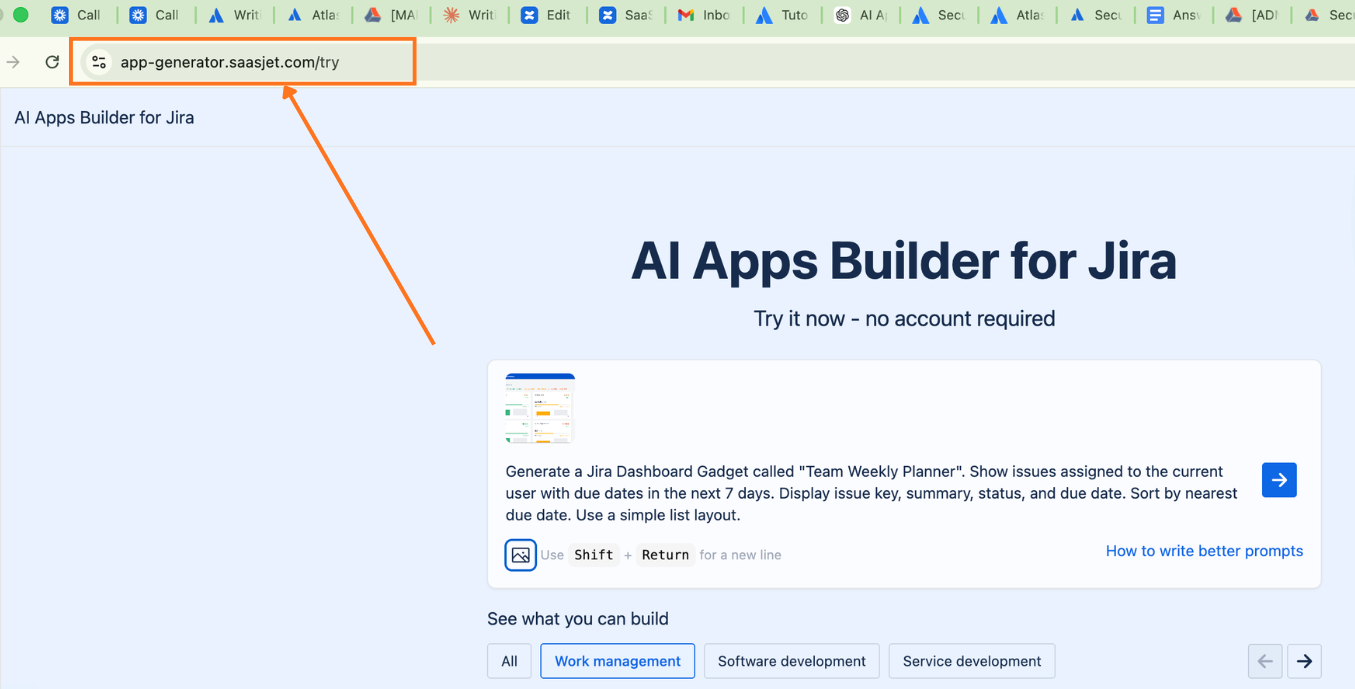
That second option is particularly relevant for teams with strict policies.
Are Your Prompts Used to Train AI Models?
No. Neither Anthropic (the AI provider behind AI Apps Builder) nor the AI Apps Builder team uses your prompts or generated outputs for model training. What you described doesn't feed back into improving the model.
This matters for teams handling sensitive internal processes, proprietary workflows, or confidential project structures. Describing your use case to generate a custom Jira app doesn't expose that information to future users of the system.
Can You Review Scopes Before Anything Gets Deployed?
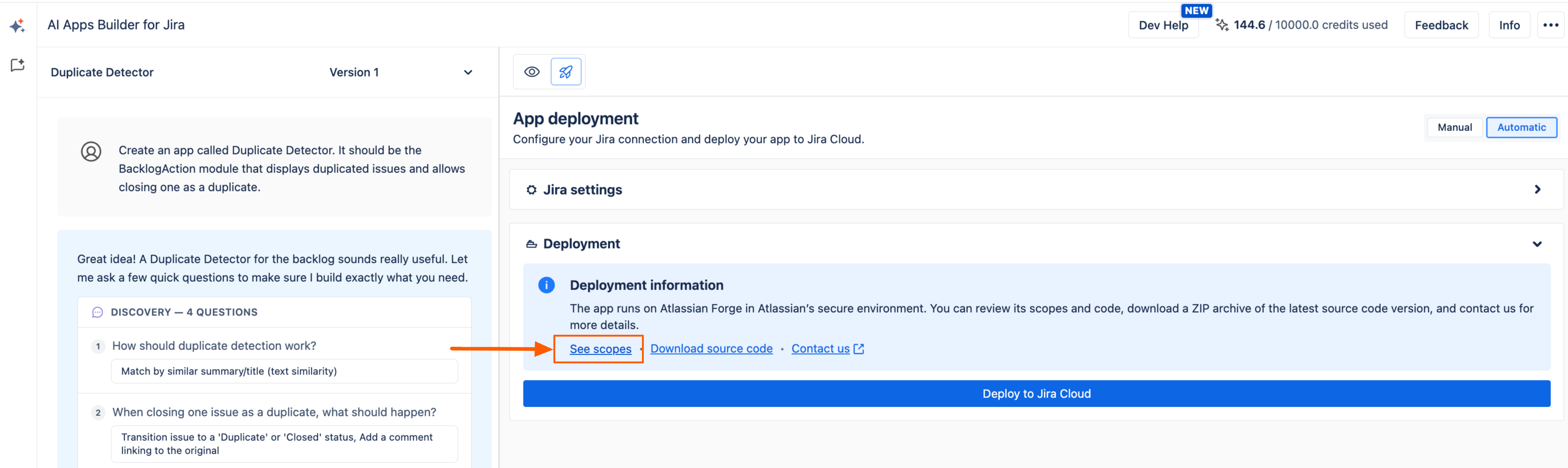
Yes — twice. Before generating a custom Jira app, AI Apps Builder creates an app specification that includes all requested scopes. You can:
-
Review each scope and permission
-
Edit the app specification
-
Confirm before proceeding.
Then, on the deployment page, you get another opportunity to review permissions before the deployment process begins. Nothing installs without your explicit approval at each step.
Where Does App Data Live?
AI Apps Builder generates secure Forge apps. That use Forge-hosted storage — Storage API, Forge SQL, and similar — data stays inside Atlassian's cloud infrastructure. Storage is scoped per installation (per customer site/tenant), encrypted at rest using AES-256, and backed up by Atlassian.
If your Jira instance has a data residency setting pinned to a specific region, Forge-hosted app data follows that setting automatically.
The one exception: if an app makes calls to external systems (third-party APIs, remote backends), that data falls outside the Forge platform boundary. In that case, you're responsible for residency, deletion, and security of that external data — not Atlassian.
In simple terms: all data stays inside Atlassian’s cloud, not on the app vendor’s own servers. Each Jira site gets its own isolated “data space,” so one company’s data is never mixed with another’s. Atlassian encrypts this data, makes backups, and handles all the infrastructure work behind the scenes.
If your Jira is pinned to a region (for example, EU or US), this app data follows that same location automatically. The only time data leaves Atlassian’s cloud is when an app talks to outside services (like third‑party APIs), and in those cases, the app vendor is responsible for how that external data is stored, secured, and deleted.
What About the API Token Required for Deployment?
AI Apps Builder asks for a Jira API token during deployment. This token is used only to authenticate your instance and verify administrator permissions during that single deployment step.
Two things worth knowing upfront:
Once deployment is complete, the token is not retained.
If you'd prefer not to provide the token through the AI Apps Builder interface at all, you can use manual deployment instead:
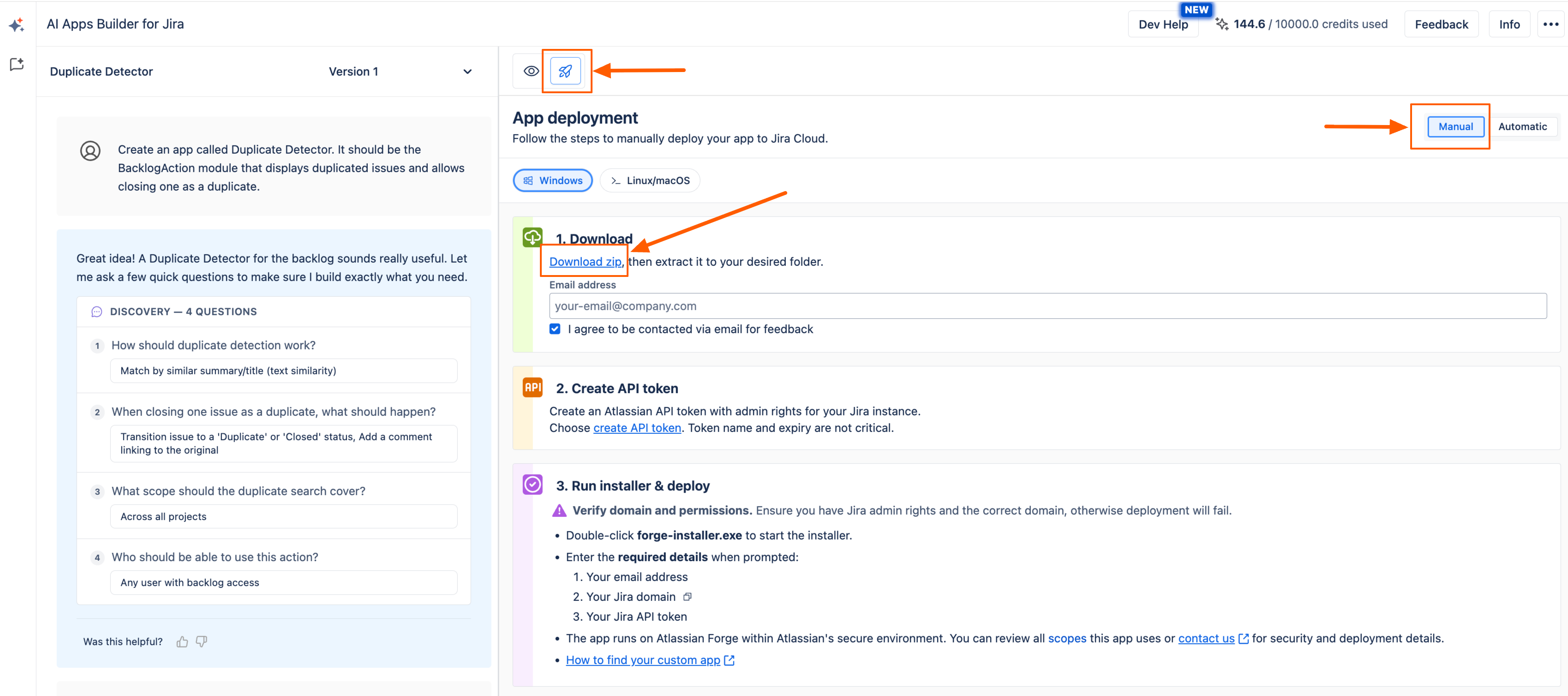
This gives organizations flexibility to match their internal security policies.
Why Does Deployment Require Jira Administrator Access?
Installing a Forge app and upgrading it when scopes or external domains change involves a consent step where a site admin approves the app’s permissions and any external domains it communicates with.
Many useful app capabilities (creating projects, custom fields, managing workflows) map to scopes that perform Jira administration actions. Those can only be granted by users with Jira Administrator global permissions.
If an update increases the app’s effective permissions — for example, by adding new scopes or new external domains — Forge treats this as a permission change. The app will not run with the new privileges until a Jira admin approves the updated version.
In simple terms: only Jira admins are allowed to say “yes” when an app asks for powerful permissions or new external connections, so Atlassian makes sure those changes are always reviewed and approved by the right people.
If you are not an admin, you can still build and test your own app with AI Apps Builder. When your app is ready and you’ve confirmed that everything works as expected, you can share your app with the administrator for deployment. How to create a share link of your Forge app, you can find in our Installation Guide.
Who Is Responsible for the Security of the Forge App: Atlassian or You?
As the AI Apps Builder generates a Forge app, you need to know that Forge uses a shared responsibility model. The split is clear:
|
Responsibility
|
Atlassian
|
You
|
|---|
|
Platform infrastructure and runtime
|
✓
|
|
|
Managed storage and encryption
|
✓
|
|
|
SOC 2 and ISO 27001 certifications (platform boundary)
|
✓
|
|
|
Backups of Forge-stored data
|
✓
|
|
|
Writing secure app code
|
|
✓
|
|
Preventing cross-tenant data leaks
|
|
✓
|
|
Choosing and minimizing scopes
|
|
✓
|
|
Defining and documenting data egress
|
|
✓
|
|
Your organization's broader compliance (ISMS, internal policies)
|
|
✓
|
Atlassian secures and operates the Forge platform. You're responsible for how your app uses that platform.
Is AI Apps Builder "Enterprise-Secure"?
All app built with AI Apps Builder runs entirely within Forge and uses only Forge‑hosted storage (no external calls), it benefits from Atlassian’s hardened runtime, encryption at rest, backups, and the same security controls Atlassian uses to achieve SOC 2 and ISO 27001 certification for the Forge platform.
If the generated app introduces data egress — for example, calls to third‑party APIs, external databases, or analytics services — then any data leaving Forge is covered by your own security and compliance responsibilities, not Atlassian’s.
A “zero‑egress” Forge app keeps all processing and storage within Atlassian’s cloud; this model closely matches enterprise security expectations and can qualify for Atlassian’s “Runs on Atlassian” program, which is designed for Forge apps that use only Atlassian‑hosted compute and storage, support data residency, and tightly control any allowed external egress.
In simple terms: your app built with AI Apps Builder keeps all data inside Atlassian’s cloud and doesn’t send it to other services, it works a lot like a locked room inside Jira that Atlassian secures for you — which is exactly what most enterprise security teams want.
Can You Review the Generated Code?
Yes. You can download the generated code, review it, and edit it.
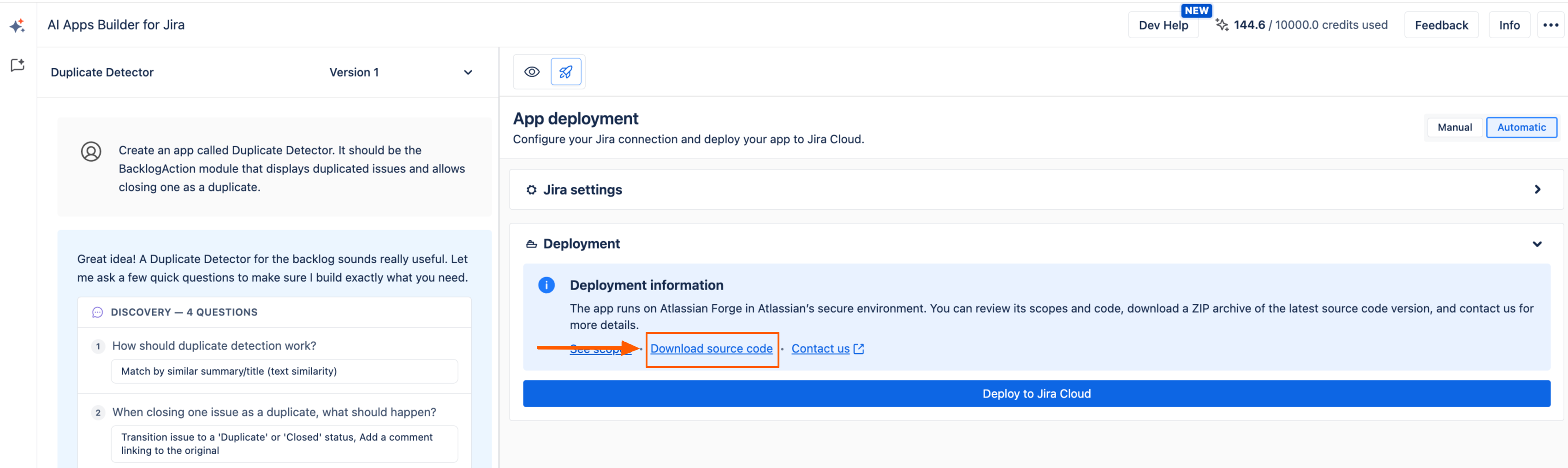
You also have the option to:
Nothing is a black box.
Build Secure Forge App without Code
Here's what AI Apps Builder actually gives you from a security standpoint:
-
No AI access to your Jira data — AI reads your prompt and generates code from Forge documentation
-
Prompts never used for training — neither Anthropic nor the AI Apps Builder team uses your prompts or outputs to train models
-
API tokens not stored — used only during the deployment step, then discarded
-
Standalone web version — build and preview apps without installing anything in Jira
-
Scope review at two checkpoints — before generation and before deployment
-
Forge infrastructure — app data encrypted at rest, backed up, and scoped per tenant
-
Data residency inheritance — Forge-hosted app data follows your Jira data residency settings
-
Manual deployment option — keep the API token and deployment entirely in your control
-
Full code transparency — download, review, and edit generated code at any time.
Install AI Apps Builder for Jira and securely build your first custom Jira app today.
Have more questions about security or compliance? Leave a comment or book a demo with our team. We’re always happy to help with security reviews, deployment questions, and audit-related discussions.
