Managing document versions often requires multiple steps: internal review, formal approval, and finally employee acknowledgment. With the new approval-based version strategy, you can now connect QC Approvals and QC Read & Understood to create a clean, controlled workflow from draft to employee confirmation.
This approach ensures that employees can confirm they’ve read and understood a page version only after it has already been fully approved.
How it works
Install and connect the apps
The first thing you need to do is install the QC Read & Understood and the QC Approvals apps from the Marketplace.
Once both apps are installed:
-
Go to the QC Approvals Site Admin and check the “Enable Sync with QC Read and Understood for Confluence” option.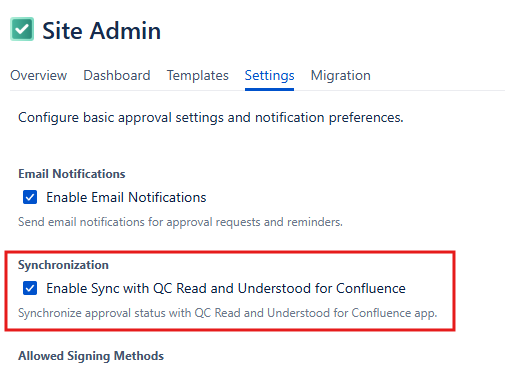
-
Go to the QC R&U Space settings, set your version strategy to “based on QC Approvals” and save your settings.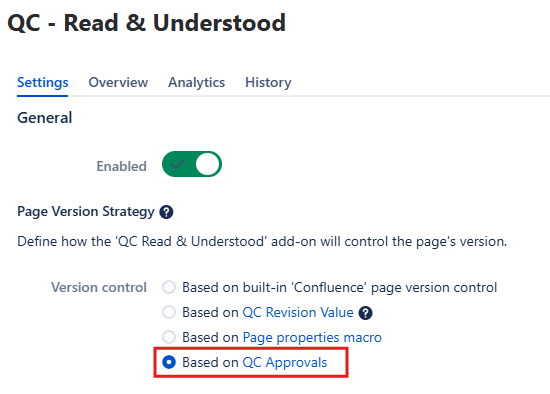
Approve versions with QC Approvals
-
Use QC Approvals to add required signers to a specific page version.
-
Signers review and either approve or reject the version.
-
Approval progress is continuously synced with QC Read & Understood.
This ensures that version control decisions are made before employees are asked to confirm they’ve read and understood it.
What employees see in QC Read & Understood
All signers have approved the version with QC Approvals
Approvals are still in progress
-
Employees see a message in QC Read & Understood, indicating that the approvals are still in progress in QC Approvals
-
Can’t R&U the page as the version is not ready yet.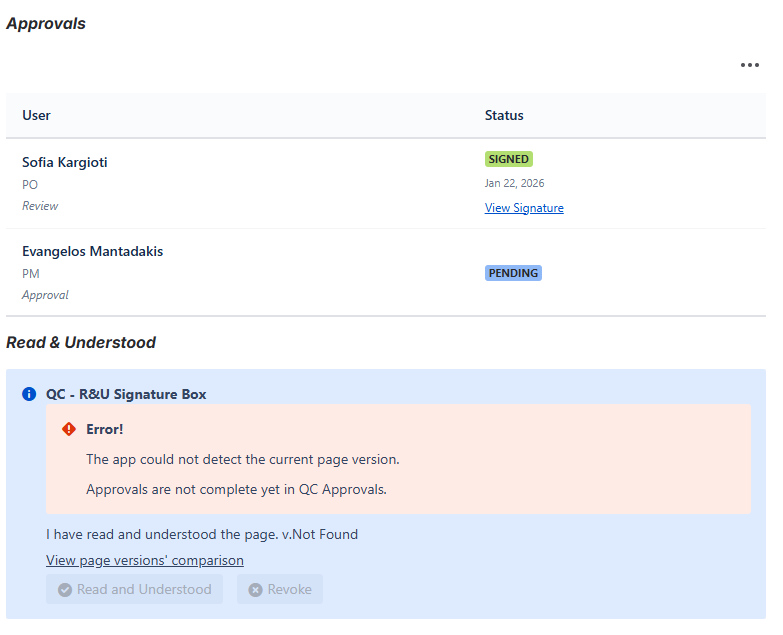
At least one signer has rejected the version with QC Approvals
-
Employees see a message in QC Read & Understood, indicating that the version is rejected
-
The version doesn’t require R&U confirmation.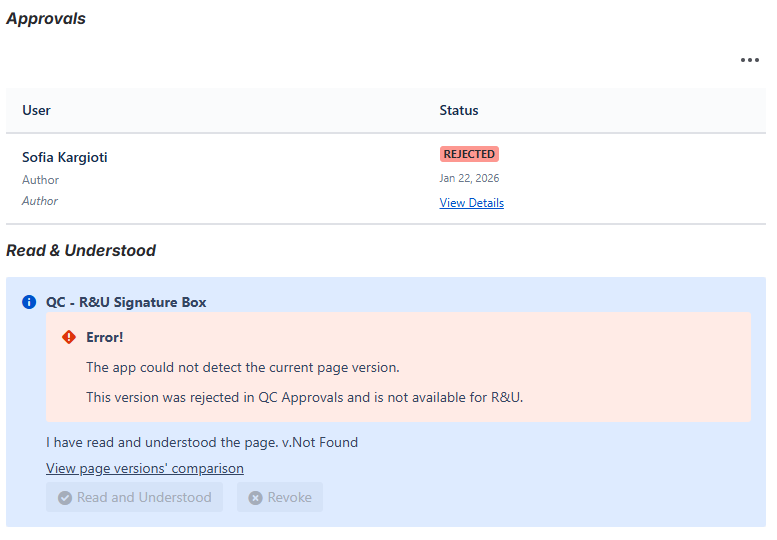
Version is marked as Minor in QC Approvals
Why use the version strategy based on QC Approvals
This setup is helpful if you want to make sure employees only read and understand content after it’s been fully approved.
The “based on QC Approvals” version strategy:
-
Ensures only approved pages reach employees
-
Prevents premature Read & Understood requests
-
Reduces confusion around rejected or draft versions
-
Supports compliance and audit-ready documentation practices
By combining QC Approvals and QC Read & Understood, you create a single, reliable flow from internal approval to employee read confirmations without manual handoffs or version confusion.


