Preparing Jira for audits and security reviews can be overwhelming - especially when auditors want to see historical changes, deleted work items, or proof of user activity from months (or years) ago.
Native Jira tools help, but often don't go far enough for compliance-driven teams, whether in finance, IT, healthcare, or enterprise environments.
The good news? With the right approach - and the right tools - Jira can be made audit-ready, transparent, and security-safe, without adding additional work for your teams.
Below are 7 practical tips to help you get there.
1. Enable Complete Visibility into Jira Work Item History
One of the first questions auditors ask is usually: "Can you show us precisely what changed when and by whom?"
Jira displays the basic work item history, but:
- It’s quite limited
- It's not searchable across projects
- Doesn't give a consolidated view needed for audits
In order to be audit-ready, you need full and long-term visibility into Jira work item history, including:
- Field changes
- Status transitions
- User actions
- Historical values
That is why it is better to use third-party apps available on Atlassian Marketplace. One of such apps is Issue History for Jira from SaaSJet team. It allows seeing every change made to work items in one unified view.
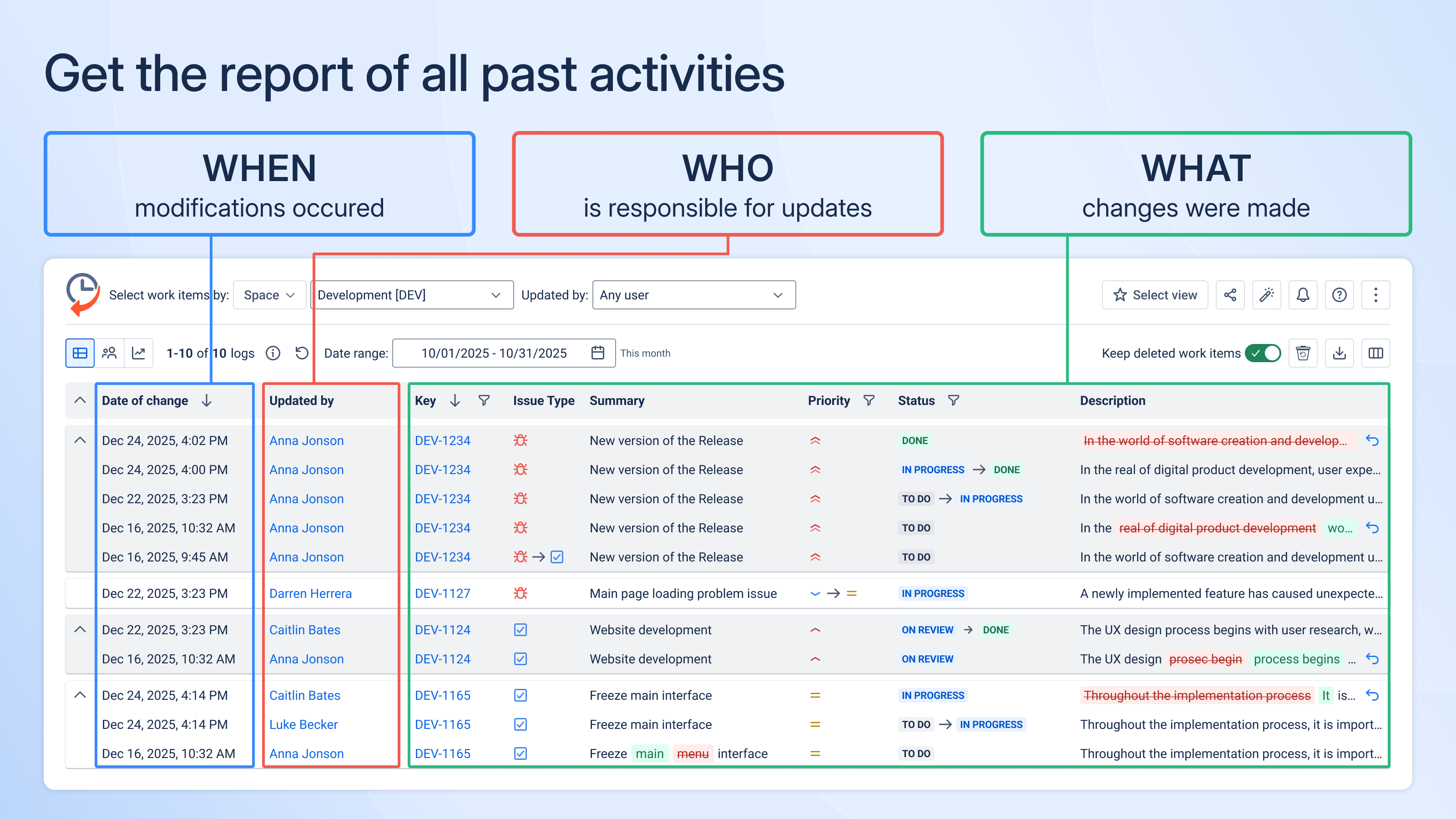
The usage of this app allows passing audits fast and easy, eliminating the need to spend hours on manual report preparation.
2. Track Deleted Work Items
One of the largest audit blind spots in Jira is deleted data.
The deleted work items may represent:
- Cancelled financial approvals
- Removed support tickets
- Security incidents that somebody tried to conceal
Without proper tracking, work items that have been deleted can be gone forever. And it’s a major red flag during audits.
With Issue History for Jira app, teams can:
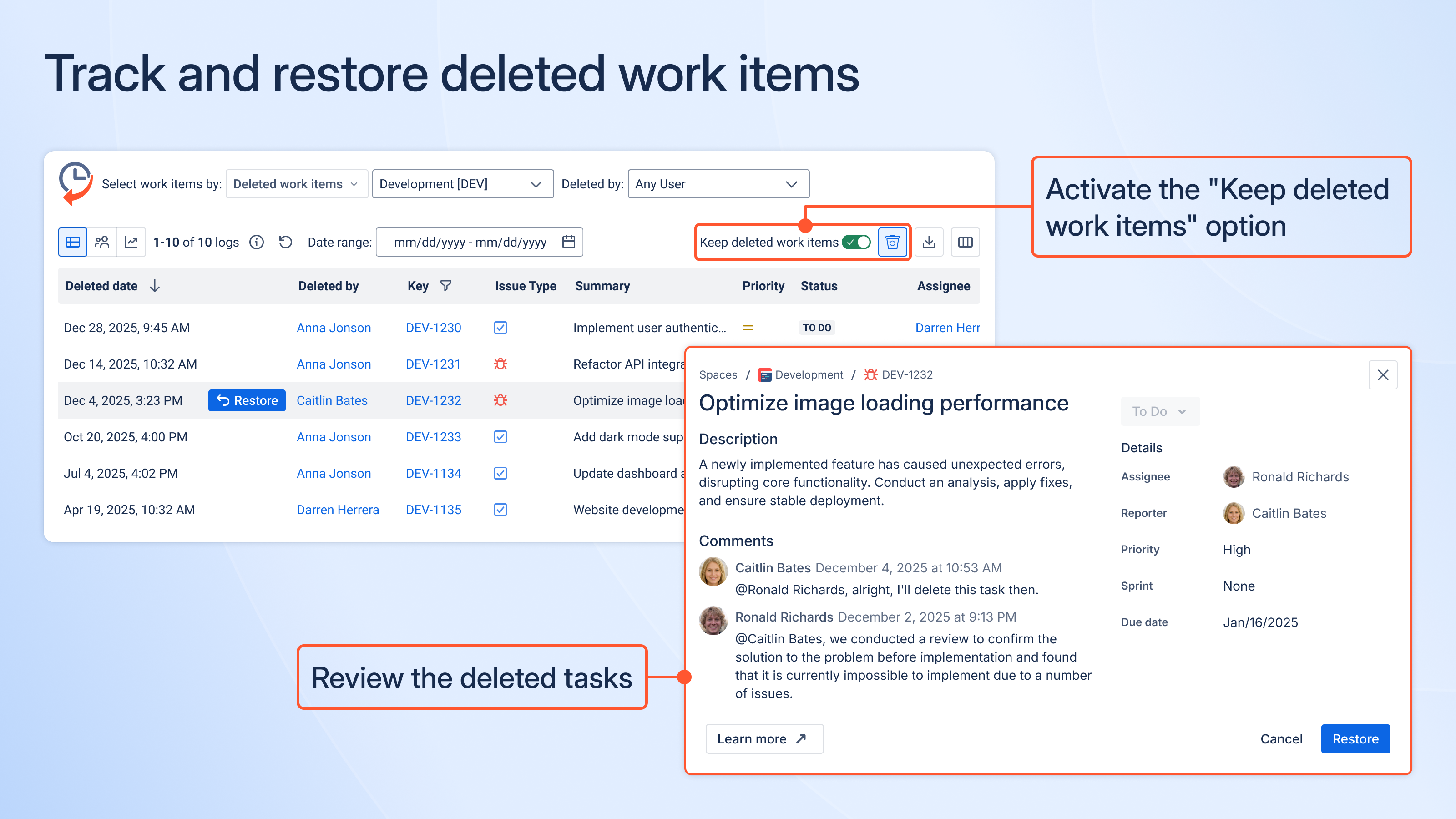
And that alone can save hours (or days) of audit back-and-forth.
3. Monitor Sensitive Data Leaks in Work Items and Their History
Audits and security checks are often about finding and preventing data leaks, not just seeing who changed a work item. In Jira, sensitive information can be added to work items and then removed from them, but it may remain in the work item history and create compliance risks.
The Security Scanner View in Issue History for Jira helps teams to identify these risks by scanning Jira work items and their history for sensitive data, such as:
- Credentials shared in comments
- API keys added temporarily and forgotten
- Personal data (PII) included in descriptions
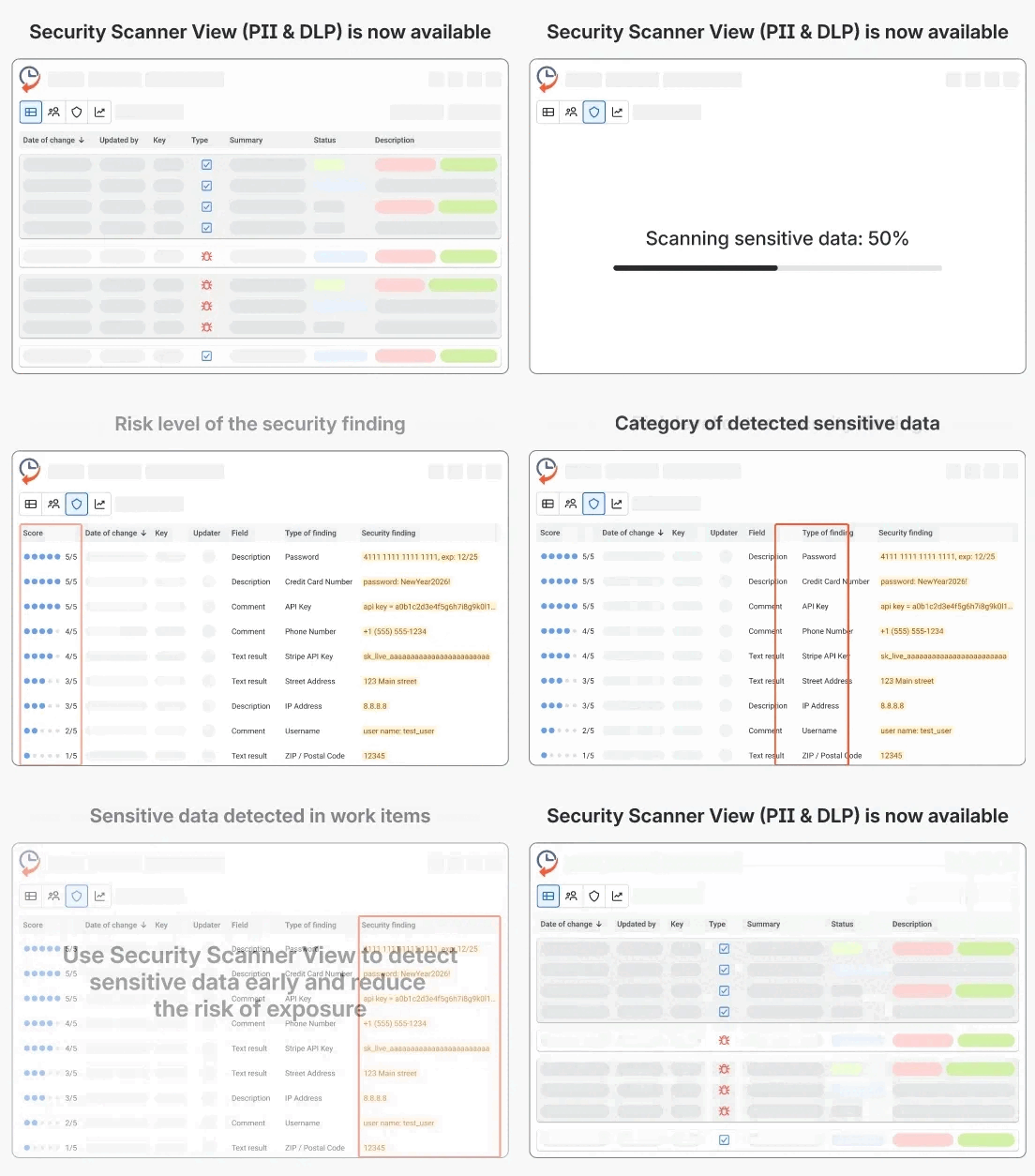
This provides security and compliance teams with a clear and easy to understand view of where sensitive data exists now or existed in the past, making audits faster and risks easier to fix.
4. Use Jira Audit Log
Often, audits also need context at the system level. This is where the Jira Audit log becomes important.
For a full review, teams should look at:
- Permission changes and admin actions
- User access updates (who added, removed, or granted rights)
- Configuration changes that impact a number of projects

Image source: Atlassian Support
When Audit log is reviewed along with the history of work items, auditors are able to get a full picture of activity in Jira. This helps answer not only when something changed, but why it was possible.
5. Make Audit Reviews Easier for Non-Technical Auditors
Auditors don't usually know Jira workflows and the field logic. If they need to ask how Jira works, audits slow down.
To make reviews easier, teams should prepare Jira data so it explains itself. So, try to follow these:
- Use consistent naming for statuses, fields, and workflows across projects
- Avoid overloaded fields in which decisions, comments, and approvals are mixed in one place
- Document approval steps clearly
- Keep key decisions structured, rather than buried in long comment threads
- Limit customization for audited projects
When Jira data has clear and predictable patterns, auditors don’t need to know Jira in-depth to understand what went on and why. This eliminates review time, follow-up questions, and audit friction.
6. Give Users Clear Instructions on What to Record in Jira
Audit readiness is not just about the tools; it is also about how people use Jira.
Teams should have clear rules on:
- what information should (and should not be) added to work items
- how approvals, decisions and changes should be documented
- where sensitive data must never be stored
Simple user instructions ensure that Jira data remains clean, consistent, and auditable. When all the people involved are aware of what is expected, audits are easier and risks are reduced long before the audit begins.
7. Provide Exportable Reports
Auditors don't want screenshots - they want clear files that they can review and keep. To be audit-ready, Jira should allow teams to export structured data with:
- CSV or Excel files
- clear dates and times
- information about whoever makes each change
- values before and after change
Issue History for Jira app makes this easy by allowing teams to export the full work item history data in CSV, Excel, or PDF formats.
This is particularly useful for teams that are preparing for ISO 27001, and SOC2, as well as internal auditing, where clear and reliable evidence is needed.
Summing Up
Making Jira audit-ready is not about making last-minute fixes, but about good structure and rules. Track changes, keep deleted data visible, look out for sensitive information, and use Jira Audit log.
Keep the Jira simple and consistent so that it can be easily followed by auditors. When data is clear and well organized, audits are faster and less stressful.
