As a Program Manager at Atlassian for the last 6ish years, my most favourite moments in driving a program are managing decisions and risks. I get all the warm fuzzies (and my team does, too!) when we make key decisions and knock out agitating risks.
When it comes to logging and tracking the wide array of decisions and risks throughout a program’s life, I have two favourite flavours. My first flavour is your basic vanilla  in the form of a Confluence table. My second flavour is neapolitan
  in the form of a project in Jira Software (JSW).
Vanilla for simplicity
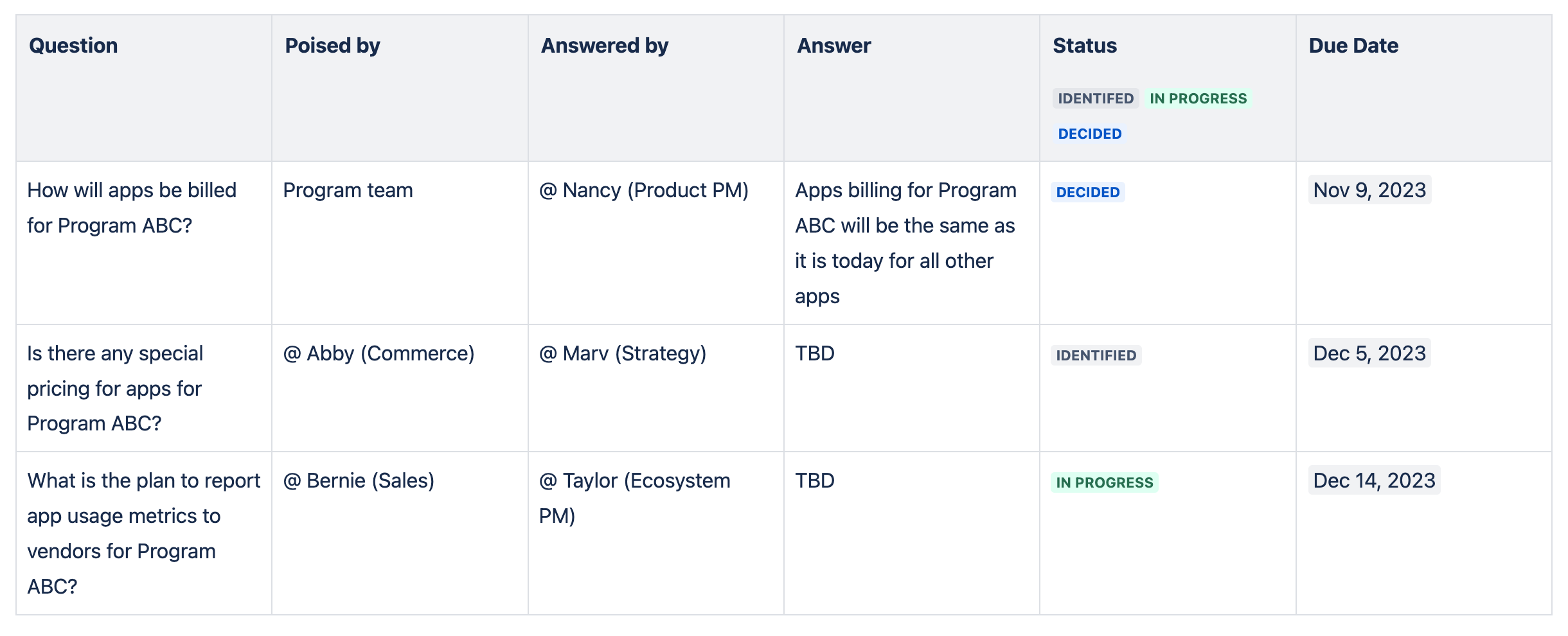
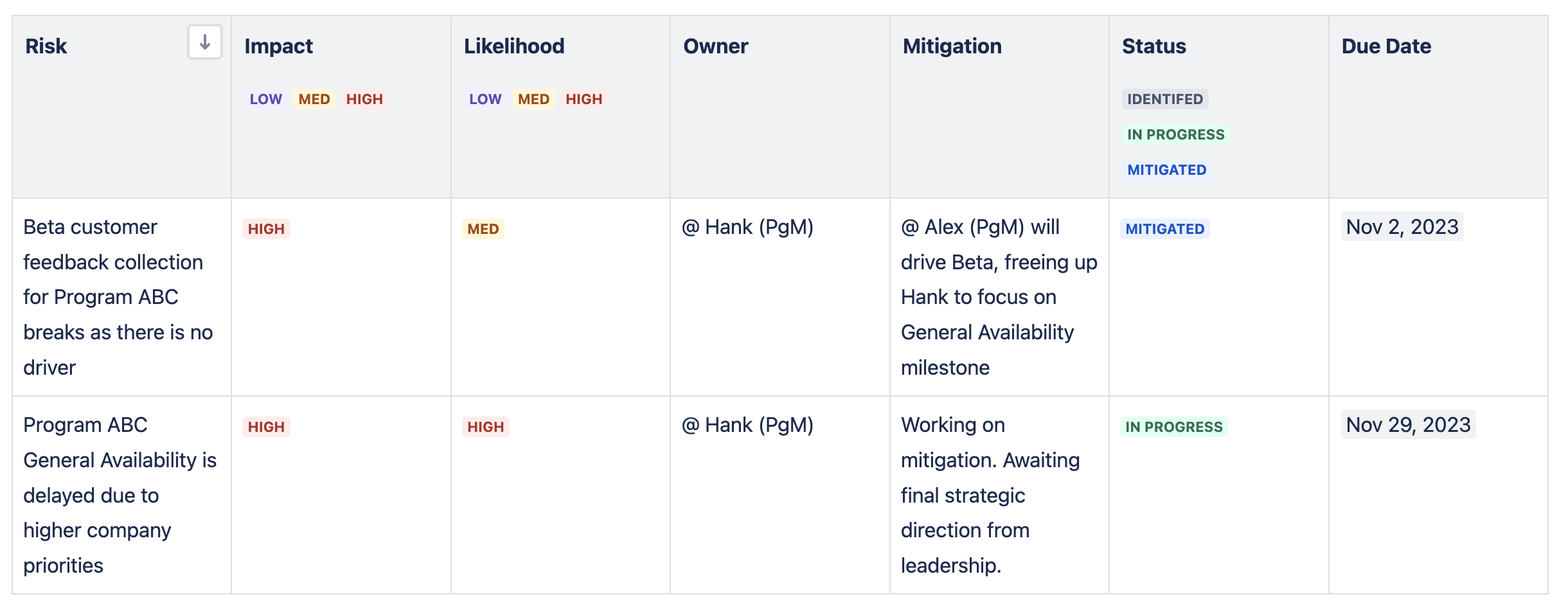
Confluence tables are great in their simplicity with set-up and ease of use. I’ve found a Confluence table works well when there’s a need to track a series of questions (aka decisions) to gain better clarity between teams on a specific feature or capability. I’ve also found a table fits the bill when a program is relatively small with low complexity so there’s rather a bounded number of decisions to be made and anticipated risks.
Example of a decision register using a Confluence table
Example of a risk register using a Confluence table
Neapolitan for more flavour
For the most part, programs are complex and ambiguous So, most of the time I use Jira Software (JSW) over a Confluence table to track decisions and risks for my programs. When a vanilla flavour doesn’t cut it, switch to neapolitan to meet your and your stakeholders cravings!
Just like how I have separate tables in Confluence for a decision register and a risk register, I have separate projects in JSW for those same registers. Using a kanban template in a team-managed JSW project, I set up my program and underlying workstreams as epics and the open decisions and risks as individual issues. Columns in JSW represent the different statuses (identified, in progress, etc.).
Here are the main reasons why I love using JSW for logging and progressing decisions and risks for a program:
-
Swimlanes! When key decisions and risks pile up, visual acuity is key. JSW provides a nice swimlane view of decisions and risks against status. I can easily see program and workstream level decisions and risks in a structured manner and smoothly progress them across the JSW kanban board as the decision/risk gets worked on. I can also quickly see the number of decisions/risks against status (identified, in progress, etc.) as there’s a count for each status column.
-
Labeling for laser focus. Labeling in JSW is great to further categorize decisions and risks that can then be specifically viewed via filtering. I tend to start with “beta” and “ga” (general availability) as default labels in my programs and later add more labels as it makes sense to. Specific labels along with a due date on a JSW issue helps my team to better frame the relevance and urgency of the issue.
-
Flag! You’re it! While I use the priority field in JSW, I also use the flag function to especially highlight those decisions and risks my program team needs to whack down ASAP. This visual highlight (the JSW decision/risk issue is set to a different color) is great to leverage in my weekly program team sync to keep the convo focused on the key open decisions and risks we need to work on for the week.
-
Custom fields for custom needs. Real estate in a Confluence table can get really cramped as you start populating it with free form data. I love that JSW allows me to create custom fields where I can neatly capture key info like who are the contributors and approver for a decision or what is the impact and likelihood a risk will happen. This info can easily and quickly be seen in JSW.

-
Comments for the hash out. Each decision and risk in JSW is it’s own issue, so clear discussions can be held on each of them via comments in the issue. Not only am I able to keep a clear historical reference of async discussions on the decision or risk but I can also use the comments field to capture key points made during live discussions on the decision or risk. I find this to be a lot cleaner than in-line commenting on a Confluence table which can start to get hairy.
While it does take a bit more time to set up a project in JSW, it’s well worth the light sweat equity. (Note, when I say “project” in this context, it’s a team managed project not a company managed project in JSW. A team managed project is one you can configure while a company managed project is set by your admin. Chat with your JSW admin to learn more.)
 What’s your flavour?
Depending on the size, complexity, and duration of your program, how you manage decisions and risks can be different but the overall framework is the same (at least in my experience!). How is everyone else tackling logging and progressing program decisions and risks? Do you use a Confluence table, JSW, or something entirely different? Do you have a favourite flavour?


