NOTE: Some field data has been removed from the images below.
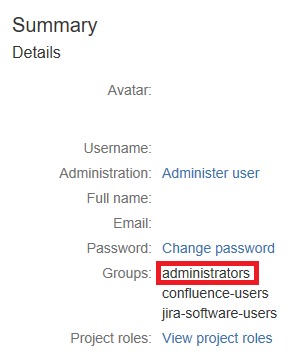
Since assigned to the "administrators" group, how is this possible below ?


 I am assigned to the administrators group. The documentation uses the terminology JIRA System Administrators, JIRA Administrators, Administrator, Project Administrator, and Board Administrator - but all in different parts of the documentation. The Settings uses Administrator - which I assume applies to any "Administrator."
So to which group does an "administrators" assigned Group member belong ?
* * * * *
Also, when I follow this:
https://confluence.atlassian.com/adminjiraserver071/managing-project-role-membership-802592468.html#Managingprojectrolemembership-viewing
Choose > Projects.
Choose Users and roles in the left menu to view and manage project role membership.
There is NO "Users and roles" in the web portal.
The only thing in our web portal is "Projects and Project Categories."
* * * * *
Where is a table that lists the different types of "Administrators" and clearly shows the default permissions for each ?
We are looking for WYSIWYG "Administrator" in the classical meaning of an "Administrator."
Does the JIRA System Administrator have to create permission schemes for every single user ?


