When selecting multiple filters of the same type in the Backlog or Board views, Custom filters behave differently than all other filter types.
For instance, if in the filter "Type" the two values "Task" and "Bug" are selected, the view shows all issues which are either a "Task" or a "Bug". If two values in the "Custom filter" drop-down are selected (let's call them A and  , the view shows all issues for which A and B apply. Technically speaking, all filters use an OR logic, except for the "Custom filters" which follow an AND logic.
This inconsistent behavior is not only odd and counterintuitive as it breaks consistency, but it also results in exponential increase of custom filters thet need to be defined and maintained. This is because in order to represent all combinations of "simple" custom filters (e.g. A, B, C) one has to define the power set of those (A, B, C, A or B, A or C, B or C, A or B or C) in order to represent all possible filter configurations.
Here are two screenshots showing the issue.

In this first screenshot, the "Type" filter is used. Notice that issues are shown, which are either a "Bug" or a "Story." Further note that the states of those issues are "To Do" and "In Review."
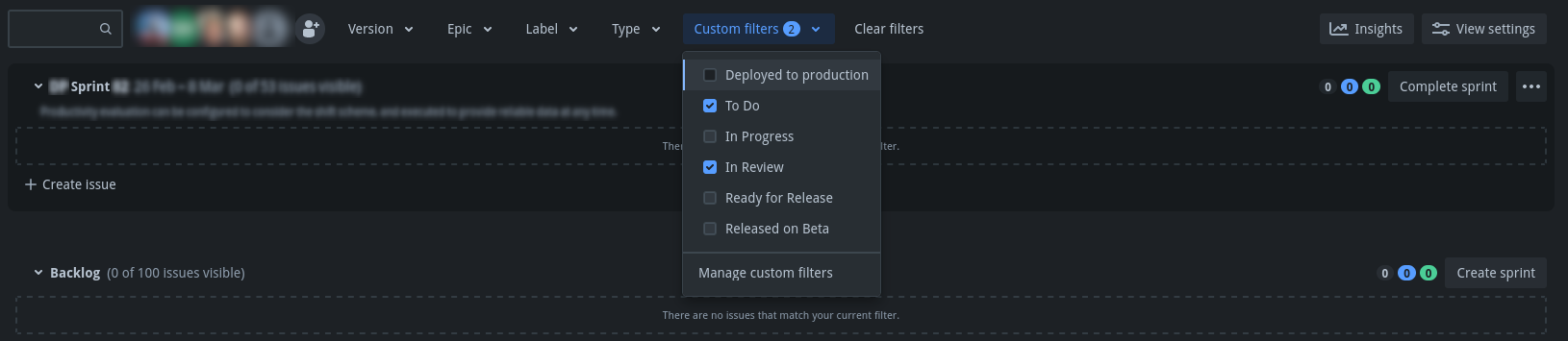
In this second screenshot, the "Type" filter has been removed, but two "Custom filters" have been applied. The filter queries for the two selected filters are `status = "To Do"` and `status = "In Review"` respectively. Notice that the two issues shown in the first screenshot are not shown. If only one custom filter is selected at a time, all issues in the according state are listed as expected.

