Hi,
I (try to) use the Time tracking in JIRA Cloud, but have a lot of difficulties with the current version:
- there is a "new view" for issues.

On this new view, I have a field "Time tracking", where I can add a time log, and a field "Time estimate" (which is sometimes also called "Original estimate" or just "Estimated").
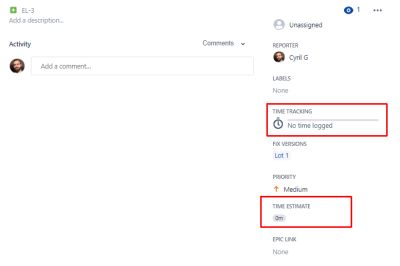
Unfortunately, on this view, I cannot have the "Work log" view that allows me to modify and check past time logs.
So, it is one of the reasons I had to switch back to legacy issue view.
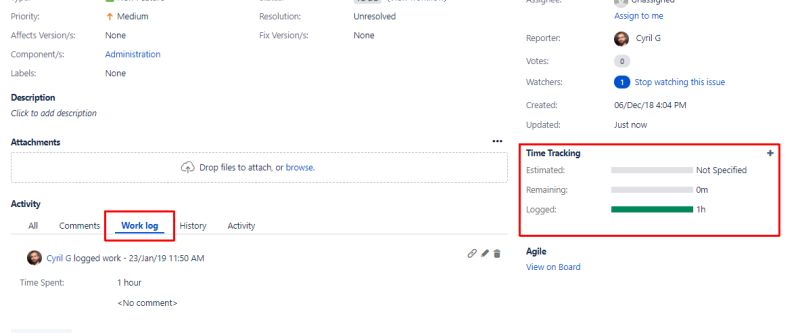
- Problem: on legacy view, I can add a time log, and see the "Work log" to change the previous time logs, but the field "Time estimate" doesn't appear anywhere. When I add a time log, the "Estimate" field appears but cannot be changed.
Quite tricky...
How is this supposed to work? I tried to follow the answer given here: https://community.atlassian.com/t5/Jira-questions/The-Original-Estimate-field-is-missing-when-creating-stories-and/qaq-p/95261 , but the "Time tracking" field seems to already be in the "Software Development Default Issue Screen", and there ie no other field I can add which looks like "Estimate" except "Story point estimate", and I don't want to use this field.
The problem with the inability to edit time log on the new screen forced us out of using "New generation project", because with this kind of project, it is not possible to switch to legacy view.
Do you have any solution for us being able to use time tracking with the current version of JIRA Cloud? Is it considered as "bugs" and should I fill a JIRA bug issue?
Thanks!
Cyril
(Also, configuring the screens is a complete nightmare. I try to also use default values for the project, but it seems that JIRA creates a new "<Project code> Software Development Default Issue Screen" and a new "<Project code> Software Development Bug Screen" for each project; so if I want to add a field on the screens of all of my project, I will have to make a lot of change in a lot of screens... It seems overly complicated for me)


