Hello,
We are using Jira to collect suggestions for our products from our colleagues. We enforced 4 mandatory fields : Use case, Suggested solution, Clients and Benefits. This fields are unlimited text fields with Wiki Style Render. Here is the result with the detail screen view :
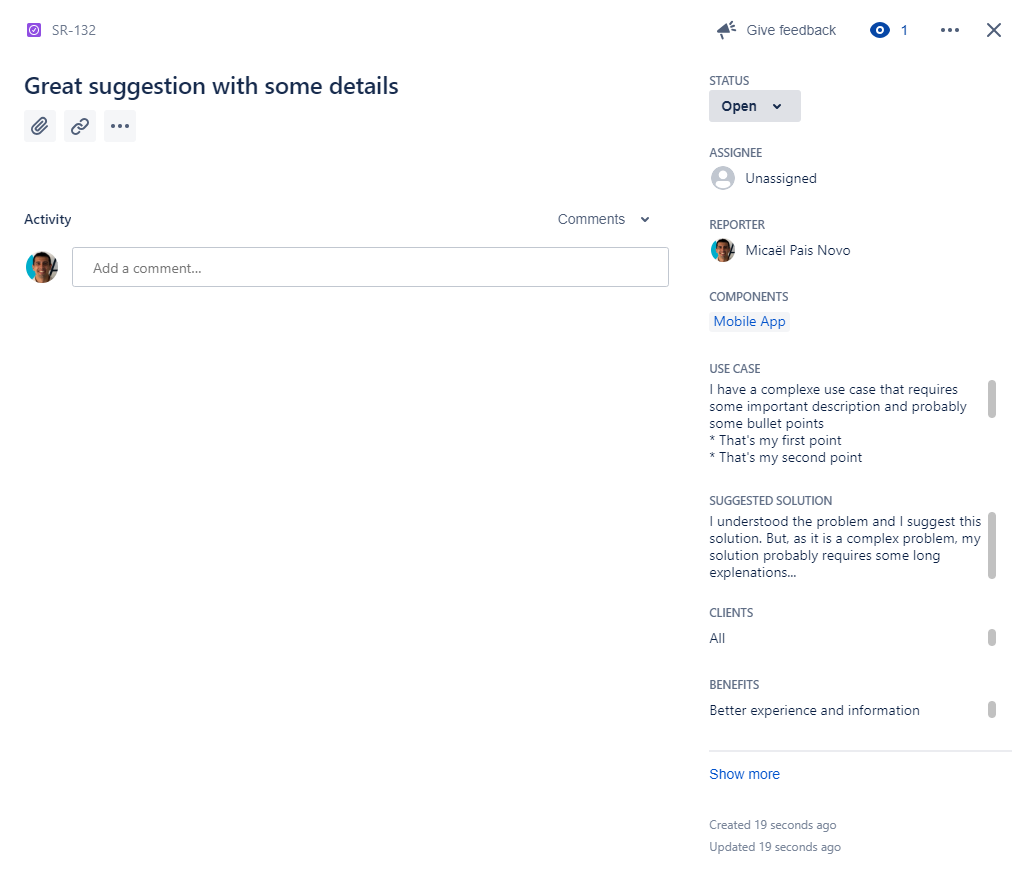
We have two issues with this layout :
- The custom fields can be important. As you can see in the screenshot, we must scroll in a tiny Textbox area to see the entire content. Is it possible to show the custom filed under the Summary field ("Great suggestion with some details" in the example) in the detail screen view ? If possible, we could display more content without scrolling
- As a result of the first issue, the text is not Wiki Style rendered (the bullet points are still displayed with the * character). How can we enforce correct rendering ?
We are using Jira Cloud with a Business Project (used by Jira Core users) and new issue view.
Thank you and best regards


