I would like to know how to I remove dropdown button from project side bar:
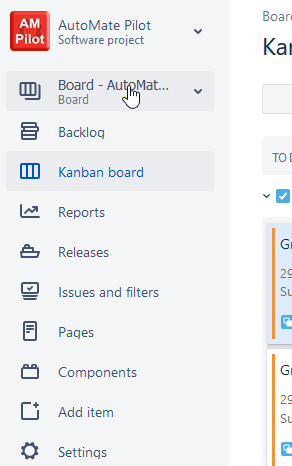
I recently had my projects side bars without this button, but it suddenly changed. I Think this button was activated automatically after I change some settings and now I can not revert it.
Now I can see on all my project the BOARD dropdown as button which I do not need at all, because I have doubled links (Project Dropdown and Board dropdow).
All I need on the project side bar is:
Backlog
Kanban Board
the rest...
Moreover, for all the project I can see all the boards available:
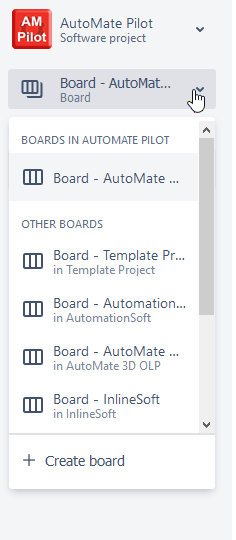
I would guess, that this is not about permissions, because this happens for admin as well as for regular user with limited rights.
I found this topic:
https://confluence.atlassian.com/jirakb/how-to-disable-board-button-for-jira-software-application-829057797.html
But it did not help, because I could not modify the module "Planning Board Menu Item"

Please any idea?
Thanks.


