Hi Atlassian community!
We’re excited to announce that we’ve officially kicked off the Early Access Program (EAP) for the modernised Jira board for company-Managed spaces. Here we’ll cover off the upcoming changes to the board experience and how you can sign-up for early access.
We're keen to invite 2-3 customers in the EAP and this is your chance to get early access to powerful new features and directly influence how the board view evolves in Jira.
We’ll also make this available via Jira Labs once the EAP concludes.
🎯 What we’ve been building
If you’ve been following our journey, the modernised board went GA to team-managed software boards in July (read our community post here) allowing us to unify 3 different board experiences, down to 2.
Now we’ve got our sights on unifying boards in company-managed spaces.
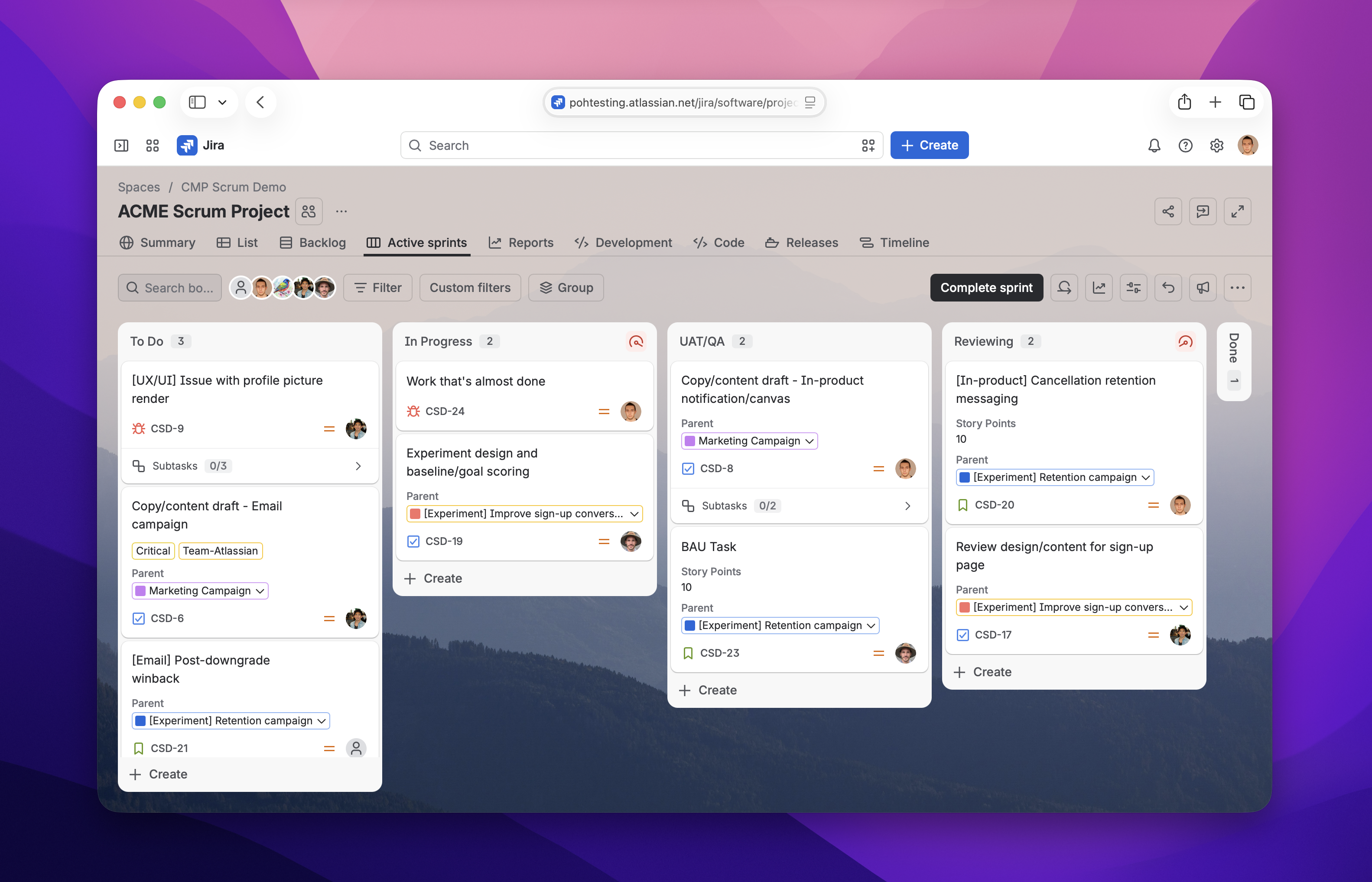
Please note: that for now we're only targeting boards that are scoped to Simple boards (see more below under known gaps/caveats)
✨ What to expect
| Feature |
How it works |
|---|
|
Board layout and navigation
|
- We’ve removed the 5000 work item limit on boards
- Work items, columns, and swimlanes are all paginated and load in as you scroll → i.e. infinite scroll
- Swimlanes and columns can be expanded/collapsed
Preview:
|
|
Improved filtering and grouping experience
|
Filtering
- We’ve brought the full power of list view filtering directly to the board, vastly expanding available filter options
- Search and pin favourite filtering fields
Note: Quick filters (admin defined/saved) filters remain unchanged but renamed to Custom filters
Grouping
- Boards now support group by labels, priority and category
Preview:
|
|
Save your board configuration
|
- Jira admins can now define and save a default board configuration based on certain view controls like:
- Applied filters
- Grouping
- Card layout changes
- Collapsed/expanded columns or swimlanes
- End-users (i.e. non-admins) can still change the board/card layouts to their preference
- All users can revert the board back to the saved configuration at any time
Preview:
|
|
Subtask summaries
|
- A summary of subtasks can optionally be enabled to show on cards
- Subtask summary allows to expand subtasks nested within their parent, with inline editing
Preview:
Note: this feature is experimental and may change or evolve as the EAP progresses
|
|
Column limits
|
- Same functionality (admins can set min and maximum work item limits)
- Refreshed design/iconography
Preview:
|
|
Column layout
|
- The modern board now lets you toggle between two modes for column widths
- Fixed
- Flexible (responsive)
- This is accessed via the board View Settings
Preview:
|
|
Column configuration (admin only)
|
- Column configuration has moved to the board view instead of being in the board settings
- Simply go to your board and click on the board menu icon (…) > Configure columns
Preview:
|
More than just a feature update, this is a completely overhauled board experience. We’ve made thousands of under-the-hood improvements to performance, design, and usability.
🤝 What we're looking for
We need teams who:
- Use company-managed boards (either Scrum or Kanban) regularly to track and manage work.
- Have a team lead/project manager (ideally with admin access) + 1-2 individual contributors willing to participate.
- Are comfortable with early access software (some features still evolving).
- Can provide candid feedback through surveys and 1-2 feedback sessions.
💡 What you get
- ✅ Early access to the improved board experience
- ✅ Directly influence the product direction of the board
- ✅ Kickoff session to walk through all changes
- ✅ Direct line to the product team via Slack or your preferred method of communication
- ✅ Regular check-ins to share feedback and get support
⚠️ Known gaps/caveats
As an early access this product is actively evolving — some features are still being refined, and you may notice changes to designs or functionality along the way.
| Feature |
Description |
Our plan |
|---|
|
Limited to single-space boards
(i.e. simple boards)
|
Admins can use board filters to include work items from multiple spaces. Multi-space company-managed boards aren’t included in this program.
|
In the event the board’s scope is changed to reference more than one space, board will automatically revert back to the classic board.
Multi-space (including global boards) is on our roadmap.
|
|
Add/create release from Board (Kanban)
|
Unique to company-managed Kanban boards — admins could create/select releases based on completed/shipped work items.
|
Not supported
This feature has extremely low adoption/usage and not supported during the EAP and will likely be sunset on release.
|
|
Bulk select/change cards
|
Multiple cards (only in the same column) could be selected and transitioned on the board. |
In development
This feature is currently being redesigned and on the roadmap to be brought back however not be available during the EAP.
|
|
Work suggestions
|
Jira work suggestions provide task recommendations generated from multiple connected tools and could be managed in the board view settings.
|
Not supported
Work suggestions in its current form is not supported on the new board. This was sunset as part of the rollout to team-managed software boards.
|
We'll give you heads-up for any major changes and support you through transitions.
🙋 Interested? Here's how to join
We're selecting just 2-3 customers for this cohort, so spots are limited! I will hold an introductory call to discuss future details.
To express interest:
- Reply to this thread, email me (poh2@atlassian.com) or contact me via your customer success manager
Include:
- Your company/organization
- Your email address
- Team size willing to participate (1 admin + 1-2 ICs)
We'll review all expressions of interest and confirm participation by next week (26 Aug, 2026) with next steps and exact dates.
Note: we have closed registrations for EAP and will conclude the program during the week of 7/Sep/2026. Thank you to everyone who expressed interest in joining.
FAQs
What is a single-space board? How can I tell?
If your company-managed board filter includes work items from only one space, this is considered a single-space board.
If your board filter includes work items from more than one space, this is considered a multi-space board. Board filters that reference ALL work (i.e. from all spaces) is considered global or an unscoped board.
Both multi and global-scoped boards will continue to remain on the classic experience until we migrate those in a future milestone.
Can I opt-out of the new experience if so, how?
Yes, throughout the duration of the EAP program, users will be able to opt-out of the new experience.
What happens after the EAP ends?
Once the EAP concludes, your boards will revert back to the classic Jira board.
However, once we start rolling out to production, we will open this experience up to Jira Labs (beta).
Is it possible to opt-in early or get access after the EAP?
Yes - both EAP and non-EAP customers will be able to enable the new board experience once the product officially starts rolling out via Jira Labs toggle. This will occur shortly after the EAP concludes.
Please note: to enable this feature in Jira Labs you must be an organisation admin.
How can teams leave feedback?
Teams can share proactive feedback during the EAP using the in-product feedback button located in the top-right section of the board. This will get sent directly to our team for review.
When are modern Jira boards rolling out to customers?
We have decided on a 2-phased rollout at the conclusion of the EAP program. Starting with customers on the Free plan, we will gradually roll this out over the coming months.
During this team we will closely monitor for any feedback, or issues raised.


