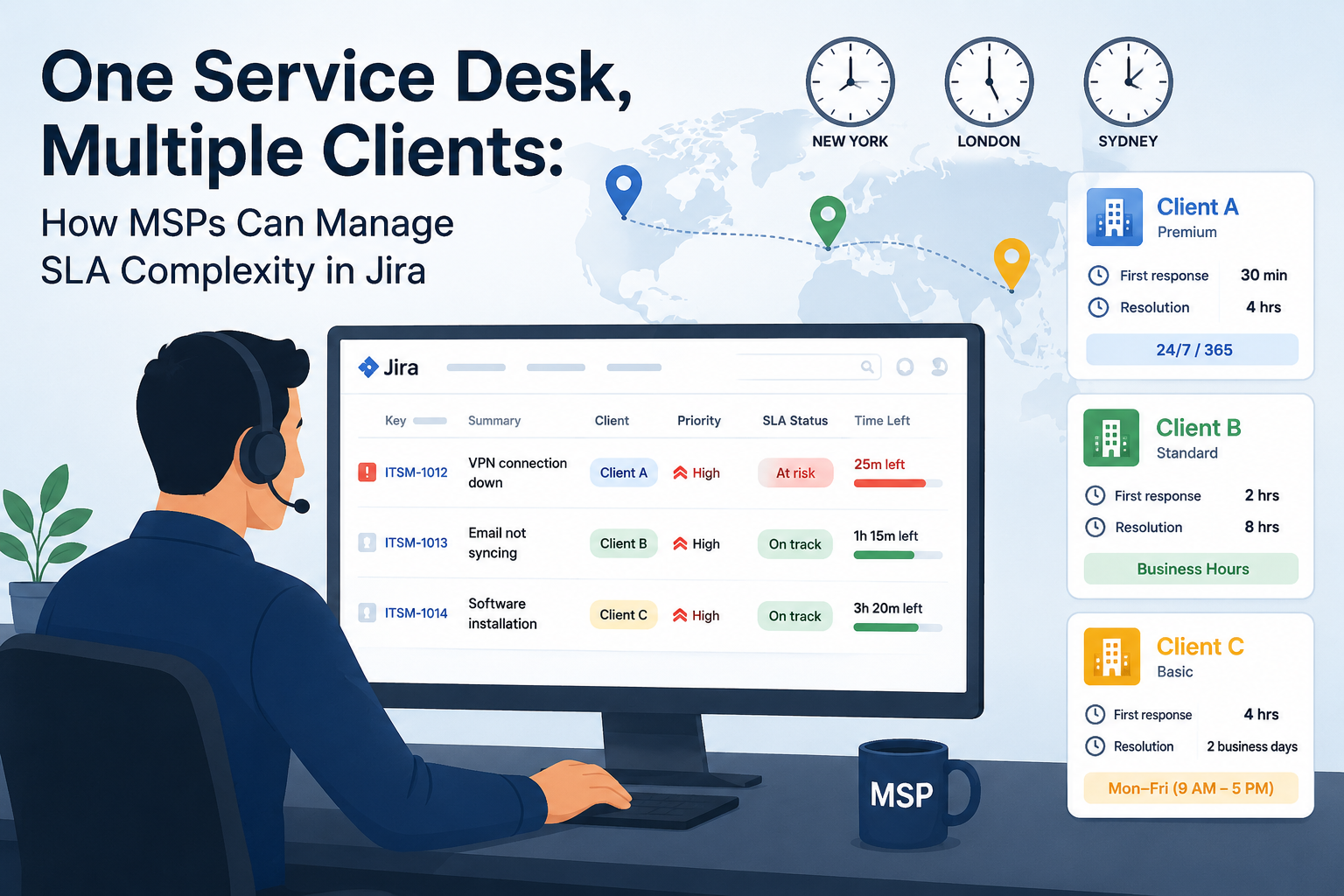
For an internal IT team, an SLA is usually a simple operational target – responding to a P1 incident within 30 minutes, or fixing a printer glitch by end-of-day.
For a Managed Service Provider (MSP), SLAs are a completely different game.
An MSP manages IT infrastructure, cloud environments, cybersecurity, and end-user support for multiple external clients, typically under ongoing service agreements. In this business model, an SLA isn't just an internal performance metric; it often reflects a formal service commitment made to the client. Client A pays a premium retainer for guaranteed 24/7 incident response, while Client B operates on a budget-conscious plan limited to standard local business hours.
The real operational pain begins when all these client requests pour into a single Jira Service Management queue. The core challenge isn't simply "How do I track an SLA timer in Jira?"
It’s: "How do we translate complex, competing contractual obligations across multiple clients into clear daily Jira workflows without missing deadlines or burning out our team?"
The Multi-Client Reality: MSP Scenario
To understand how SLA management becomes more complex for MSPs, imagine a service desk supporting three different account tiers:
|
Client
|
Service Tier
|
First Response Target
|
Resolution Target
|
Support Hours
|
|
Client A
|
Premium
|
30 minutes
|
4 hours
|
24/7 / 365 Coverage
|
|
Client B
|
Standard
|
2 hours
|
8 hours
|
Local Business Hours
|
|
Client C
|
Basic
|
4 hours
|
2 business days
|
Mon–Fri (9 AM – 5 PM)
|
Now imagine two tickets hit your Jira queue at 4:30 PM on a Friday afternoon, both assigned Priority: High:
- Client C submits a request about a minor database export error.
- Client A reports a critical service slowdown affecting their sales team.
If your support engineers only look at a standard Jira queue filtered by priority, these issues appear identical. But from an SLA perspective, they require very different responses. Client A requires immediate intervention under their 24/7 premium agreement. Meanwhile, Client C’s SLA clock should pause at 5:00 PM and not resume until Monday morning.
If agents have to manually cross-reference client contracts, spreadsheets, or account notes to figure out who gets priority, human error is guaranteed – and high-value contracts get breached by accident.
Bridging Contracts and Operations with SLA Time and Report
To solve this complexity, SLA Time and Report helps MSPs transform varied client commitments into clear, automated rules, schedules, monitoring systems, and analytical reports directly inside Jira.
Here is how to address the five biggest MSP operational hurdles using the app’s specific capabilities.
1. Ditching Blanket Rules with Context-Aware SLA Configurations
The Challenge: Applying a single, uniform SLA policy across your entire service desk fails because every client contract has different nuances. Trying to hardcode a single timer forces agents to memorize contract terms or check external documents before picking up a ticket.
How to solve this in Jira:
Instead of rigid defaults, SLA Time and Report allows you to build distinct SLA configurations where target goals automatically adjust based on the specific context of the request. SLA goals can be configured based on request context, such as Priority, Assignee, Request Type, Organization, Reporter, or other supported Jira fields and custom fields.
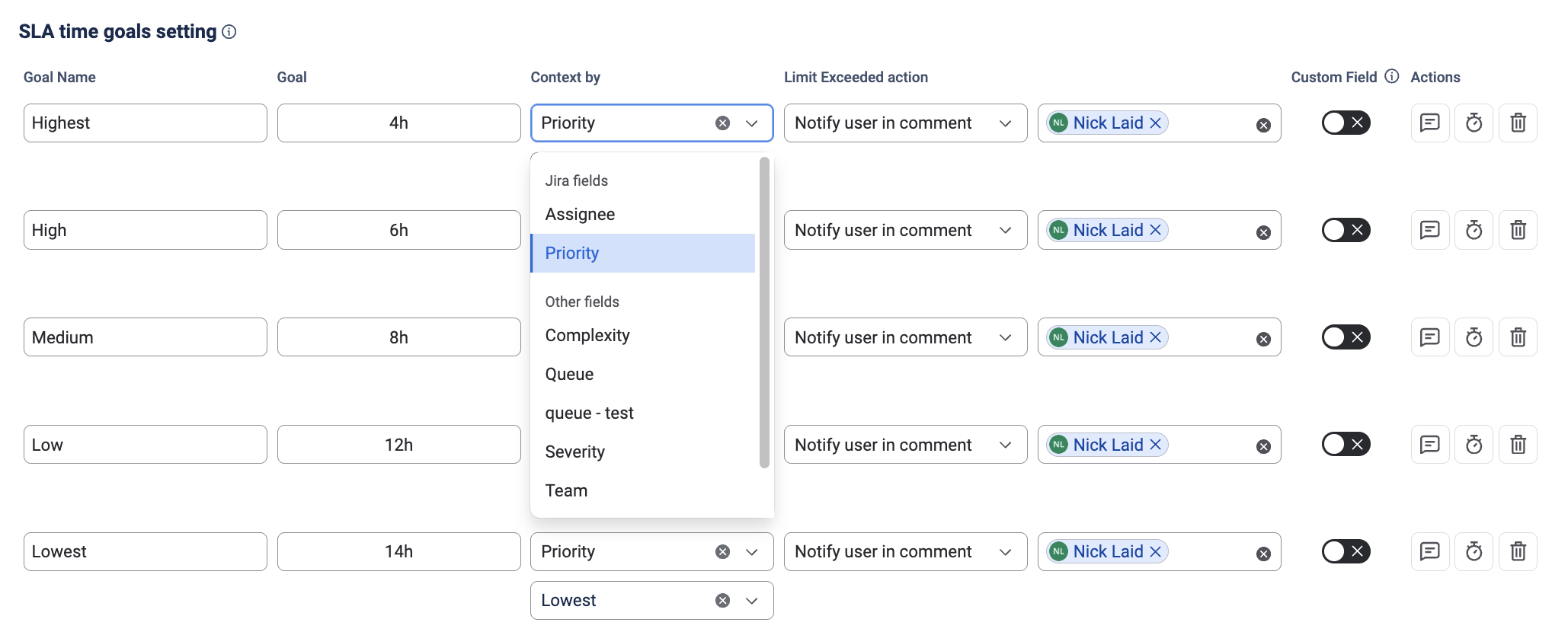
- Operational Reality: A ticket from an Organization marked as Premium automatically gets a 30-minute First Response and 4-hour Resolution target. The exact same ticket type coming from a Standard client automatically maps to a 2-hour response window. Engineers don't need to consult account managers – the correct contractual countdown starts automatically upon ticket creation.
2. Eliminating Time Zone Chaos with Flexible Work Schedules
The Challenge: A "4-hour response target" means something completely different for a client in London than it does for one in New York, Tokyo, or Sydney. Furthermore, handling regional public holidays across a global client base makes manual time tracking nearly impossible.
To keep tracking accurate and fair, you can assign dedicated Work schedules directly to individual SLA configurations in the app. These schedules define the exact operational window during which the SLA timer is allowed to calculate time.
Work schedules give you granular control over:
- Working Hours & Working Days: Define standard shifts (e.g., Mon–Fri, 9:00 AM – 5:00 PM) or round-the-clock coverage.
- Time Zones: Assign specific global time zones so SLA calculations match the client's local region rather than your server's default time.
- Regional Holidays: Add specific public holiday calendars by country or state so non-working days don't penalize your team's metrics.
Client A SLA Rule ──> Work Schedule: 24/7 Universal ───────> Time calculates continuously

Client B SLA Rule ──> Work Schedule: UK Business Hours ────> Off-hours/UK holidays excluded

Client C SLA Rule ──> Work Schedule: APAC Business Hours ──> Off-hours/APAC holidays excluded
- Operational Reality: Time falling outside the designated work schedule is automatically excluded from the SLA calculation. When Client B's business day ends at 5:00 PM GMT, their SLA clock safely excludes off-hours time. Meanwhile, Client A’s 24/7 SLA timer continues calculating seamlessly overnight.
3. Catching At-Risk Tickets Before They Breach
The Challenge: Looking at end-of-month compliance metrics to see which SLAs were breached is an autopsy – it tells you what went wrong after the damage is already done. MSP team leads need real-time operational visibility while tickets are still open.
To prevent breaches before they happen, SLA Time and Report combines embedded visual tracking with proactive automated alerts:
- Embedded SLA Visibility: SLA timers are visible directly on Jira issue views (SLA Time on Work Item). Support agents can see elapsed time, remaining SLA time, and current SLA status instantly without leaving the ticket.
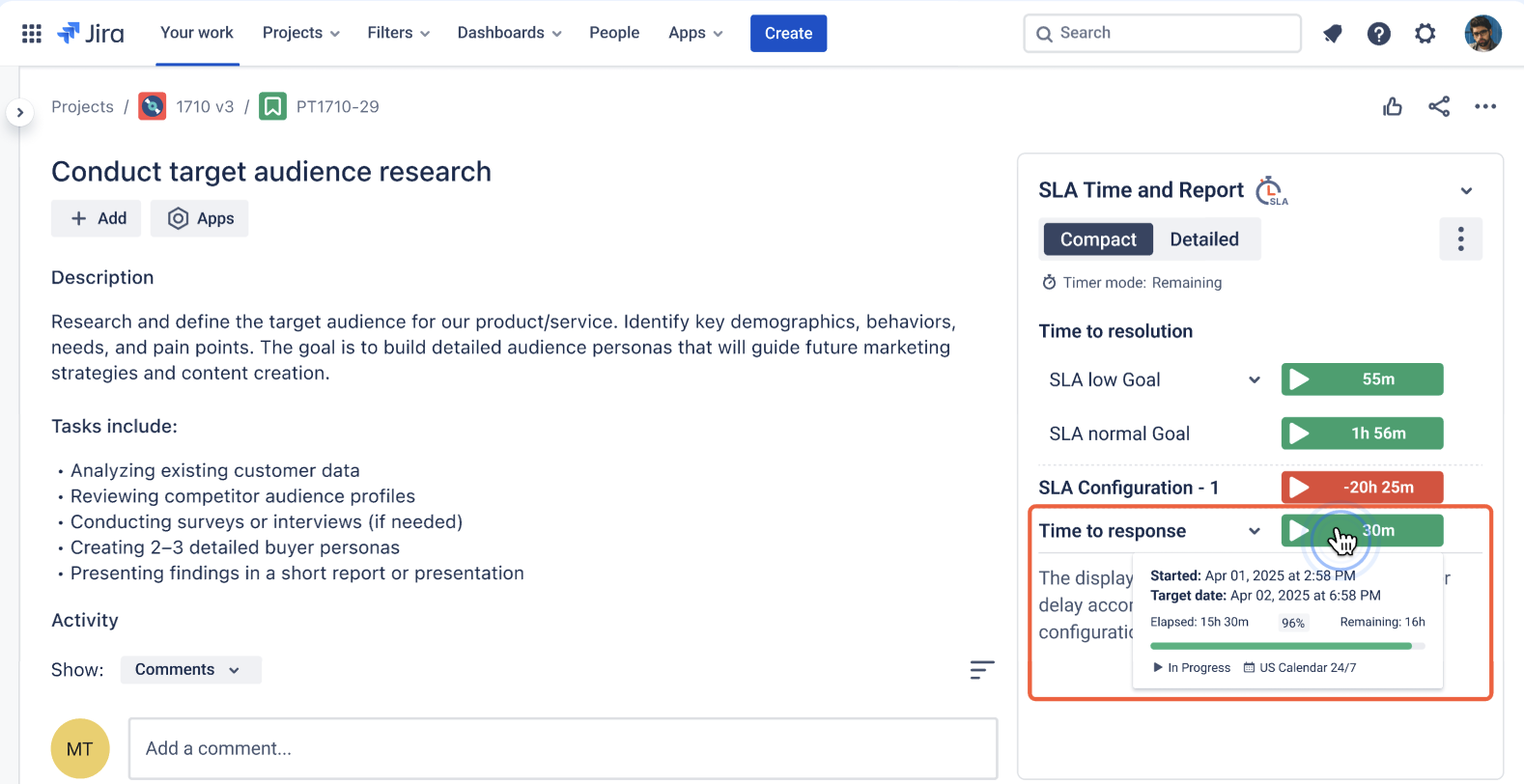
- Pre-Breach Notifications: You can configure automated breach notifications based on custom time thresholds – for instance, triggering an alert when a ticket reaches 80% of its total SLA budget. These notifications can be delivered via email or posted directly into designated Slack channels.
- Automated Exceeded Actions: If an SLA target is exceeded, the app can trigger automated actions such as changing the assignee, priority, or status, adding a notification in Jira comments, or sending a Slack notification.
4. Client-Level Reporting: Moving Beyond Queue Averages
The Challenge: During quarterly business reviews (QBRs), a client doesn't care about your overall service desk health or average resolution times across 50 other companies. They want a clear, audited report showing performance against their specific contractual SLA.
Rather than wrestling with manual spreadsheets, SLA Time and Report separates reporting into clear, functional tools tailored for different analysis needs:
- SLA Grid Report: Serves as a granular, issue-by-issue data view. It allows team leads to audit individual ticket performance, inspect exact start/pause/end timestamps, and verify specific SLA metrics line by line.
- SLA Chart Reports: Provides high-level visual analytics for management and client presentations. You can display aggregated data including Met vs. Exceeded SLA counts, overall SLA success percentages, and performance breakdowns grouped by criteria like Assignee, Priority, Organization, Reporter, Project, or SLA Configuration.
- Filtering & Exporting: All reports can be filtered precisely using parameters like Jira Project, specific SLA Configuration, saved Jira Filters, or custom JQL. Table reports can be exported directly to CSV or XLSX for external documentation.
- Report Scheduler: To save time on recurring account administration, you can use the Report Scheduler to automate the preparation and delivery of recurring SLA reports.
5. Maintaining Administrative Order as Your Account Base Scales
The Challenge: Managing 5 or 6 SLA rules for a couple of clients is easy. But as an MSP grows to 30, 50, or 100 accounts – each with separate response, resolution, priority, and tier requirements – you quickly end up with dozens of overlapping rules and administrative clutter.
Long-term stability requires clean administrative architecture. Instead of creating redundant, fragmented rules, administrators can use the app's flexible configuration structure to keep the SLA framework manageable:
- Logical Naming & Categorization: Define SLA configurations systematically based on standardized client tiers (e.g., [Tier-1] Response SLA, [Tier-2] Resolution SLA) or project scopes.
- Targeted JQL Filtering: Where the same SLA logic applies across multiple clients, use shared conditions or JQL criteria to reduce the need for separate configurations.
This structured setup makes it easy for new Jira administrators to audit existing rules, troubleshoot timer logic, and onboard new client contracts smoothly as the business expands.
Turning Contract Promises into Daily Operational Control
Managing multi-client SLAs in Jira shouldn't rely on agent memory, manual spreadsheets, or constant firefighting.
By converting client contracts into context-driven SLA rules, regional work schedules, proactive breach notifications, and segmented reports, SLA Time and Report helps translate client SLA commitments into the rules, schedules, monitoring, and reporting used in daily Jira operations. Support engineers get complete clarity on actual contractual urgency and remaining time directly within their Jira issues, while MSP leads gain the oversight needed to mitigate breach risks, maintain accountability, and protect client trust at scale.

