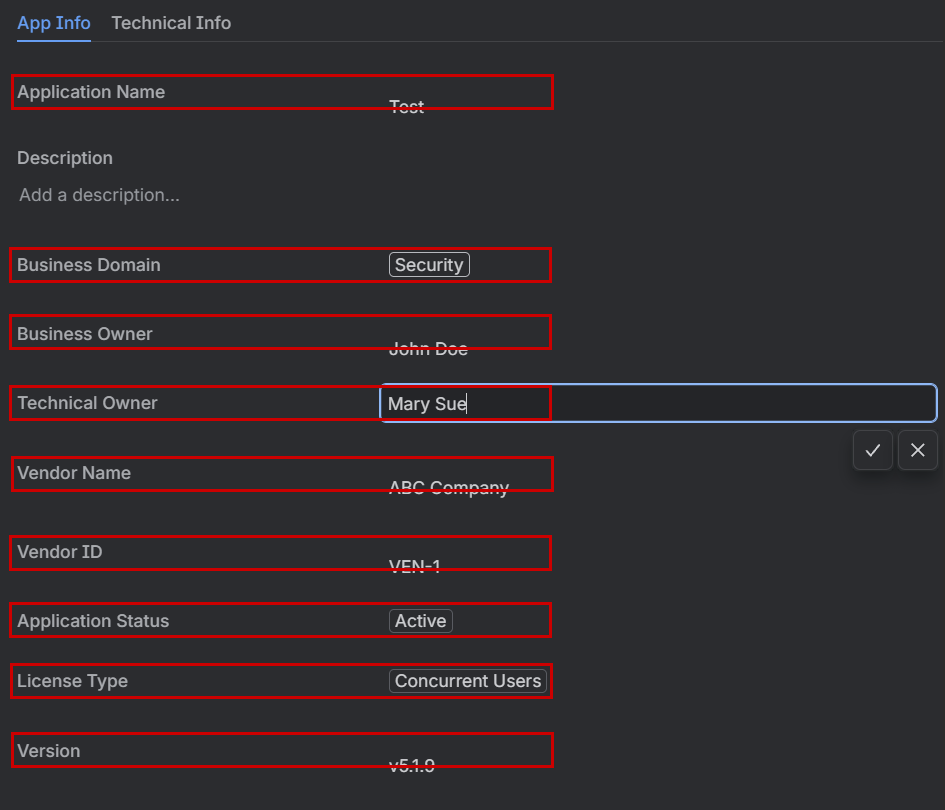
Hi, I’ve noticed an odd behavior when using short text fields where the entered text ends up misaligned from the field name. The issue occurs when viewing/editing a screen in the list view. When you are actively typing in the field, the contents are at the same level.

However, once the data is entered the field expands to twice the height.

I thought that maybe it was happening because that was the set height for the field and having a longer string of text would fill in the space but that isn’t the case. It continues to add an empty line above.

I added text boxes to highlight the alignment of various fields as they appear on the screen. The misaligned entries are all short text fields.
I don’t recall this always being the case. Maybe I’m just doing something wrong? I’m considering opening a ticket to inquire about this but I figured I should first check with the community to see if someone else has encountered this and might have a solution. Any feedback or suggestions would be greatly appreciated!


