Disclaimer: This is a recurring question in the Community — variations of “how do I lock this transition/status to a specific group?” come up regularly.
Two tools people often confuse
In the new Jira workflow editor there are two different mechanisms for controlling who can do what:
|
Tool
|
Current name
|
Scope
|
Where to configure
|
|
Restrict transition (formerly Condition)
|
Workflow Rule
|
A single transition (one arrow)
|
Click the transition → side panel → Rules → Add rule → Restrict transition
|
|
Property jira.permission.*
|
Workflow Property
|
An entire status (all outgoing transitions from it)
|
Click the status (or transition) → side panel → Properties → Add property
|
Both are configured through the same side panel, but they operate at different levels. “Restrict transition” rules are the standard tool for “only group X may run this one transition.” Properties are meant for cases that go beyond the permission scheme — as Atlassian's own lesson puts it:
“It's best to manage permissions exclusively in your permission scheme. However, you may have specific use cases worth the administrative burden.”
Property key format
jira.permission.[subtasks.]{permission}.{user}[.suffix]
- {permission}: transition, edit, comment, attach, delete, assign, resolve, close, work, …
- {user}: group, projectrole, user, reporter, assignee, applicationRole, groupCF, userCF,
- [.suffix]: optional number, used when you need to add the same property more than once (e.g. multiple groups)
Worked example: only "qa-team" can transition out of "In Review"
Goal: while an item sits in "In Review", only the group qa-team should be able to run any outgoing transition at all.
1. Get the group ID
The value must be the group ID, not the group name:
- Jira admin → User management → Groups → open the group (ID is in the URL), or
- REST: GET /rest/api/3/group?groupname=qa-team
2. Set the property on the status
- New workflow editor → click status "In Review".
- Side panel → Properties → Add property → Add new property.
- Enter:
|
Key
|
Value
|
|
jira.permission.transition.group
|
<group ID of qa-team>
|
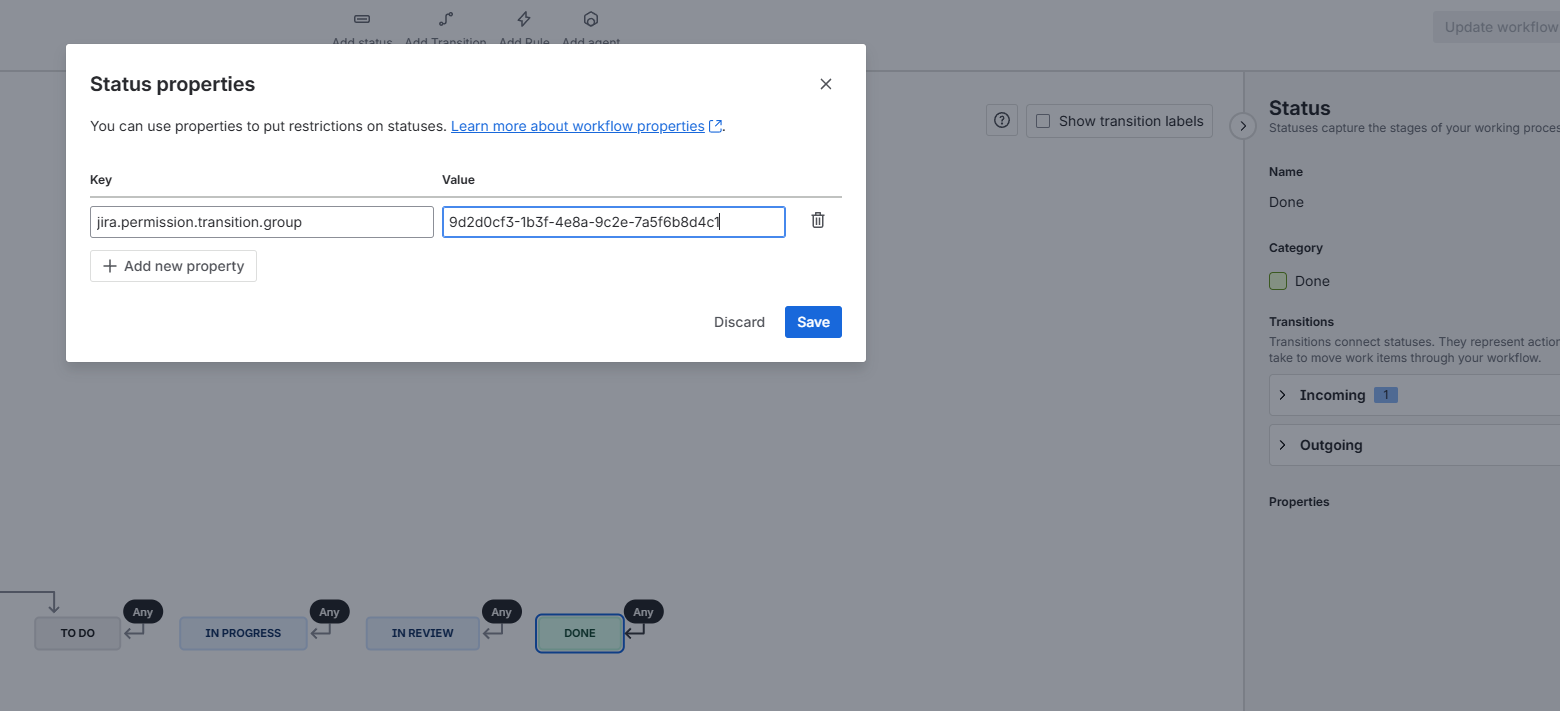
- Save and publish the workflow.
Result: as long as an issue is in “In Review,” only qa-team can transition it — regardless of how many outgoing arrows that status has.
What if only ONE specific transition needs locking?
Then the property is the wrong tool, since it acts status-wide. Use a Restrict transition rule directly on the arrow instead:
- Click the transition you want to lock.
- Side panel → Rules → Add rule (+) → Restrict transition.
- Pick the "User is in group" rule, assign the group, save.
Summary
|
Question
|
Answer
|
|
Restrict only one transition to a group
|
Restrict transition rule on that transition
|
|
Restrict all transitions out of a status to a group
|
Property jira.permission.transition.group = group ID, on the status
|
|
Need both
|
Combine them — property as the “safety net,” restrict-transition rule for fine-grained control of individual arrows
|
The properties don't replace the permission scheme — i use it for edge cases.
Atlassian's own guidance is
permissions in the permission scheme first
and then ,when needed, use workflow properties.
I hope it helps someone in the future.
Sources
Related discussions in the Community


