Key question:
How can we export the full Jira hierarchy (Epic → Task → Subtask), including the correct parent-child relationships and layout, so that the timeline can continue to be shared and maintained outside Jira?
Problem Description
We use Jira to manage and track the budget planning timeline, as it allows us to visualize task dependencies and relationships. Since not all departments within the organization work in Jira, we regularly export the timeline to Excel and share it via SharePoint.
Historically, we were able to export the complete Jira structure (Epic → Task → Subtask) using the following method: List view → Expand all items → Select all items → Copy to clipboard. This ensured that all hierarchy levels were included and correctly displayed in Excel, preserving both the structure and layout required for sharing with stakeholders. Recently, this functionality was removed or changed. Since then, we have tested multiple export options, but none provide the required result. The exported data either:
- Excludes subtasks completely,
- Does not link subtasks to the correct parent tasks, or
- Produces a layout that is not suitable for our reporting purposes.
As a result, we can no longer generate a complete and accurate Excel timeline for users outside Jira.
Screenshot of the relevant configuration screen:
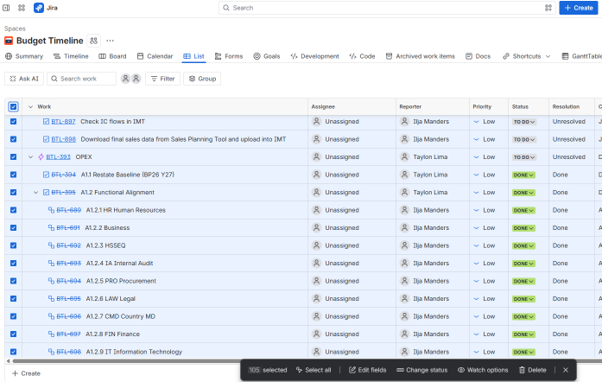
Previously the black box showed the option: copy to clipboard.


![FireShot Capture 030 - Planyway - Jira - [planyway-product.atlassian.net].png](https://us.v-cdn.net/6038660/uploads/images/436860i29D214CCDFA7DA21/FireShot%20Capture%20030%20-%20Planyway%20-%20Jira%20-%20%5Bplanyway-product.atlassian.net%5D.png "FireShot Capture 030 - Planyway - Jira - [planyway-product.atlassian.net].png")