Hi Jira Community,
We're updating how work items are created in Jira Cloud through the Global Issue Create button and wanted to give you a heads up on what’s changing.
Why this change?
Today, creating a work item from Jira Cloud’s top navigation Global Issue Create (GIC) button opens the large full form create screen. Over time, this screen has accumulated many fields – and today, the default form shows far more than what most users need for creating a typical work item. This leads to unnecessary friction: slower load times, a steeper learning curve for new users, and a flow that feels heavyweight even for simple tasks creation.
Instead, we wanted to design an experience that is easier to start with, and just as powerful when you need it.
What's changing?
We’re introducing a faster, redesigned create experience that gives you a focused quick-create flow by default, while keeping the full form available whenever you need it.
| Before |
After |
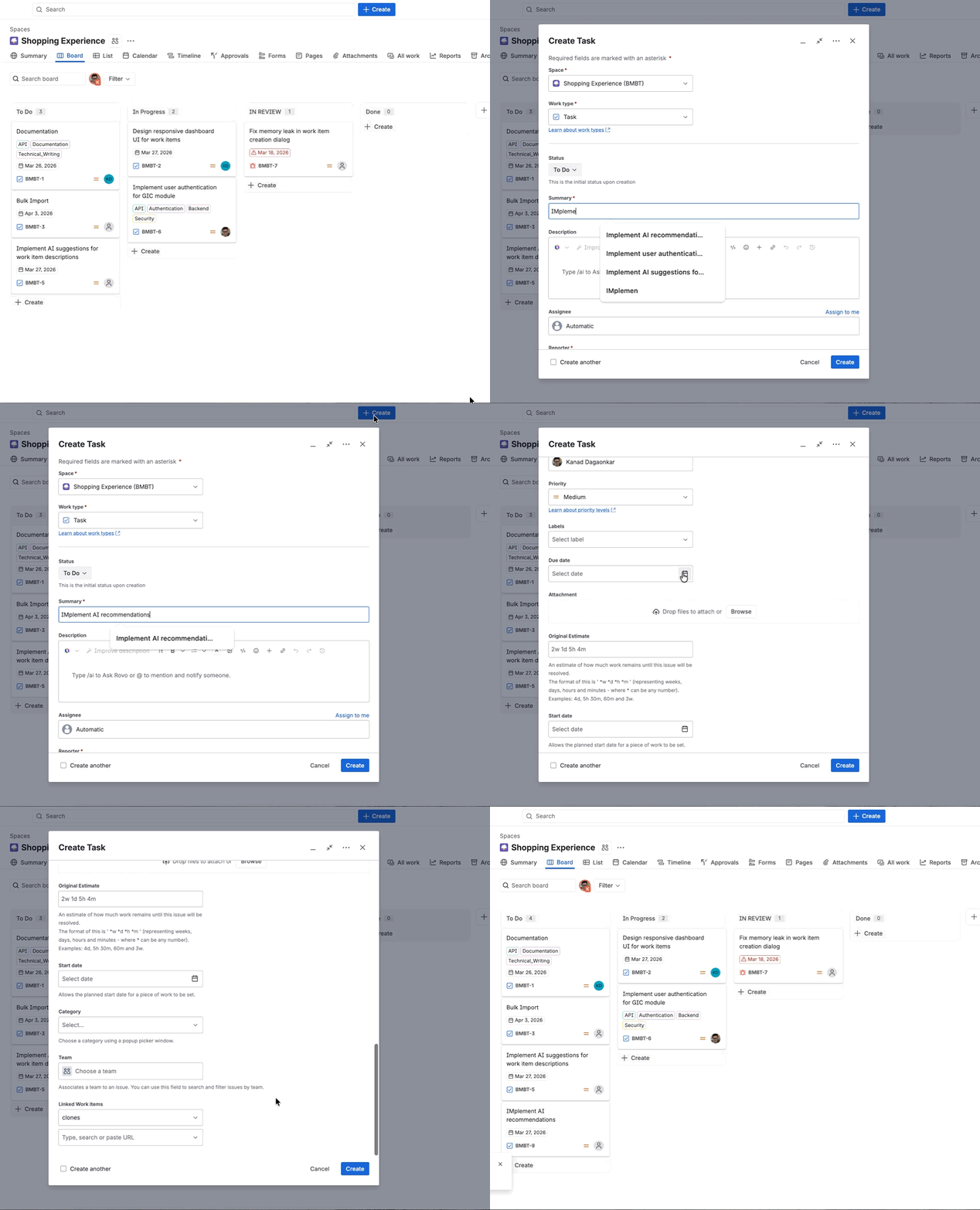 |
 |
Here’s what’s new and different:
 Window and Layout Control
The new modal supports two main modes - a compact Quick Create mode and a Full Form mode
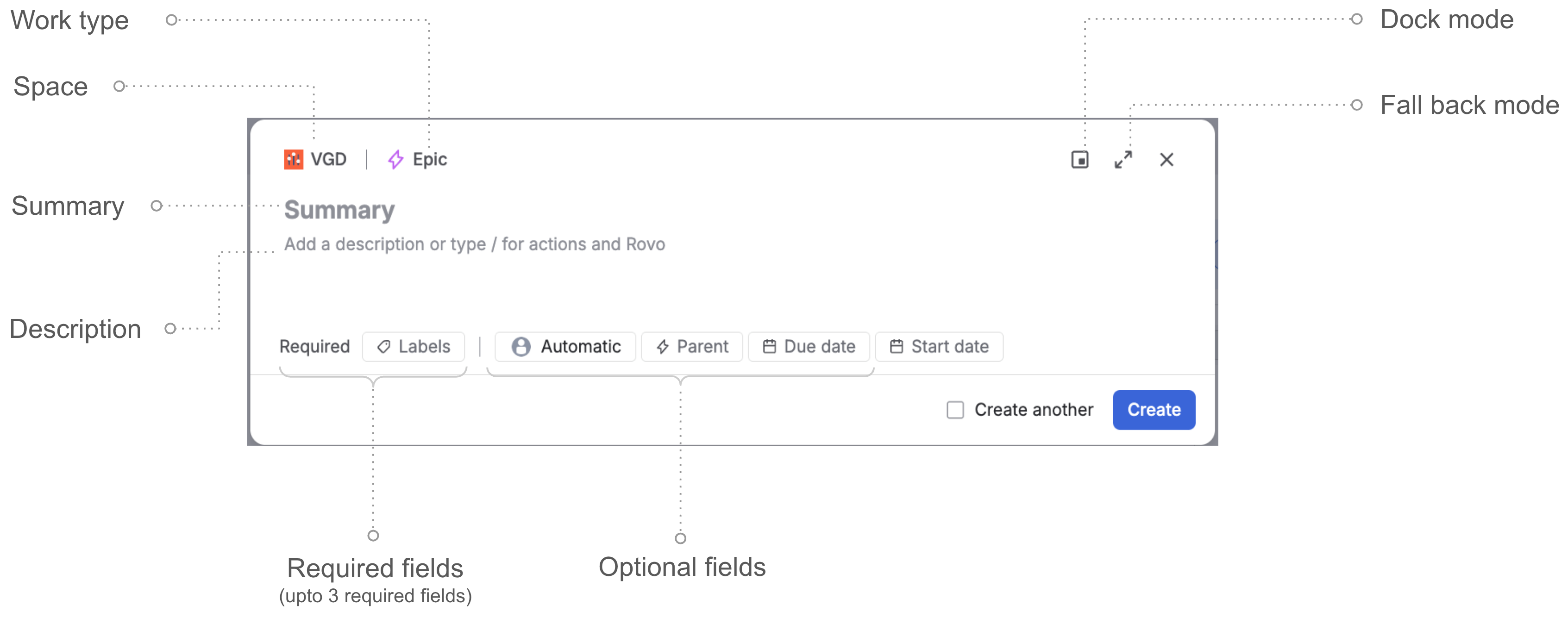
Quick form mode
 Full form mode
 Docked mode
|
 Info Info
While the Quick Create is the default mode for simpler work items, you will see the Full Form load automatically if your work item has more complex requirements - tabs, more than three required fields, custom create screens (CMP spaces), Forge UI app modifications, or a complex field type such as rich text.
|
 Main Input Area
-
Description field is responsive : Expands vertically to accommodate long descriptions, code blocks, table edits, and pasted images.

Exhibit | Responsiveness of create dialog with long code block
 Field Chips
-
Required and optional fields are separated: Required fields appear first on the quick create form. Optional fields appear beside them. When there aren’t any required fields, the quick create modal shows only the optional fields.
-
The order of fields in the required and optional sections matches the order set by admins in the space setting - with two refinements: fields that always have a system default (such as Reporter) and fields that a user rarely interacts with are excluded from the default view, keeping the form focused. These fields remain accessible via "Show more fields."
What does this mean for you?
A faster create experience
- A compact form allows us to load the create screen faster for you. In our internal testing, we have seen ~35% reduction in loading times.
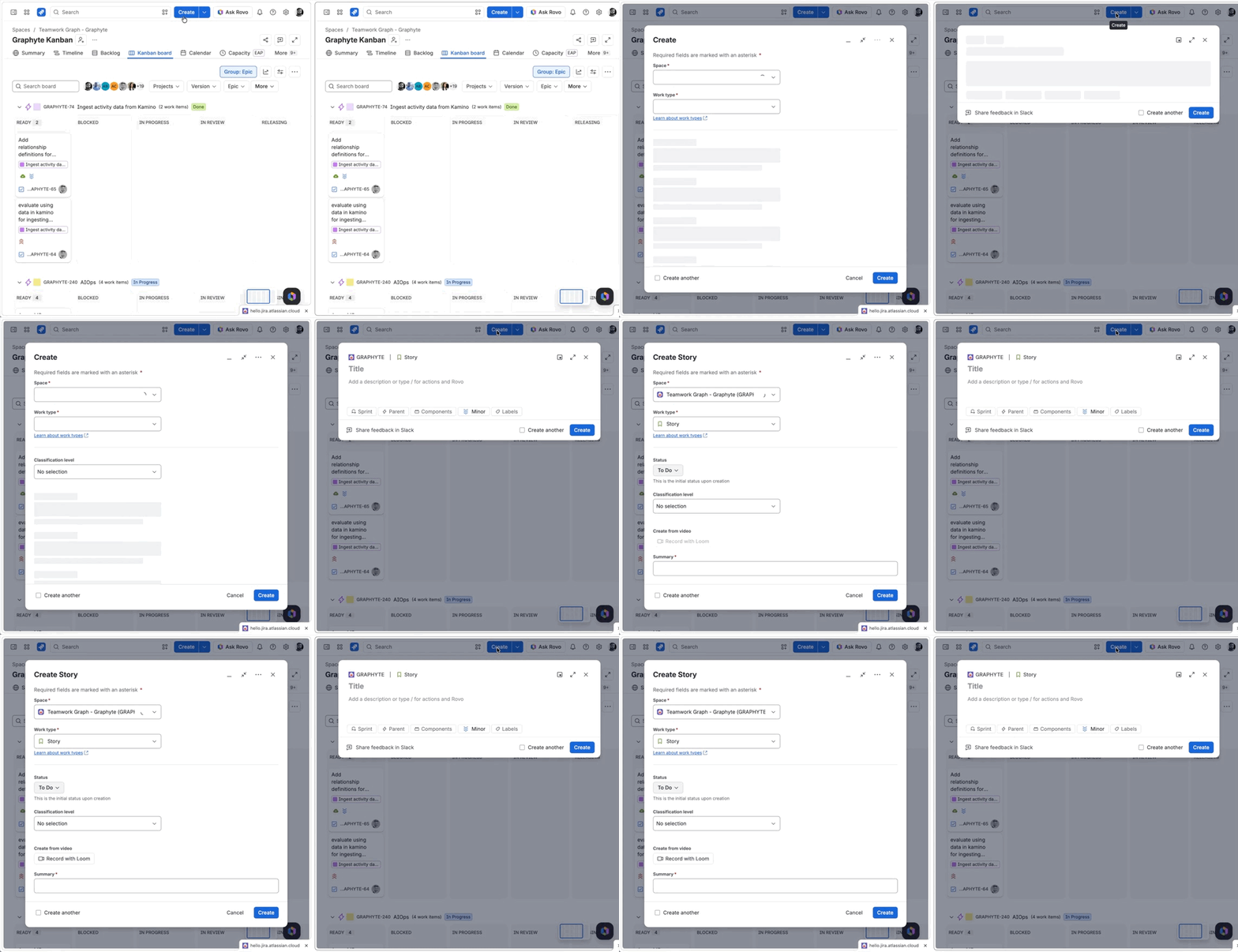
- The quick create form allows for more focussed work item creation. No fields are being removed. The full set of fields remains available – they're just not shown upfront by default
Field visibility customization as a Jira user
-
You can customize which specific optional fields appear — select More actions (•••), then Configure Fields, then choose Custom fields from the dropdown to pick the fields you want. Unchecked fields will be hidden from both the quick create and full form.
If you're an admin
You can control which fields your team sees by default in Quick Create via Space Settings.
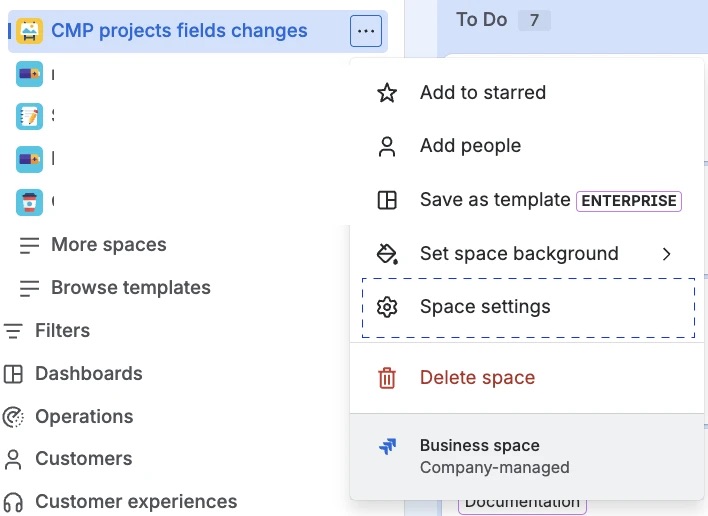
-
For team-managed spaces,
-
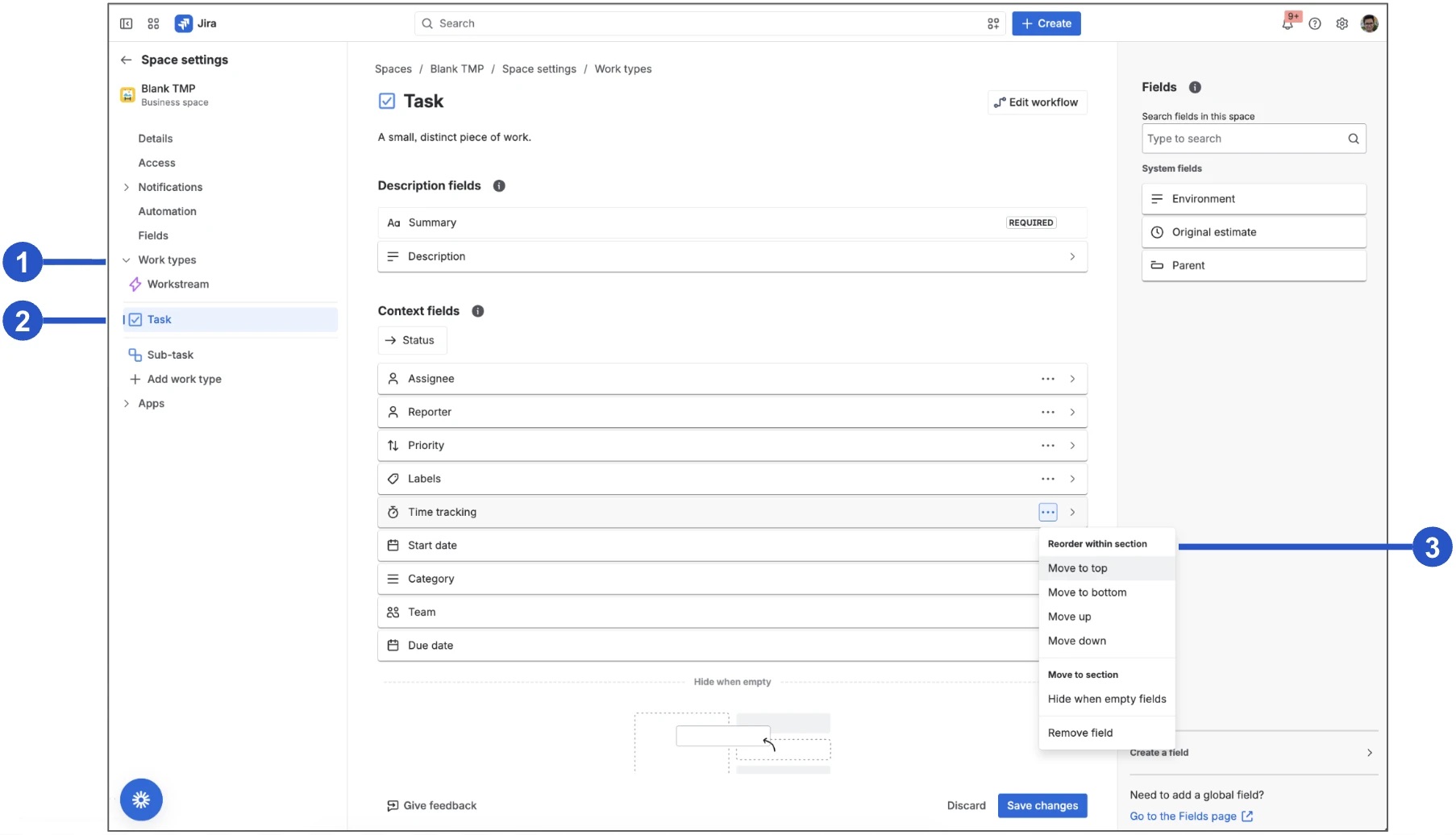
Once inside Space Setting, select Work types.
-
Select the work type you want to configure.
-
Reorder the fields to control what your team sees in Quick Create. The Quick Create form always shows Summary, Description and upto 3 required fields – those are fixed. Beyond those, it picks the top optional fields based on the ranking below. For instance, if you want your team to see Team and Due Date in Quick Create, drag those to the top of the field list.
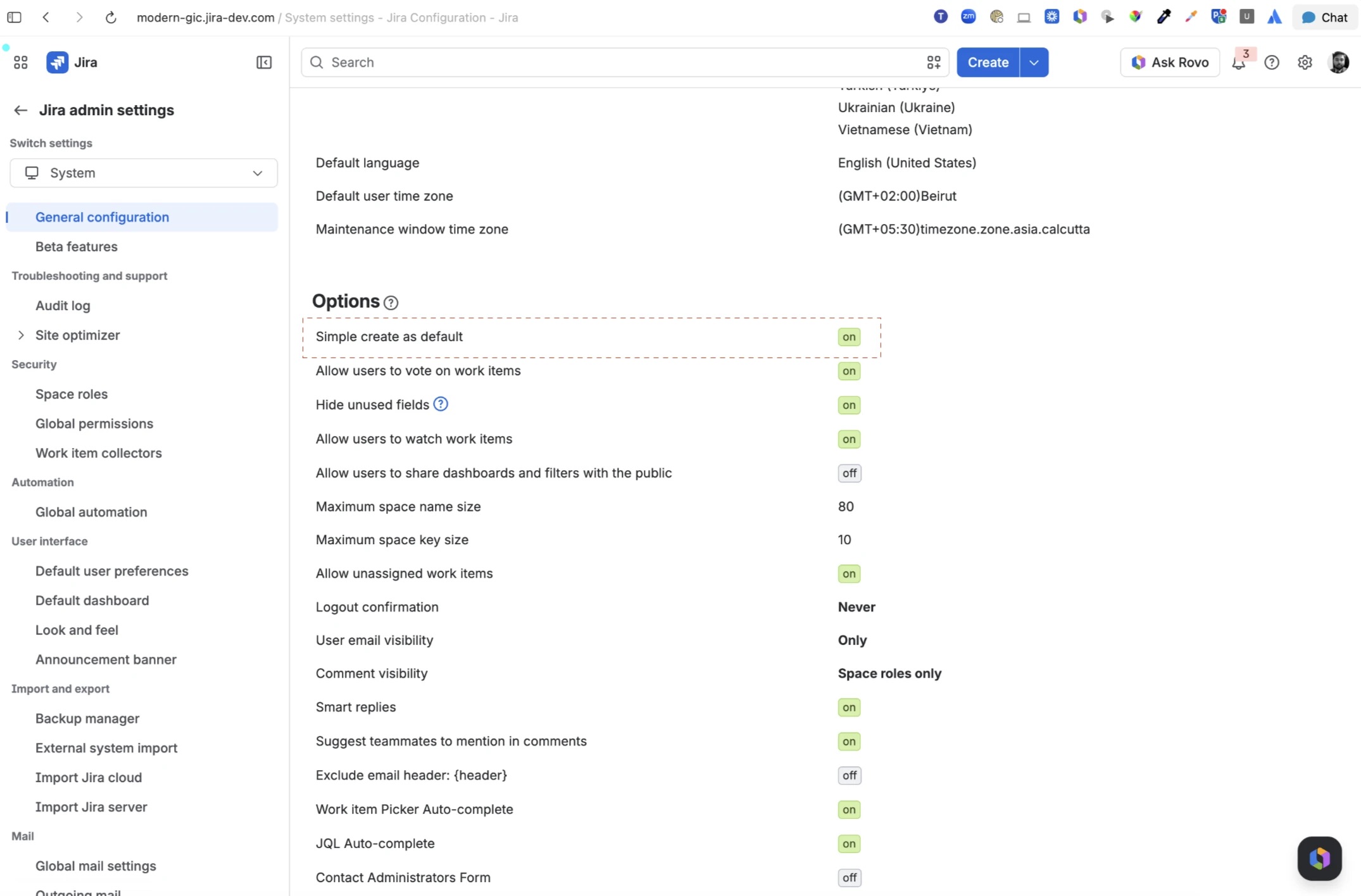
Note: Admins can also revert their site to the previous create experience via Settings > System > General Configurations, then set "Simple Create as Default" to off. This applies to the entire site.
|
 Note Note
- With this change, other entry points in Jira that previously opened the older create form will now open the new modal – including inline creation in Board, Timeline, and Roadmap views (where the new modal appears when required fields need to be completed), and creating child items within a work item.
-
The new changes do not apply yet to Jira Service Management (JSM) and Jira Product Discovery (JPD).
|
When is this rolling out?
This update will roll out progressively to all Jira Cloud customers starting mid-July with the summer Jira release.
Questions or feedback?
If you have questions about this change or run into anything unexpected, please share in the comments below. We'll do our best to respond and take your feedback into account.
Thank you!
Edit (July 2026): We've updated this post to reflect a change in the final release. The new create modal uses "Summary" as the field label — an earlier version of this post mentioned that the field would be relabelled "Title" in the UI. That change did not make it into the release. JQL queries, API calls, and integrations referencing summary continue to work as before, as they always have.


![Photo of Susan Hauth [Jira Queen]](https://us.v-cdn.net/6038660/uploads/avatars/24/83/n248383517a99c7d7e8b69a9791de8d32.png)


