| Update on October 13, 2025 |
|
Sharing this update here — originally posted by Dave Myer, Head of Product for Jira, in JRACLOUD-96247.
Hello everyone,
After further consideration and listening to your feedback, we’ve decided to revert the change to the status button location in the work item view. The feature request associated with this change will remain “not being considered”, as we don’t intend to make the button’s location customizable. We hope this rollback addresses the concerns raised.
We remain committed to iterating on the work item view to make it faster, visually appealing, and easier to consume. But in this case, we made significant misjudgments in how this change would affect our users and how we communicated it to you. We sincerely apologize and are committed to ensuring it does not happen again.
Here are the next steps we will take:
- The status button will return to its previous location on the right (“context”) side of the work item view beginning the week of 13 October 2025. For customers on the bundled release track, this change will be removed from the bundle (however you may still see a note in the changelog).
- In the spirit of Atlassian’s “open company, no bullshit” value, we will publish a PIR (post-incident review) on the Atlassian Community. While there was no service downtime from this change, we recognize the scale of the impact and will treat it like an operational incident.
- We’ve initiated a comprehensive review of Jira’s change management and feature rollout processes. We will share our plans for how Jira will release UI updates going forward in the Jira Cloud admins group on Atlassian Community by December 2025. We will add a link to the post on this page once it is live.
We take your feedback seriously. We took the wrong approach and we’re deeply sorry. We will take meaningful steps to ensure it doesn’t happen again. I’m incredibly excited about our plans for Jira over the next year and hope we can regain your trust.
Regards,
Dave Meyer
Head of Product, Jira
|
| Update on September 26, 2025 |
|
Hi everyone,
We’re sorry that this change has caused issues and added extra admin load for some of you. We know changes like this impact your day to day workflows, and we don’t take that lightly.
This decision was based on extensive user testing across a wide range of Jira users: new and long term, technical and non technical. The results were clear, and when we followed up with an A/B test, we saw statistically significant improvements that gave us confidence to move forward.
We aren’t rolling this change back, but we are listening closely. We’ll continue to explore ways to address the feedback you’re sharing here, so please keep it coming. It genuinely helps us understand the impact from your perspective.
Thank you again for taking the time to engage with us.
Warm regards,
Ahmud
Product Manager, Jira Cloud
|
Hi Jira Community,
We’re thrilled to announce a small but important change to how you update the status of a work item in Jira. The Status field will now appear directly under the work item’s Summary, making it easier and faster to find and update the status of your work.
What’s changing?
-
Previous location: The status field was grouped with other actions, which sometimes made it tricky to find.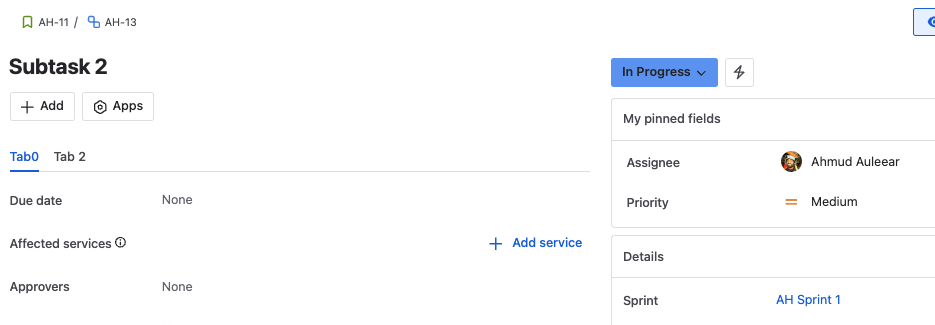
-
New location: The status field is now below the summary field, right next to the Add button.
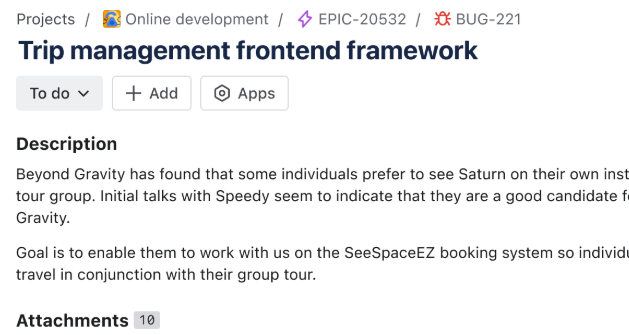
Why are we making this change?
Many users told us that finding and updating a work item’s status was confusing. Moving the status field to a more visible spot simplifies your workflow and makes Jira feel more intuitive. Based on our research and past experiments, making the status easier to find led to more updates and smoother onboarding.
What about the Resolution field?
The Resolution field in CMP remains unchanged for now. It will continue to appear only on Done work items.
What do you need to do?
Nothing! This change will be applied automatically.
If you work across multiple project types, you may notice the status field in different places as we rollout—this is expected. We are rolling out to team-managed projects first, then company-managed projects. We will commence rolling out mid August.


