Hello,
I would like to ask for help regarding an Automation for Jira setting.
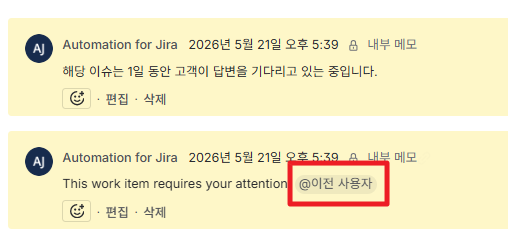
Currently, when a Jira ticket request comes in and no reply/comment is added for a certain period of time, an automatic comment is posted by Automation for Jira, such as:
"This work item requires your attention. @PreviousUser"
Due to a personnel change, we need to replace the mentioned user (@PreviousUser) with a different user.
I would like to know:
Where can I find the setting for this automatic mention/comment?
How can I change the mentioned user to another person?
Is this usually configured in Automation, workflow, notification, or another area?
I have already checked Project settings, Automation, workflow, and fields, but I am still having difficulty finding where this specific setting is managed.
I am still a beginner with Jira administration, so I would greatly appreciate a detailed explanation or step-by-step guidance, if possible.
Thank you in advance for your help!