In Confluence Cloud, when entering Japanese text with an IME in a search/input field, pressing Space to
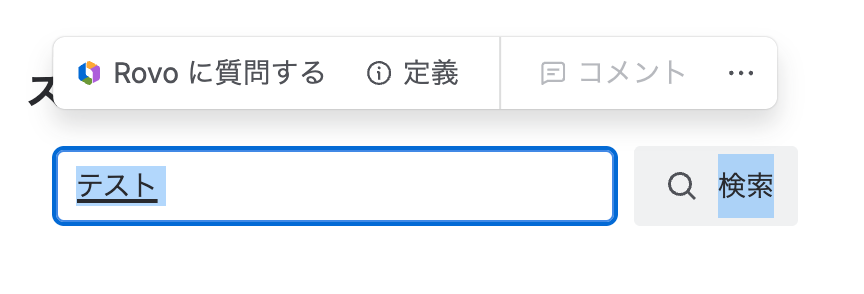
convert text causes Confluence's floating selection toolbar to appear.
The toolbar includes actions such as "Ask Rovo", "Define", and "Comment". This appears to treat IME
composition text selection as a normal page text selection.
This breaks Japanese input because Space is used for IME conversion, but Confluence reacts as if text was
selected on the page.
Environment:
- Product: Confluence Cloud
- Browser: Google Chrome on macOS
- Language/Input: Japanese IME
- Affected field: Confluence page/search input field
Steps to reproduce:
1. Open a Confluence Cloud page.
2. Focus a Confluence search/input field.
3. Type Japanese text using Japanese IME.
4. Press Space to convert the composing text.
5. Observe that the Confluence floating selection toolbar appears with actions like Ask Rovo / Define /
Comment.
Expected:
During IME composition, Confluence should not show the floating selection toolbar or treat composing text as
page text selection.
Actual:
The floating selection toolbar appears during IME conversion and interferes with Japanese input.
Impact:
This makes Japanese input unreliable in Confluence search/input fields.
Additional note:
This is not the search suggestion dropdown. It is the floating selection toolbar normally shown when
selecting text on a page.
The issue seems to be that Confluence treats the highlighted IME composition text inside the input field as a
normal page text selection.
I will also test with browser extensions disabled / in an incognito window to rule out extension
interference.


