Auto Behaviour can look straightforward in a demo until it reaches a real production environment.
If `Priority = Highest`, make `Impact` required. If `Environment = Production`, restrict the available change options. If the current user is the assignee, let them edit a small set of execution fields.
On paper, those are just a few conditions and actions. In Jira Cloud, they become runtime problems Auto Behaviour has to handle correctly.
That distinction matters, because the thing that usually breaks is not the visible rule. It is the context in which the rule runs.
The hard part is not expression. It is execution
Most teams can describe the business logic they want. The difficulty appears later, when the behavior has to stay predictable across views, issue states, field types, and user interactions.
In practice, stable field behavior in Jira Cloud depends on at least four things:
- which lifecycle callback is active
- whether the current value is a live form value or an issue snapshot value
- whether the field is registered for the current callback scope
- whether the action can be executed safely in the browser or needs backend normalization
If a solution only focuses on the visible if/else, it may work in a demo and still fail under real usage.
Auto Behaviour's runtime model is built around these four constraints: two evaluation phases, explicit context semantics that separate live form values from issue-backed values, auto-derived watch field tracking, and a two-path write strategy for safe value normalization.
`onInit` and `onChange` solve different problems
One of the most common design errors is treating change-time logic as if it automatically establishes the correct initial screen state.
It does not.
In Jira forms, values may already be present before a user interacts with the page. The issue type may already be selected. Defaults may already exist. An existing issue may already have saved values that should affect the screen on first render.
That is why stable field behavior usually requires both of these ideas:
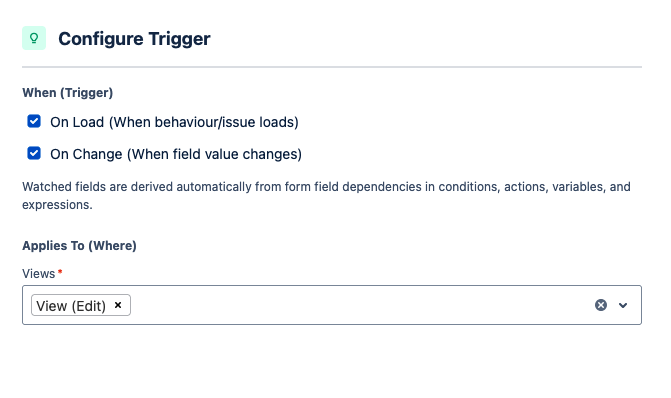
- `onInit` establishes the first visible state of the form
- `onChange` keeps the form synchronized after the user edits it
If a behavior matters on first render, it should not be left to chance.
Auto Behaviour handles this with two explicit evaluation phases: init-scoped rules fire once when the form first renders; change-scoped rules fire per-field and are narrowed to those whose derived watch fields include the changed field.
Live form values and issue values are not the same thing
Another reason dynamic behavior becomes unreliable is that there are at least two valid notions of `current value` during an editing session:
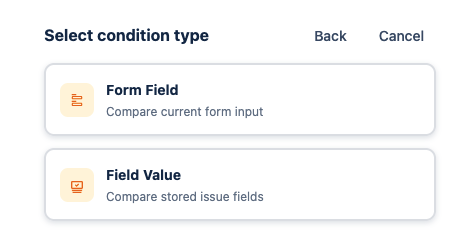
- the live value the user has just changed on the form
- the issue-backed value the system already knows
Those serve different purposes.
Some conditions need to look at what the user is editing right now. Others need to evaluate the issue context itself. When those semantics are blurred together, behavior becomes hard to explain, especially in `IssueView`, where live edits and saved issue values can temporarily diverge.
Any serious field behavior system needs a clear answer to this question: when a user changes a field in the current screen, what should downstream conditions actually see?
Watch fields should be derived, not guessed
Another source of unpredictability is overly broad reactivity.
If every field change causes every change rule to re-run, the system becomes noisy and difficult to reason about. A much more stable approach is to derive watch fields from the dependencies already present in the rule model:
- direct form-field conditions imply dependencies
- smart values such as `{{form.xxx}}` imply hidden dependencies
- actor conditions with form-based subjects imply dependencies
- expressions and lookup inputs can imply dependencies as well
Once those driver fields are explicit, change-time execution becomes easier to trust and easier to explain.
Auto Behaviour derives watch fields automatically at rule save time — parsing direct field conditions, smart value references like `{{form.xxx}}`, actor subjects, and expression inputs — so admins do not have to track them by hand.
Five questions worth asking before writing any rule
Before modeling dynamic field behavior, I find these five questions more useful than opening the editor immediately:
- Does this need to be correct on first render?
- Which field changes should actually re-trigger it?
- Is the logic about live form state or issue state?
- Does the target field and view support the intended setter?
- If the condition stops matching, does the fallback branch fully restore the intended state?
Those questions force the runtime assumptions into the open.
A better mental model
I find it helpful to think of Jira Cloud field behavior as a three-layer system:
- an authoring model, where admins define logic
- a runtime model, where the logic executes with real context
- a platform contract, where Jira decides what is actually allowed in a specific view and field type
Auto Behaviour is one way to package those layers into a visual rule model, but the important point is broader than any single app: field behavior only becomes reliable when those three layers are aligned.
If they are not aligned, the rules may still look fine in the editor while behaving unpredictably in production.
The practical question is not whether a rule can be expressed. It is whether the runtime model keeps that rule predictable once views, values, and field contracts start to vary.
