Dear Community,
I believe there have been a few minor changes in behaviour of the list view in Jira Business Projects in Jira Cloud. Which makes it a bit annoying to work with the list view in daily business.
First problem:
I have selected to group the issues in the list view by status, which generates sections for each status. For example "Open", "In Progress" and "Done" and lists the relevant issues under these sections.
If I select an issue in status "In Progress", click on the task ID to open all details and then click on the back link in the upper left corner (or simply use the back button in the browser), I'll get back to the list view. The problem is that only the section with the first status (here "Open") is expanded by default. I as a user would expect the status section "In Progress" being expanded, as I selected an issue from there to display. And I am quite sure that this was the case in the past!
Second problem:
The list view does not highlight the due dates in yellow or red anymore. This was definitely the case in the past and I do not understand why this has been changed? Well I tried to use a condition rule especially to highlight the due date cell but this doesn't work either. My rule is as follows:
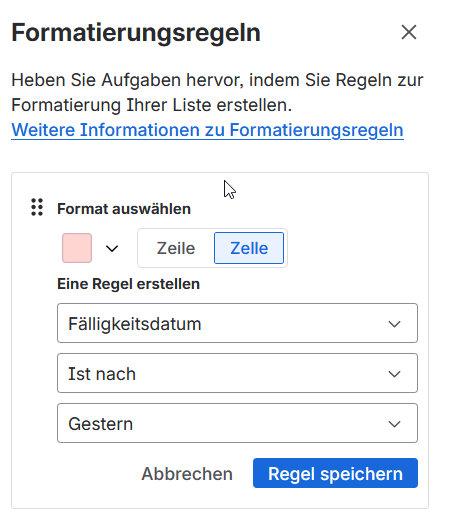
Also tried it with "Today" instead of "Yesterday", selecting the row instead of the cell, but doesn't work either.
Is there a possibility to get back the old list view where all these things did not happen?
I saw this option here in the list settings:
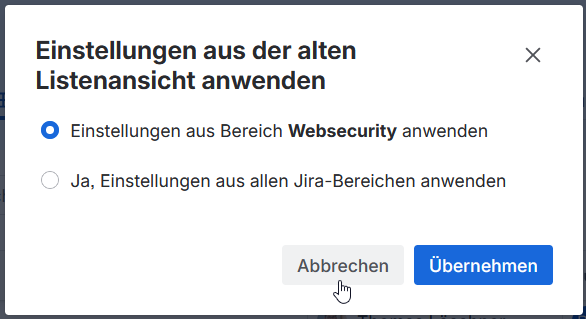
But I am not sure if this setting only applies for the project in which I select it or if it applies to all projects across the whole organization?
Thanks in advance.
Cheers,
Thomas


