|
Criterion
|
Rovo Studio
|
AI Apps Builder
|
Verdict
|
|---|
|
Setup
|
Manual developer space selection
|
Auto-configured
|
Rovo gives more flexibility
|
|
Prompt interpretation
|
Generated a global page
|
Generated a dashboard gadget
|
AI Apps Builder result closer to intent
|
|
App naming
|
Auto-generated
|
User sets at start
|
AI Apps Builder gives more ownership
|
|
Generation transparency
|
Show an app specification before starting to build
|
Show an app specification before starting to build
|
Both tools have an app spec (updated)
|
|
Interactive preview
|
Approximate
|
Approximate
|
Both tools have a preview (updated)
|
|
Deploy
|
Select instance → publish
|
Requires API token
|
Rovo wins
|
|
Deploy time
|
1–2 minutes
|
5–10 minutes
|
Rovo wins
|
|
Result reliability
|
❌ Error 400 on first try; Error 410 on fix attempt
|
✅ Correct result on first attempt
|
Critical win for AI Apps Builder
|
|
Source code export
|
ZIP archive
|
ZIP archive + forge-installer
|
AAB has an auto-install bonus
|
|
Version history
|
❌ None
|
✅ Full version history
|
AI Apps Builder wins
|
|
Screenshot input
|
First message only
|
Any message
|
AI Apps Builder wins
|
|
Third-party integrations
|
✅ API keys, broader app support
|
❌ Not yet supported
|
Rovo wins
|
|
Supported modules
|
No module restrictions
|
31 Jira modules (updated)
|
Rovo wins
|
|
Time to first token
|
1–2 seconds
|
5–7 seconds
|
Rovo wins
|
|
Frontend tech
|
Atlaskit components
|
React + CSS
|
Rovo wins
|
About the Reliability of Results
When I used the prompt in Rovo Studio, I got a 400 error. I tried to fix it, but then got a 410 error. At that point, I couldn't finish the experiment because the app never deployed.
To be fair, Rovo Studio is still in beta, and this is what beta looks like: rough edges, unexpected errors, and features that aren’t finished yet. This isn’t a judgment on where the product is headed. It’s just the honest result of my test. The architecture behind Rovo Studio is interesting, and Atlassian is clearly putting effort into it.
But for this prompt, on this day, AI Apps Builder created a working dashboard gadget on the first try, with no errors.
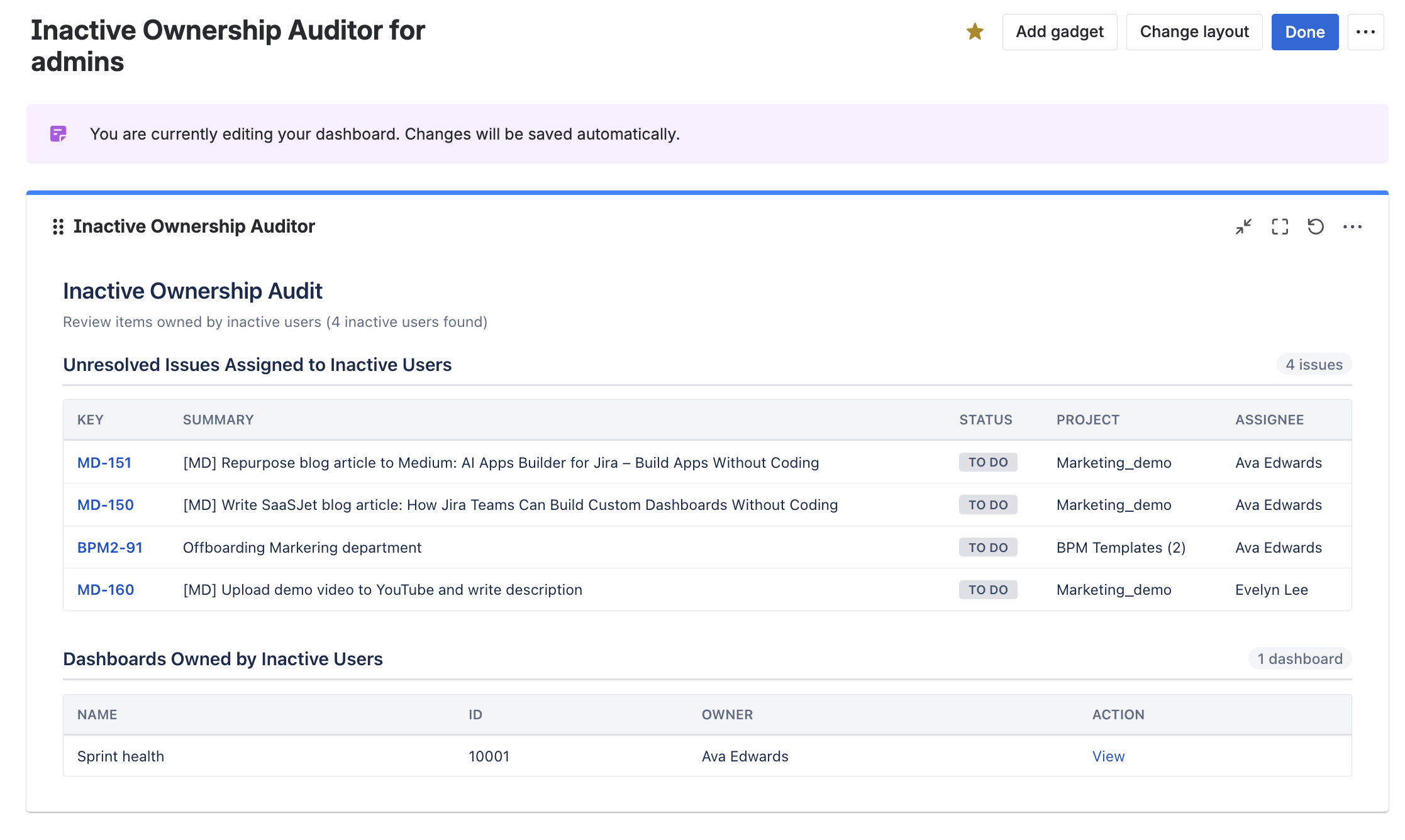
Reliability in a beta test isn’t the final word. Still, it’s what matters most if you want to use something right now.
Where Each No-code Tool Is Stronger
Rovo Studio has the edge on:
-
Faster deploy time
-
Interactive preview with an honest "this is approximate" notice
-
No module restrictions — build anything Forge supports
-
Atlaskit components for native-feeling Atlassian UI
-
Third-party integrations with API key management
AI Apps Builder has the edge on:
-
Reliability — correct result on the first attempt in this test
-
Full version history — try something, see what happens, roll back if needed
-
Screenshot input at any point in the conversation — show the AI what you mean
-
Forge-installer — automatically installs the generated app into your Jira instance
-
Human developer support is available when generation falls short.
Both tools are milestones. They represent the Atlassian platform moving from "write code" to "describe what you need." That's a meaningful change regardless of which tool you use today.
AI Apps Builder for Jira: What It Does and How It Works
What You Can Build
If you haven’t heard of AI Apps Builder for Jira, this no-code builder creates custom Forge apps for Jira Cloud using natural language prompts. It supports three module types:
-
Global Pages — custom pages accessible from the Jira Apps menu
-
Issue Panels — panels displayed directly inside the Jira issue view
-
Dashboard Gadgets — widgets users can add to their Jira dashboards.
However, the AI Apps Builder team is working to add more modules soon.
How Generation Works
The no-code builder follows an agent-style reasoning workflow:
-
Plan — the system analyzes your prompt and determines the required app structure
-
Act — app configuration and UI modules are generated
-
Review — the system evaluates and refines the output before deployment.
Platform and Security
Generated apps are Forge apps running within Atlassian's cloud infrastructure. They follow Forge's security model, permissions, and access control standards.
What's New in Recent Updates
Version History lets you try something new, see the result, and roll back to any earlier version if you don’t like it. Your previous work is always recoverable.
Developer Support helps if the generation produces broken or incomplete results. The team's developers can review your code, fix issues, and improve output. Non-technical users get real human support. Technical users get a second pair of eyes.
Screenshot Upload lets you add screenshots at any point in the conversation, not just the first message. Show the AI what’s broken instead of explaining it. Upload a style example to match a specific look. This makes iteration faster and more precise.
Summary
Rovo Studio and AI Apps Builder both represent big steps forward for the Atlassian ecosystem. Being able to create working Forge apps from a simple prompt, without any coding or setting up a development environment, is still a new idea, and it’s clearly important.
Rovo Studio stands out because it has a smoother user experience, easier deployment, and a wider technical base. Since it’s still in beta, some things didn’t work as expected during this test. That’s normal for this stage, and it will be interesting to see how quickly it improves.
AI Apps Builder is focused on Jira Cloud right now. Features like version history, screenshot input, and developer support make it easier to improve your app, especially for non-technical users solving real problems.
It’s also worth noting that both teams are actively shaping these no-code tools. Rovo Studio is still learning and improving, so early limitations are expected. Meanwhile, the AI Apps Builder team (I can say this with confidence since it’s my team) is working to let users create more Jira solutions, improve generation quality, and enhance the preview experience.
Things are changing quickly in this space. A fair comparison today could look very different just a few weeks from now.
I think it makes sense to revisit this comparison soon with a “Part 2” to see what has improved, what has changed, and how both tools develop over time.
Have you tested either of these tools on a real Jira use case? Share what you found in the comments; the community learns faster when we compare notes.
Try AI Apps Builder for Jira
I’d love to encourage you to try AI Apps Builder for Jira. If you want to build a custom Jira app without writing code, this no-code builder is a practical tool to start.
Just a reminder: every new user gets 100 credits to explore and create their own Jira tools. You can also earn 100 extra credits by sharing your experience at Team '26. See more details here: "Build your own Jira app, visit booth 310, and get 100 extra credits in AI Apps Builder."