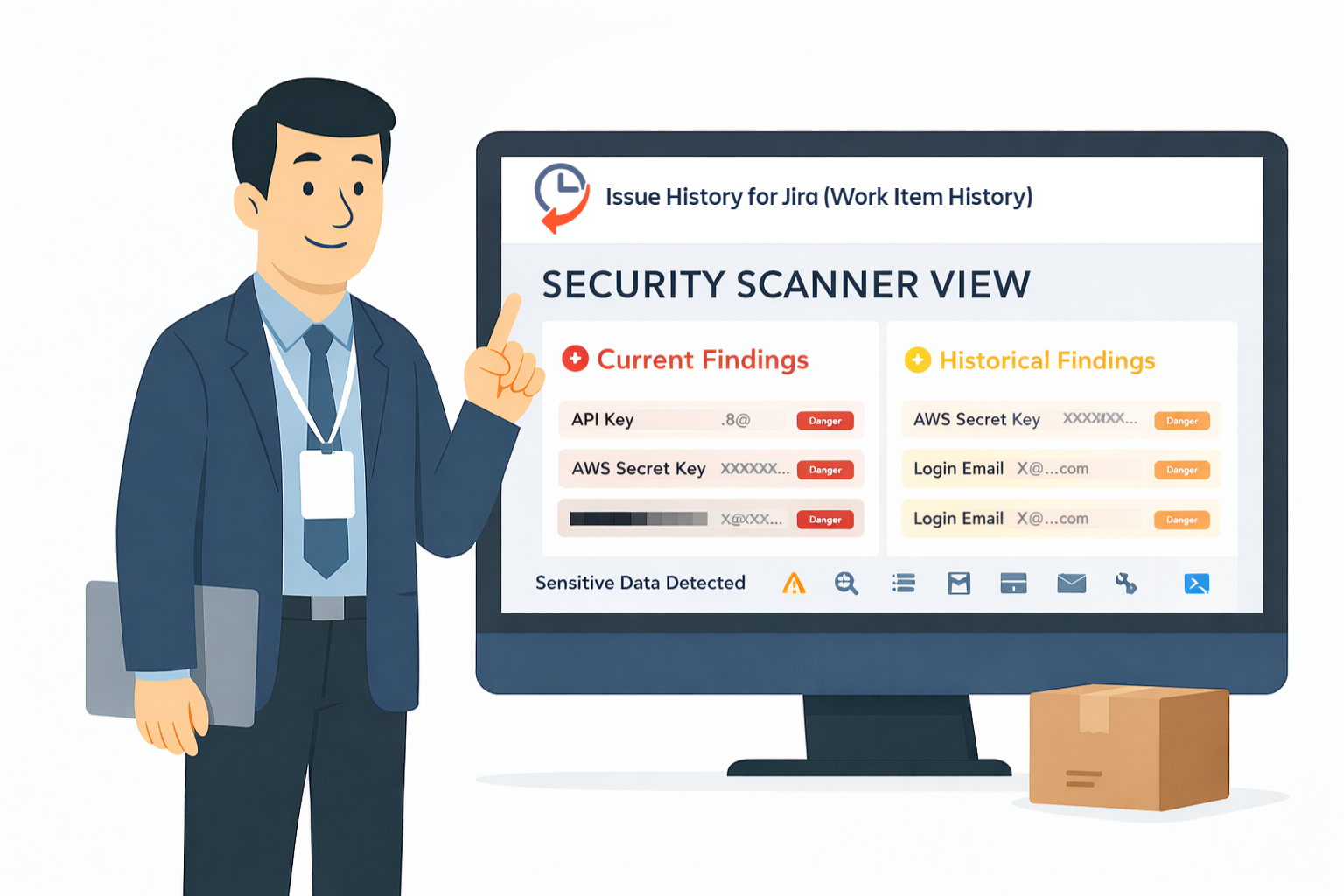
Jira isn't just a task tracker. It is a place where real work is happening in many teams; where discussions, logs, screenshots, quick fixes, and hasty decisions are being taken.
As a result, sensitive data tends to be found in Jira work items. And when it appears there, it doesn't always disappear when you think it does.
So, let's look at why this happens and why it matters.
What Is Sensitive Data in Jira
Sensitive data is information that was never intended to live in Jira, but somehow ends up there anyway.
Not because people are careless. But because Jira is the place where work actually takes place.
When a production problem happens, a payment fails to go through, or an API suddenly stops functioning, people are quick to act. They paste logs, share credentials "just for a minute", so the team can get on with it. And Jira remembers everything.
In Jira, sensitive data may include:
- Passwords and passphrases
- API keys and access tokens
- Login credentials
- Credit card numbers
- Personal information (e.g., emails, phone numbers, addresses)
- Social Security Numbers or national IDs
- OAuth tokens and secrets
The tricky part? This data is often temporary, edited, or deleted later. A comment gets cleaned up. A description is updated. A field value is replaced. But the original data may still be there - in the work item history.
So even if a Jira work item seems clean today, it may contain sensitive data from yesterday, last month, or last year. Hidden. Forgotten. But not gone.
That's why sensitive data in Jira work items is rarely obvious, and the reason why finding it requires more than a simple search.
Why Hidden Sensitive Data in Jira Is a Security Risk
Many teams believe: "We removed it, so it's gone." That's not true.

Jira keeps change history:
- Previous versions of descriptions
- Edited comments
- Field value changes
So even though the sensitive data is no longer visible, it may still exist in the work item history. This creates real problems:
❌ Security exposure - old credentials can still be misused.
❌ Audit risks - auditors look at what was exposed in the past, not only what is visible now.
❌ Compliance risks - GDPR, SOC 2, ISO 27001 require proof of control.
❌ Incident investigations are a guesswork.
Native Jira search is not made for this kind of analysis.
Why Native Jira Search Falls Short
Jira search is a good option when you are trying to find out what exists at any given moment. But sensitive data is almost never a "right now" problem.
Native Jira search can't look deep into the work item history. It doesn't scan old versions of descriptions, edited comments or previous values of fields. If sensitive data was added but was later deleted, Jira considers it gone - even if the data may still exist in the history.
Jira also doesn't know what it is looking for. It can't recognize passwords, API keys, or personal data patterns. You have to guess the keywords yourself, and that means you only discover what you already know to look for.
As a result, native search creates a false sense of security. It shows what is seen - not what was exposed.
That's why searching for sensitive data in Jira requires more than a simple search.
How to Scan Jira Work Items for Sensitive Data
To do this correctly, you need three things:
- Complete history scanning (not just current work items’ values).
- Pattern-based detection for credentials and PII.
- Clear reporting that shows what needs attention.
That's what exactly Issue History for Jira app from SaaSJet team offers with its Security Scanner (PII & DLP).
What Is Security Scanner
Security Scanner is a special view within Issue History for Jira app that automatically scans Jira work items and their complete change history for sensitive data.
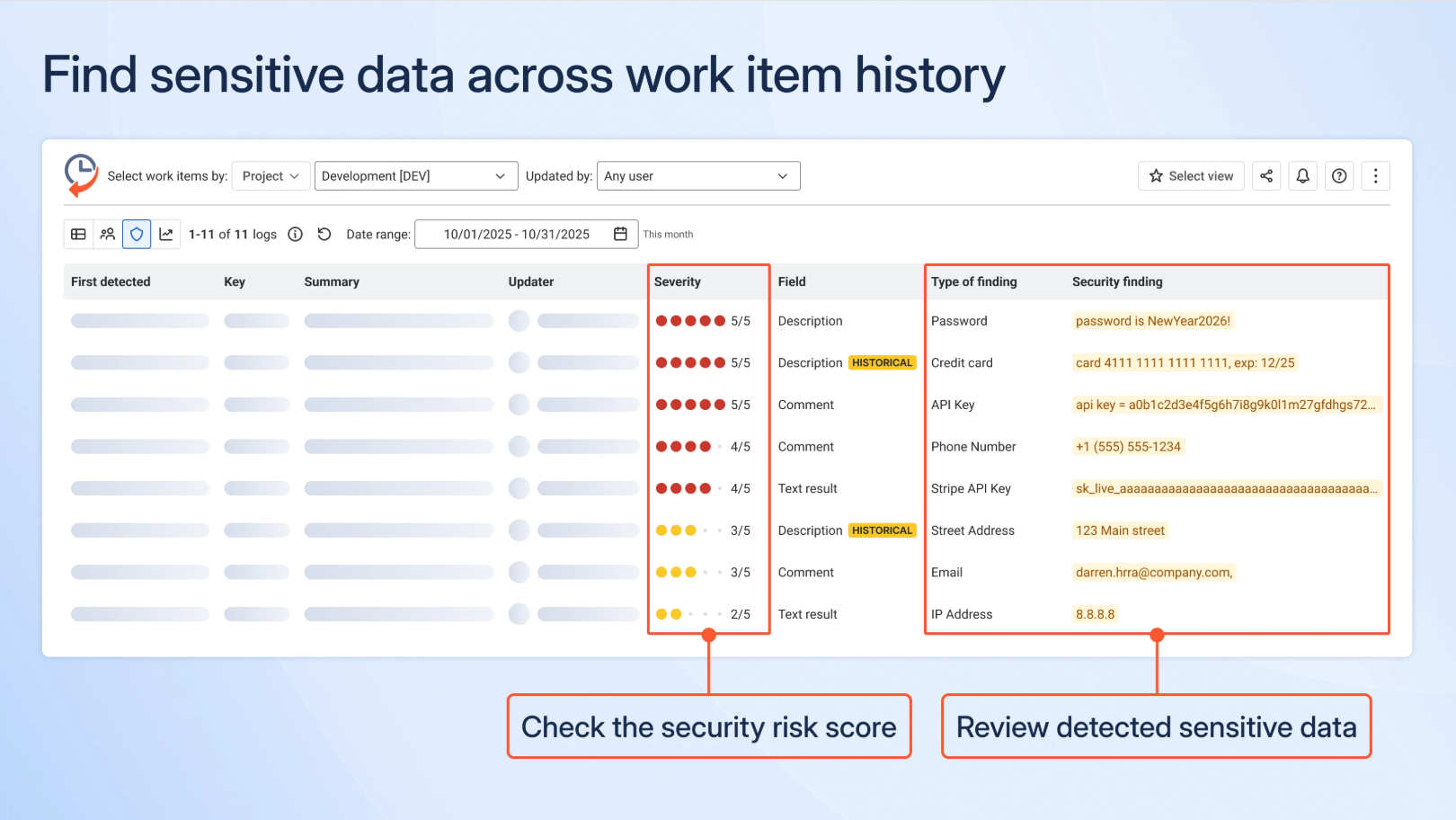
It doesn’t look at just what exists now. It also analyzes what was there before.
The scanner identifies many types of sensitive data, including:
- Passwords and passphrases
- Login credentials
- Credit card numbers
- Social Security Numbers
- AWS access keys and secret keys
- API keys and OAuth tokens
- Email addresses and phone numbers
- IP addresses
- Usernames and logins
- Physical addresses and postal codes
Each security finding is classified, so you immediately understand the type of risk you’re dealing with.
How Does Security Scanner Work
To start searching for sensitive data in Jira work items using Issue History for Jira app, follow these steps:
- In your Jira, go to Apps, find Issue History by SaaSJet and in its left sidebar menu choose Security Scanner.
- Select scan filters (e.g., choose the required space or sprint).
- Set the date range.
- Run the scan and review the report, which reveals all sensitive data found in your work items (including their history) and their associated risk scores.
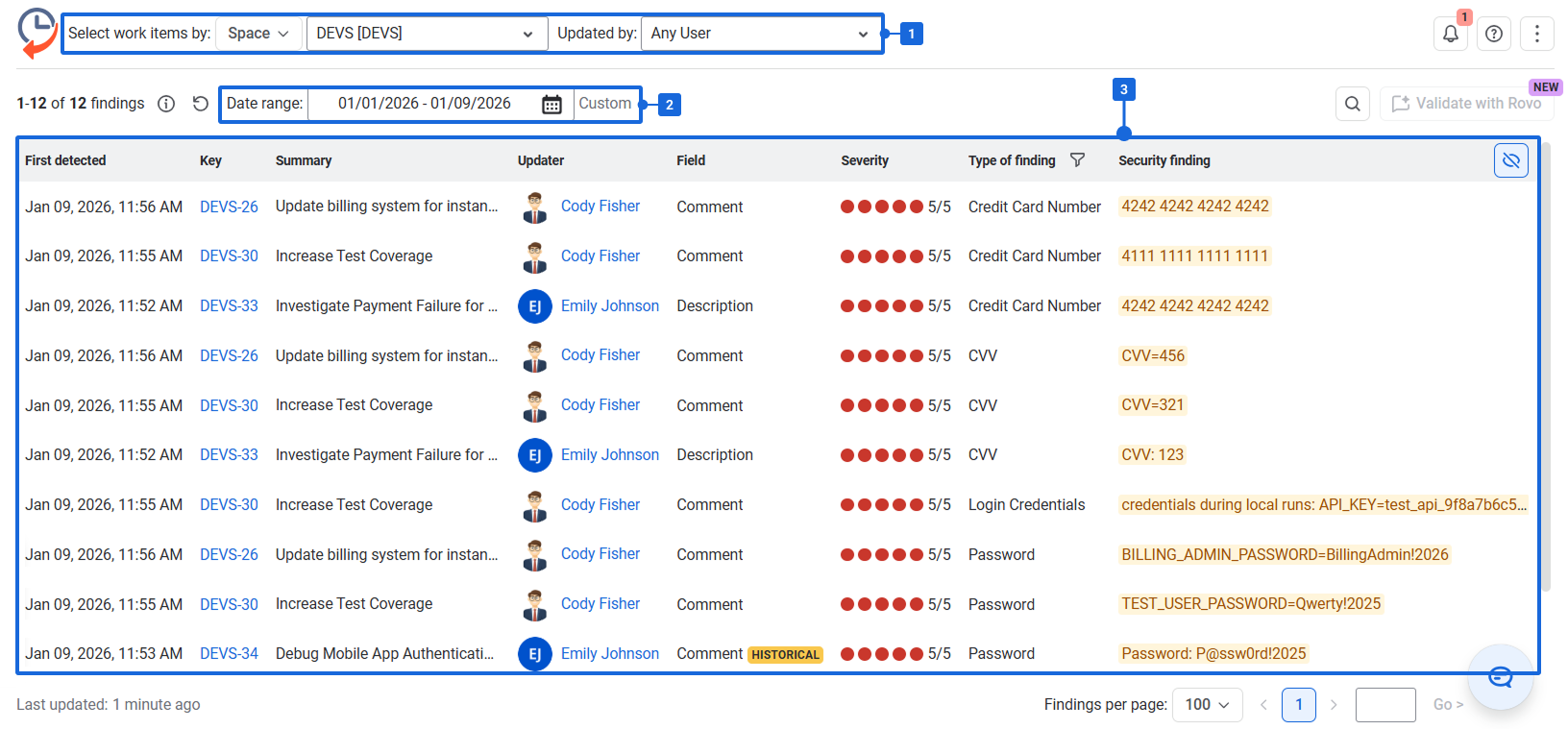
The result is a structured table. You can see what matters fast.
Current vs Historical Security Findings (This Is Critical)
Security Scanner provided by Issue History for Jira app makes clear distinctions between:
🔴 Current Findings: sensitive data still exists in the work item.
🟡 Historical Findings: sensitive information existed in the past, but is no longer visible (for example, in earlier versions of comment or description, and was later removed or updated).
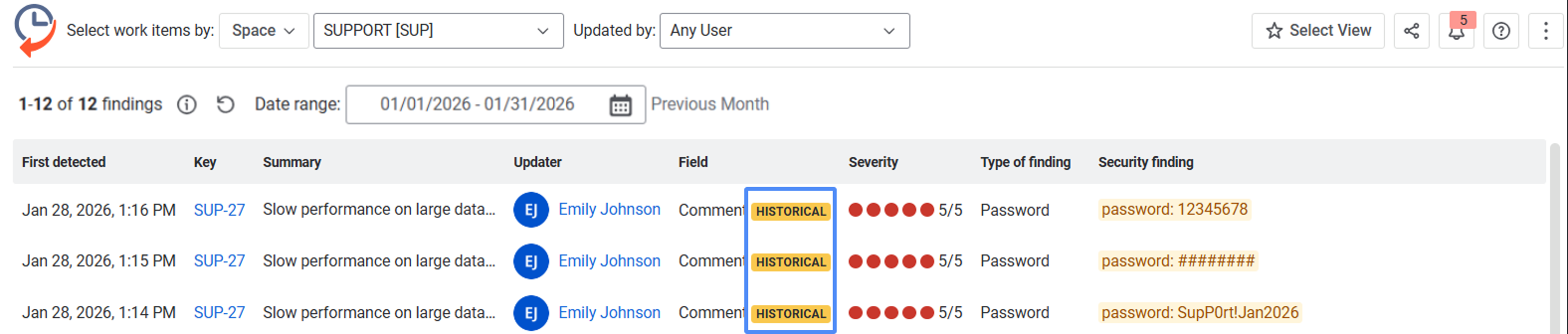
This matters because:
- Auditors are concerned about historical exposure.
- Data that has been removed can still be recovered.
- Past leaks might still need mitigation.
- Most tools completely ignore this.
Security Scanner is available during the trial period and is included in the Advanced plan of Issue History for Jira app.
Analyze Security Scanner Findings with Rovo
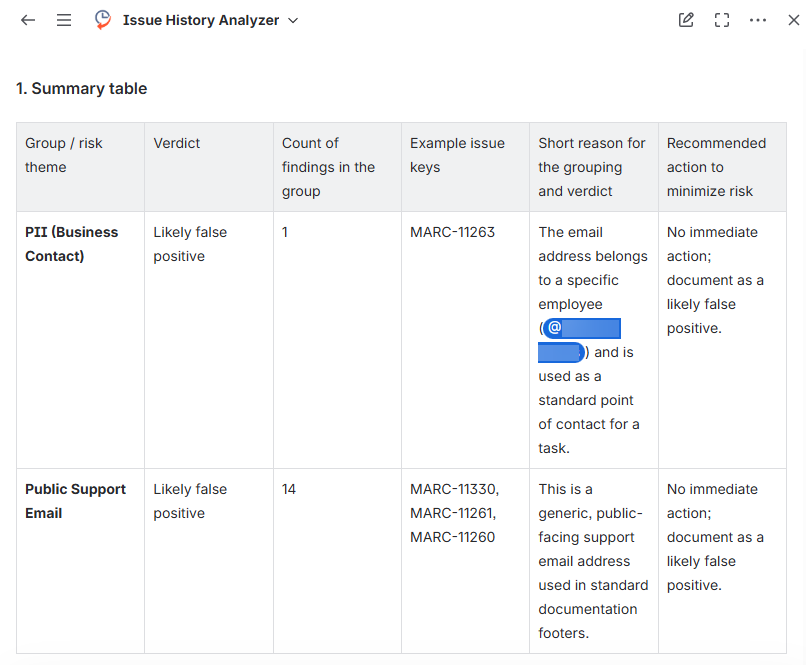
Reviewing dozens, or even hundreds, of detected sensitive data findings can take time. To speed up investigations, Issue History for Jira now lets you analyze Security Scanner findings with Atlassian Rovo.
Instead of manually reviewing each finding, Rovo generates an AI-powered summary that helps you quickly understand:
- the type of sensitive data detected
- why the detected data may pose a security risk
- recommended remediation steps
- which findings require immediate attention
Detect Organization-Specific Sensitive Data in Jira with Custom Patterns
Not all companies are dealing with the same types of sensitive data. Some will be looking to detect employee IDs, customer IDS, healthcare records, or company-specific access tokens.
With custom detection patterns in the Issue History for the Jira Security Scanner, you can create your own rules to find sensitive data that's specific to your organization.
There are two ways to create a custom pattern:
- Create with AI: Describe what you want to detect and AI will generate you a regex pattern and a name for it.
- Create manually: Write your own regular expression (regex) to identify specific data formats.

Before you save, you can test your pattern against some sample data to check it's accurate and to minimize the number of false positives.
Once saved, custom patterns are included in Security Scanner scans. You can also filter your custom findings separately from the default findings.
This gives teams greater flexibility in detecting sensitive data in Jira (data that may be specific to their industry, their own internal processes, and their compliance requirements).
What to Do If You Find Sensitive Data in Work Item History
If the sensitive data is only in history, there is a safe and practical way to handle it.
✅ Recommended approach:
- Clone the work item. Make a new work item based on the current state only - with no sensitive data.
- Verify the cloned work item. Make sure descriptions, comments, and fields are clean and do not contain secrets or personal data.
- Delete the original work item. This eliminates the historical versions where the sensitive data was stored.
This approach helps you:
- Delete sensitive data in Jira entirely.
- Maintain the work item in a clean, safe state.
- Reduce audit and compliance risks.
Act fast without complicated clean-up processes.
Summing Up
Sensitive data often ends up in Jira - and deleting it doesn’t mean it's gone. Jira keeps work item history, and that's where real risk lives.
Native Jira search only displays the current state of work items. It can't show you what was previously exposed.
Using the Security Scanner in the Issue History for Jira app, you can search for sensitive data across current content and work item history, reducing risk and supporting audit readiness.
If Jira is your system of record, its history is important.
Frequently Asked Questions About Sensitive Data in Jira
- How can I find sensitive data in Jira?
You can use Security Scanner in the Issue History for Jira to find sensitive information such as passwords, API keys, access tokens, and PII. It will scan the content of the current work item as well as the history of changes to the work item to help identify any potential security issues.
2. Can sensitive data still exist in Jira after it has been deleted?
Yes. Even if a password, API key, or personal details have been removed from a Jira work item, the prior value may still be present in the change history. Security Scanner helps to identify these historical findings so teams can investigate potential exposure.
3. Can I create custom sensitive data detection rules in Jira?
Yes. Issue History for Jira allows you to create custom detection Patterns using either regular expressions (regex) or AI-generated rules. You can use it to detect organization-specific data such as employee IDs, customer IDS or custom access tokens.


