Hi everyone,
I’m reaching out because I couldn’t find a clear answer to this during my research, and maybe someone here can help.
We’re not actively using Assets yet, but we’re planning to. Today I spent a lot of time practicing and testing how it works, and I think I’ve got the logic mostly figured out. However, there’s one area I’m stuck on:
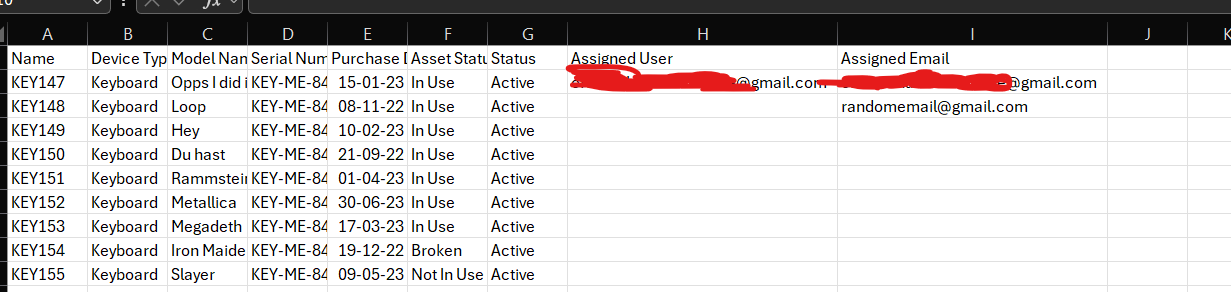
Let’s say we have an object type called Keyboards, and we want to import data using a CSV file.
We also have an "Assigned To" attribute (of type User), which is meant to show who the device belongs to.
In the CSV file, we provide email addresses for the "Assigned To" field, because in our company, users don’t always know the exact Jira usernames of employees — email is more reliable.
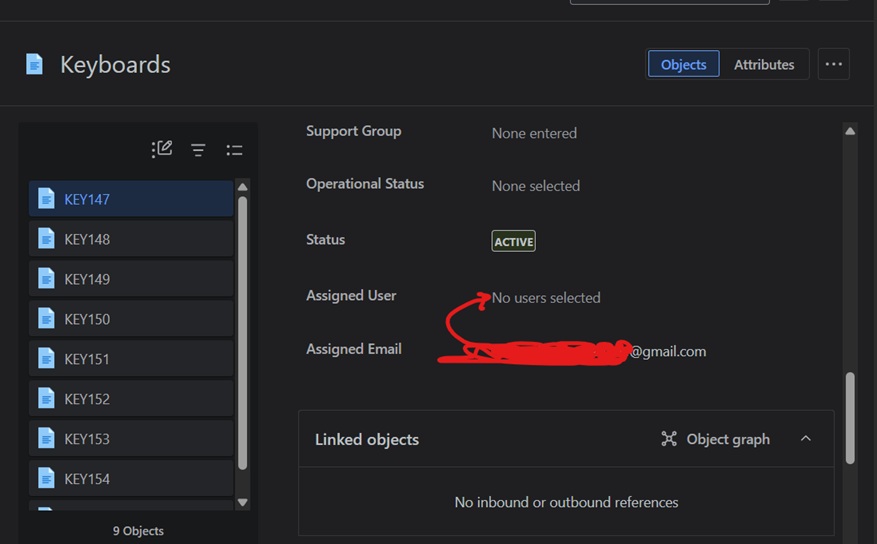
However, during import, everything is imported correctly, except for the email-to-user matching. The user is not assigned automatically.
What we need is for Jira to match the email to the user account (agent or customer) and assign it accordingly — without having to manually go into each asset and link the user afterward.
That would be very time-consuming and not scalable.
So, is there any way to make email-based matching work during import? Or any workaround that would help us assign users automatically based on their emails?
Additional clarification:
When I import the "Assigned To" attribute using an email address (e.g., john.doe@example.com), the value is imported as plain text and not linked to the actual user account in Jira. The email shows up, but it’s not recognized as a user object.
Is there a way to make Assets match the email address to a real Jira user (agent or customer) during import, so that the "Assigned To" field is properly linked to a user and not just display text?
Thanks in advance for any suggestions!