I recently went through the "Manage project roles and permissions in Jira Service Management" course. It brought up an "Organization" feature. I proceeded to follow the steps to get into Organizations and created a few. I even added a few customers to each.
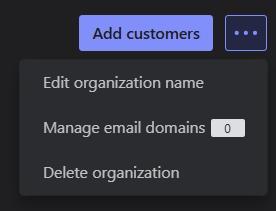
However, I get to step 3 below and do not have a "Manage detail fields" option in the ellipses (...) See attached screenshot. I've tried to locate the missing link, but haven't found any conclusive answers yet. What am I missing here?
To add detail fields:
From your service project, go to Organizations.
Select the name of any organization.
Select Organization details (...), then select Manage detail fields.
- Uh what? There's no option for that??