Hello,
I have two custom fields “Business System Owner” and “Technology System Owner” in my Jira Team-Managed project. It is a people field (multiple user).
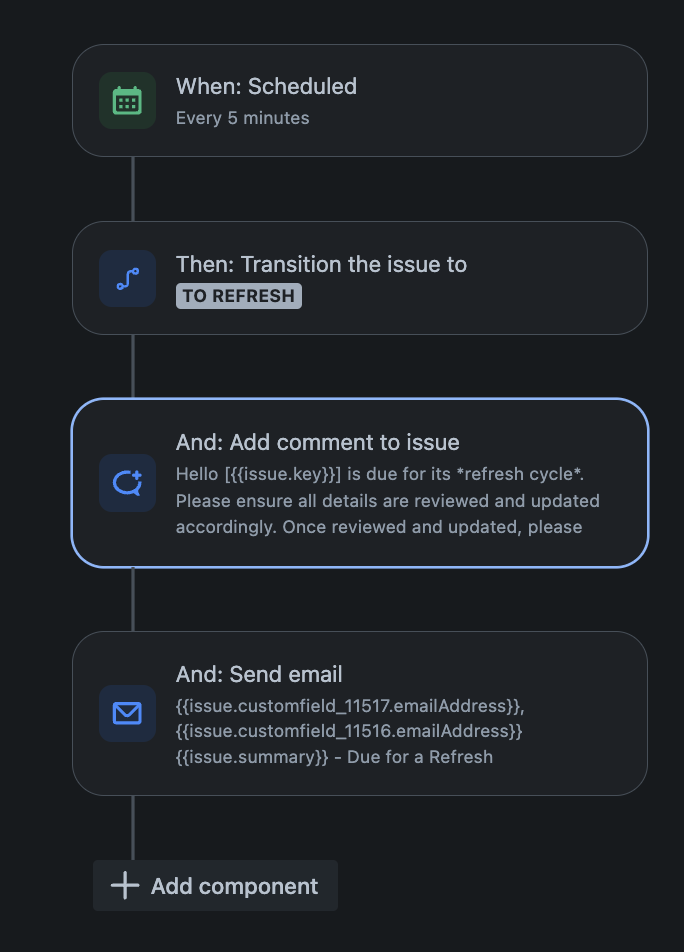
I'm trying to use automation to comment and send emails to all users in both fields when a specific action occurs. The comment portion works, but the sending email failed. My Jira Site Admin has added the two fields at the global level. But the sending of email action still failed after I chose both “Business System Owner” and “Technology System Owner” in the “To:” field in the send email action. The audit log states two types of error:
- Unable to send the email as the recipient's email address wasn't provided
- There is no value set for the field:
- customfield_12874, customfield_12876
- Unable to send the email as the recipient's email address wasn't provided
I also discovered that there are two “Business System Owner” and “Technology System Owner” fields in the fields tab of the project settings.
I have tried to use smart values in the “To:” field, but to no avail. I have tried:
- {{issue.customfield_11517.emailAddress}}
- {{issue.customfield_11517}}
- {{issue.customfield_11516.emailAddress}}
- {{issue.customfield_11516}}
- {{issue.customfield_12874.emailAddress}}
- {{issue.customfield_12874}}
- {{issue.customfield_12876.emailAddress}}
- {{issue.customfield_12876}}
The comment section works in tagging / mentioning the users when I used:
{{#issue.customfield_11517}}[~accountId:{{accountId}}] {{/}}{{#issue.customfield_11516}}[~accountId:{{accountId}}] {{/}}
But it doesn’t work when I used the audit log customfield values:{{#issue.customfield_12874}}[~accountId:{{accountId}}] {{/}}{{#issue.customfield_12876}}[~accountId:{{accountId}}] {{/}}
Attached are the rule set up, the field tab showing duplicate fields and audit logs.
Is there a way to do this? Thanks in advance.