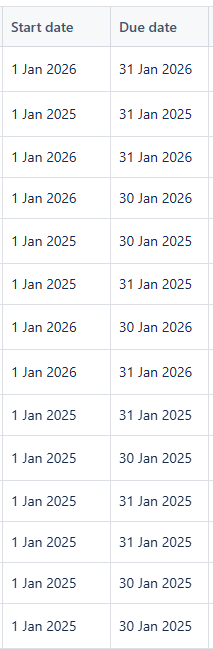
Hi community
I imported a number of work items using the Bulk import CSV option. While the mapping of data looked to be working correctly, when I examined the imported data in Jira, the date fields (Duedate and Custom Field Start date) were imported incorrectly.
I set the date format correctly to match my csv file (dd/mm/yyyy) and double checked the data mapping for each input date.
I thought I must have missed something so I then tried to update the date fields using the External System Import, but experienced the same issue.
As an example, if this was what I was Importing or Updating:
Custom field (Start date): 01/04/2025
Due date: 30/06/2025
after import I would see:
Custom field (Start date): 01/01/2025
Due date: 30/01/2025
Below is a screen shot of the values that I should have seen uploaded i.e. standard quarter dates that I double checked.
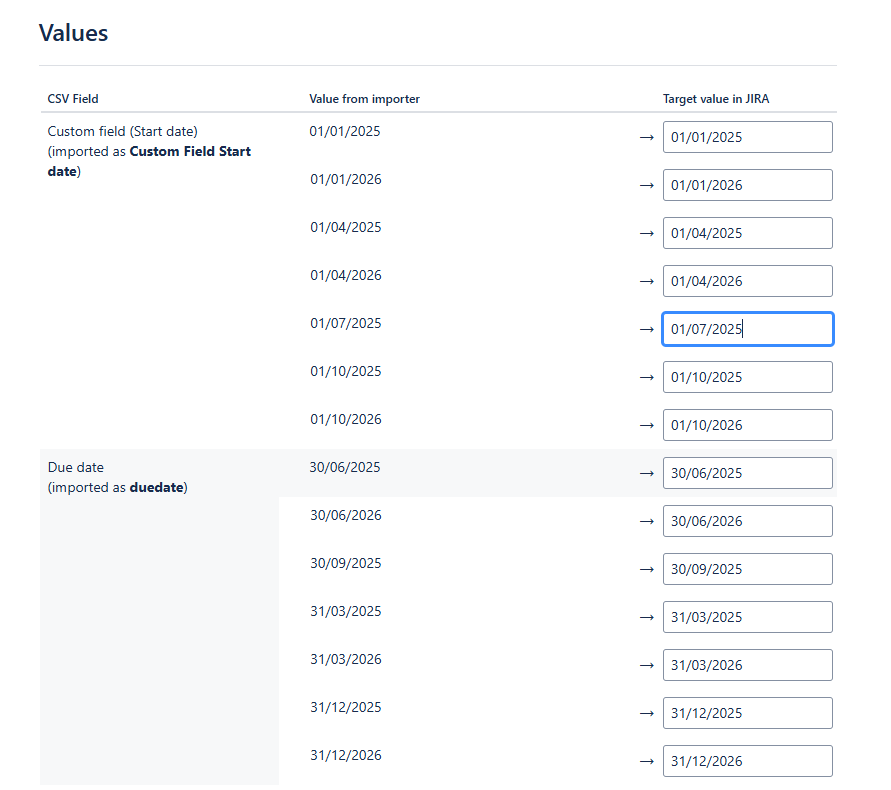
But what I got was Jan dates for all dates. It appears to have ignored the Month part of the date and defaulted to Jan - which appears to be the pattern for Due Date.
Any pointers or suggestions appreciated