How can we hide the "Add mentions" toolbar in the commetns box?
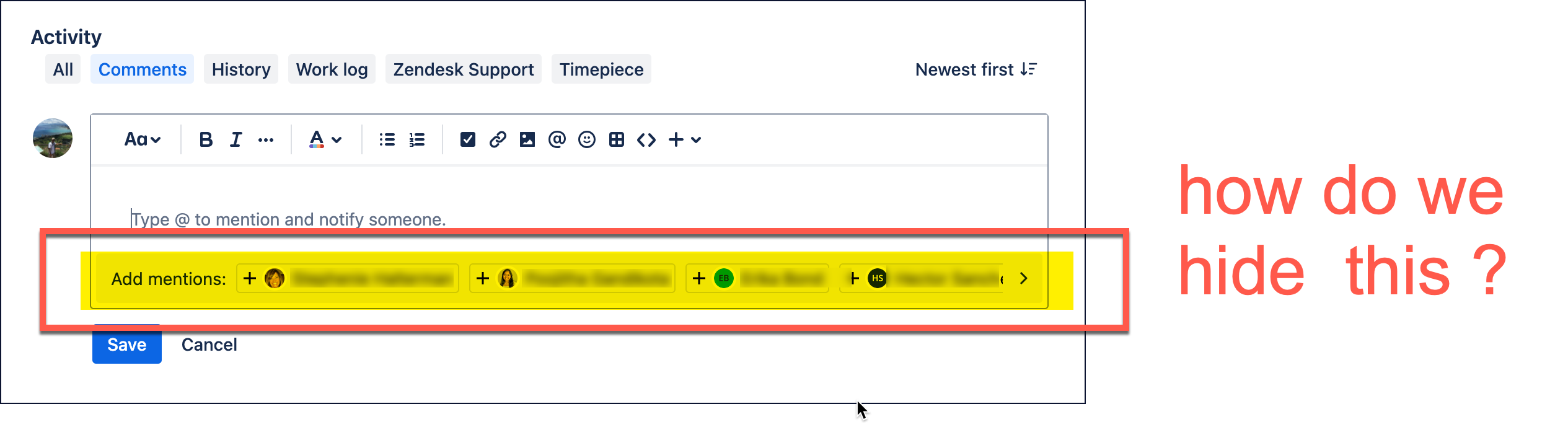
In my opinion this has only added clutter and distraction to this workspace.
UPDATE: I was able to hide this in Chrome for MacOS, with an ad-blocking browser extension.
YMMV... they worked for me, but no guarantees
These are only offered as a work-around in the event you are unable to gain assistance from your JIRA admin and can't have these features turned off at a per-user level. The intent is not to promote the malicious modification of Atlassian software or to suggest any activity which might violate the terms of use.
! JIRA - Hide "Rovo" Ai Annoyances
! MacOS Tahoe 26.3
! Chrome version: Version 145.0.7632.46 (Official Build) (arm64)
! AdGuard extension version: Version 5.3.0.8

! Add mentions bar when editing a comment
nrccua.atlassian.net##div[data-editor-content-component="true"]

! "Ask Rovo" popup button when highlighting multiple (more than 5?) words
atlassian.net##div.atlaskit-portal:has(button[data-testid="context-menu-rovo-chat-button"])

! "Define" button that pops up when highlighting a single word
atlassian.net##button[data-testid="highlight-actions.ui.popup-target.popup-dialog.action-items.define-button.define-button"]

! "Ask Rovo" button inside the popup toolbar for tables in comments.
!  This only hides the Ai button, so the other toolbar options are still available
atlassian.net##button[data-testid="ak-editor-ai-selection-toolbar-ai-button"]

! Floating Ai conversation button when viewing tickets in full window mode
atlassian.net##div[data-testid="layout-controller.ui.bottom-right-corner.container.styled-container"]:has(button[data-testid="platform-ai-button"])

! Floating Ai conversation button when viewing tickets in overlay mode
atlassian.net##div:has(> *[data-testid="platform-ai-button"])

! Ask Rovo button in top nav bar
atlassian.net##span[data-testid="atlassian-navigation.ui.conversation-assistant.app-navigation-ai-mate"]


