The process i followed
### Step-by-Step Guide to Revert Description Using Jira Automation
1. **Create an Automation Rule**:
-Go to **Project Settings** > **Automation**.
- Click on **Create Rule**.
2. **Set the Trigger**:
- Choose a trigger that fits your scenario, such as **Issue Updated** or **Field Value Changed**.
3. **Add an Action to Fetch Change Log**:
- Choose **Send web request**.
- **URL**: `https://your-domain.atlassian.net/rest/api/3/issue/{{issue.key}}/changelog`
- **HTTP Method**: `GET`
- **Headers**: - `Authorization: Basic `
- `Content-Type: application/json`
4. **Extract Previous Description Value**:
- Use a **Create variable** action to extract the previous description value from the change log response.
- **Variable name**: `previousDescription`
- **Smart value**: `{{webhookResponse.body.changelog.histories[-1].items[?(@.field == 'description')].fromString}}`
5. **Add an Action to Update the Description**:
- Choose **Send web request**.
- **URL**: `https://your-domain.atlassian.net/rest/api/3/issue/{{issue.key}}`
- **HTTP Method**: `PUT`
- **Headers**:
- `Authorization: Basic `
- `Content-Type: application/json`
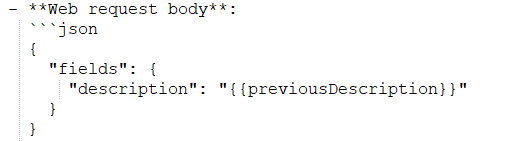
- **Web request body**:
6. **Save and Enable, Run the Rule**:

