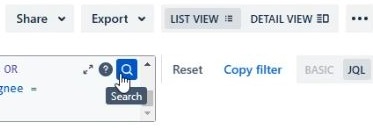
I'm not sure when this change was made exactly, but it seems that the search button for a JQL search changed from being a somewhat large, standalone 'Search' button to the right of the query box, to now being embedded inside the query box as a small blue magnifying glass. Below are photos for reference.
Is there a way to revert back to the bigger Search button?
To some users the small magnifying glass is not intuitive. They may forget to click "Search", THEN "Save filter" before leaving the screen.
Perhaps a different resolution... could be for Atlassian developers to make a 'Search & Save Filter' button. This would reduce the number of steps for updating a filter. If the filter is invalid then Jira could give an error message per usual.
New, small Search button:
Old, large Search button: