Hi everybody,
we are trying to use Jira edge connector (JEC) to establish a communication between our Cloud Jira and on-prem tool.
Unfortunately I cannot seem to make it work, so I guess I am missing something. And documentation for JEC is very limited.
So I followed instructions provided by Atlassian:
Install JEC and prepare config file
{
    "apiKey" : "xxx-xxx-xxx",
    "baseUrl" : "https://api.atlassian.com",
    "logLevel" : "debug",
    "actionMappings" : {
        "testJEC" : {
            "sourceType" : "local",
            "filepath" : "/home/jsm/jec/scripts/othertest.py",
            "env" : [],
            "stdout" : "/home/jsm/jec/output/testout.txt",
            "stderr" :   "/home/jsm/jec/output/testout.txt"
        }
    },
    "pollerConf" : {
        "pollingWaitIntervalInMillis" : 100,
        "visibilityTimeoutInSeconds" : 30,
        "maxNumberOfMessages" : 10
    },
    "poolConf" : {
        "maxNumberOfWorker": 12,
        "minNumberOfWorker": 4,
        "queueSize" : 0,
        "keepAliveTimeInMillis" : 6000,
        "monitoringPeriodInMillis" : 15000
    }
}
Prepare simple script
Simple script othertest.py that just writes text in a file (so that I can see that it has been triggered)
f = open("output.txt", "w")
f.write("Test file\n")
f.close()Create automation
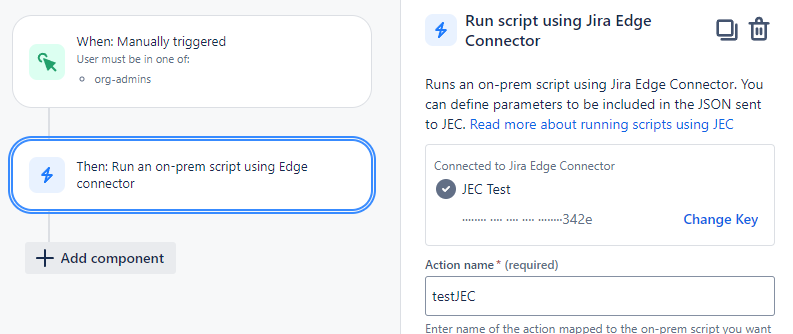
Automation should trigger action testJEC. Also I used apiKey generated here in the config file.
Run JEC
Run JEC using
sudo systemctl start jec
So after all this set up, when I trigger my automation, it should call on-prem JEC through Connection and through config file it should select action testJEC which should run a script othertest.py as defined in config file. But nothing happenes. So what am I doing wrong?
I checked and I can ping to my server and from my server to api.atlassian.com. Automation runs successfully.

