: At least one of 'id' or 'key' is required to identify an issue.
Also, it says the issue was created successfully, but when I try to find the cloned issue there is nothing to be found.
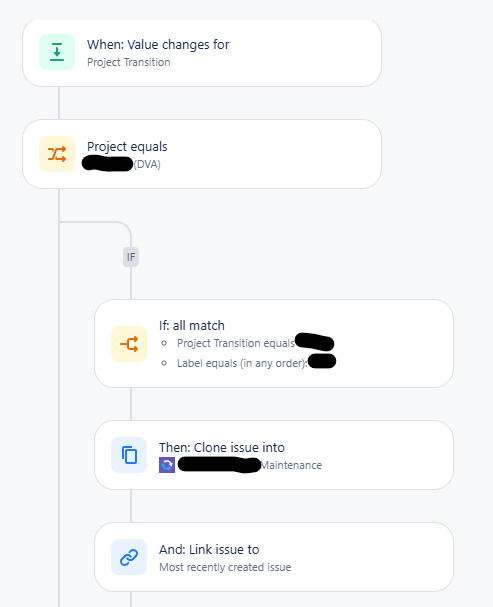
Here is how the automation is set up:
There are no issues in the automation until it gets to the cloning/linking part.
Our actor is also Jira Automation, so there is no issues with a user not having the correct privilege.
I have tried to manually clone the problem issues, and they will clone, just not through the automation.
I also tested a few issues from last quarter, and they are able to clone from the automation. I even tried some manual test tickets from Q3 and they work as well, so it's not an issue with the fields.
However, I tested a ticket one of my team members manually created for Q3 and we could not get it to clone through the automation.
I am worried there may be an issue with previous quarter and current quarter tickets because of how they were imported. I am a bit skeptical because there are also issues with manually created tickets.
Previous quarter tickets were imported via the External System Import in the system settings. This quarter, the tickets were imported via the 'Import issues from CSV' button. Despite this, all the files we have ever uploaded to create tickets have always been CSV files, so that has not changed.
I don't know if this is a bug or if it is user error.
Thank you!


