Through automation in my Jira cloud project, I want to assign new issues to a sprint called "Triage" in my project. I don't know how to reference this sprint in the automation action correctly.
Jira automation only offers two standard values for the "Sprint" field in the "Edit issue" action:
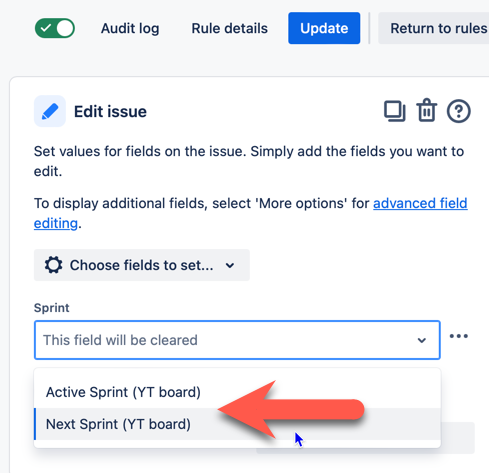
If I pick "Next Sprint (YT board)", it works. But this relies on my "Triage" sprint being the next sprint, which it won't be soon anymore.
Now, here's me trying to use smart values to put in the sprint "Triage". It's ID is "7" in my project (3). You also see my trigger (1) and my action (2):
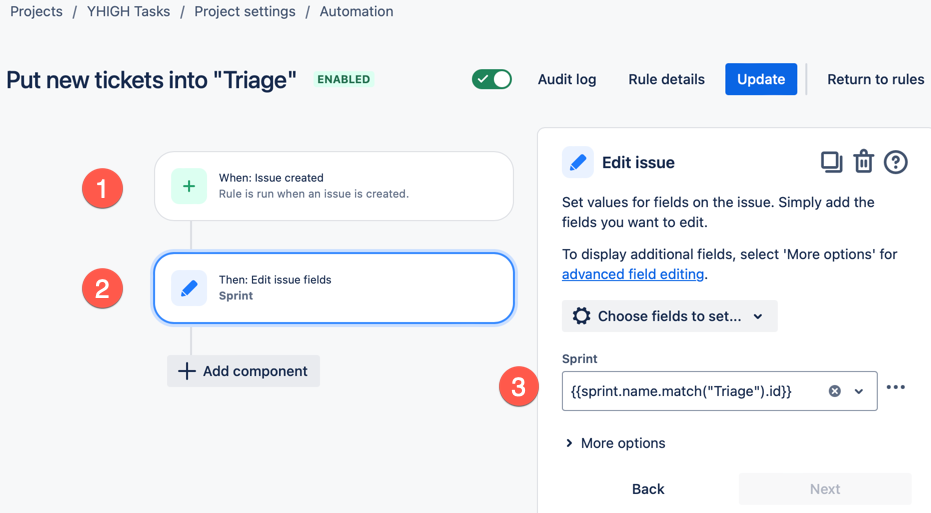
I tried {{sprint.name.match("Triage").id}} and {{sprint.name.match("Triage")}} and {{"Triage"}} and {{"7"}} and {{7}}.
None worked. All gave me an error in the automation rule audit log: "No fields or field values to edit for issues (could be due to some field values not existing in a given project)".
So, what's the smart value for the sprint "Triage"?


