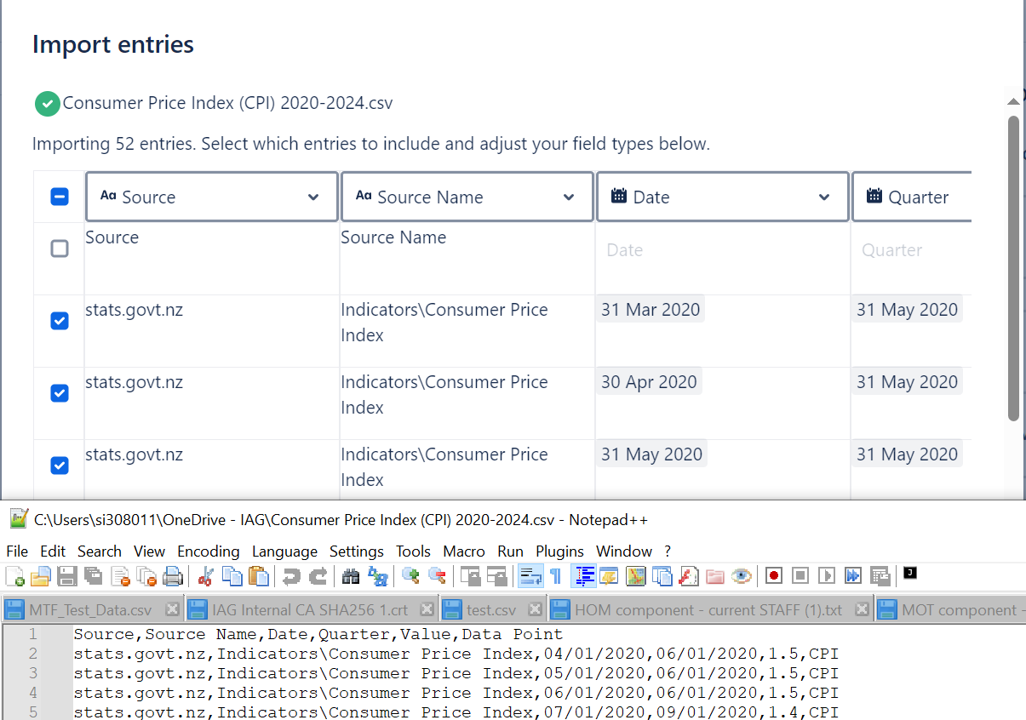
I have created some dated statistics in Excel which I had to export as a csv file as it is a supported file type for Confluence database import option.
I found that I couldn't use the import to also create the necessary columns, I had to do those first, which was ok.
However, upon reviewing the import, I noted that all the dates had been read as if they were M/D/YYYY which, in New Zealand is incorrect, it is D/M/YYYY. In the import, there is no way to correct this.
Either Confluence should accept Excel files which would tell Confluence the format of a date, or the import option should include setting the format of the date of the csv file.
As an alternative to import, I attempted to copy and paste from Excel into the database which resulted in the entire table pasting into the first cell of the first row.
All in all, I am finding this database quite frustrating, a backwards step in functionality from tables which I loathed before but compared to the usability of this, at least I could get data into it, even if I didn't have the ability to set up views based on filters of it.
I don't think there is a user workaround or fix to this, but I consider it to be a bug, even a showstopper of Confluence databases. Is there a roadmap for fixing such issues? Thanks
Update
I got ChatGPT to convert all my dates as text to US format (because Excel reinterprets as a date again) and on the import, it reads it in the format that it wants to but every date is one month out - what is wrong with this import function? Terrible