Via Confluence Cloud REST API I convert a Table of Contents macro to its storage format, using the contentbody/convert/export_view endpoint.
This does return a wrong result when using the include parameter:
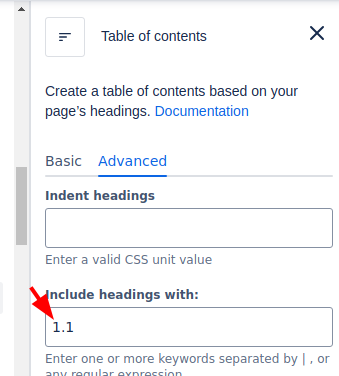
Here's how the TOC macro correctly renders in the browser, with the include parameter being set to 1.1:
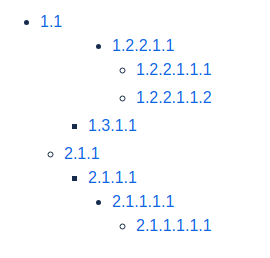
You see that only nodes containing the text 1.1 are shown. This is what I expect to be returned from the contentbody/convert/export_view as well.
For reference and to reproduce this issue, here's the original tree, without the include filter set:
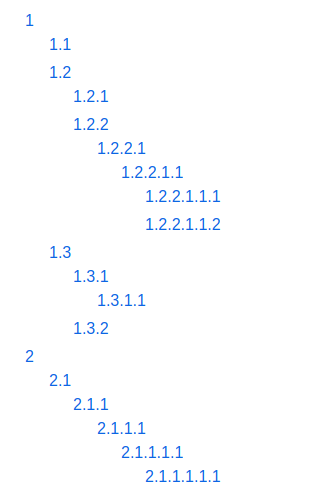
So, I expect multiple nodes to be returned, all that contain 1.1.
But the contentbody/convert/export_view endpoint only returns one single node: 1.1.
Here's a curl that reproduces the issue for me (using it on a page that has the headings configured like seen above, and a table of contents web part in place with the include=1.1 filter set):
curl --request POST \

--url 'https://<company>.atlassian.net/wiki/rest/api/contentbody/convert/export_view' \
--user '<email>:<token>' \
--header 'Accept: application/json' \
--header 'Content-Type: application/json' \
--data '{"content":{"id":"145785084"},"value":"<ac:structured-macro ac:name=\"toc\" ac:schema-version=\"1\" data-layout=\"default\" ac:local-id=\"8c0ef255-40df-4779-9a5b-ce9aefffeeab\" ac:macro-id=\"61ec8443-4b6a-4dc1-9846-a7733f70b7f8\"><ac:parameter ac:name=\"minLevel\">1</ac:parameter><ac:parameter ac:name=\"maxLevel\">6</ac:parameter><ac:parameter ac:name=\"include\">1.1</ac:parameter><ac:parameter ac:name=\"outline\">false</ac:parameter><ac:parameter ac:name=\"indent\" /><ac:parameter ac:name=\"style\">default</ac:parameter><ac:parameter ac:name=\"exclude\" /><ac:parameter ac:name=\"type\">list</ac:parameter><ac:parameter ac:name=\"class\" /><ac:parameter ac:name=\"printable\">true</ac:parameter></ac:structured-macro>","representation":"storage"}'
The result is this:
{
"value": "<style type='text/css'>/*<![CDATA[*/\ndiv.rbtoc1721992747641 {padding: 0px;}\ndiv.rbtoc1721992747641 ul {list-style: default;margin-left: 0px;padding-left: ;}\ndiv.rbtoc1721992747641 li {margin-left: 0px;padding-left: 0px;}\n\n/*]]>*/</style><div class='toc-macro rbtoc1721992747641'>\n<ul class='toc-indentation'>\n<li><a href
='#TOCTEST-1.1'>1.1</a></li>\n</ul>\n</div>",
"representation": "export_view",
"_expandable": {
"webresource": "",
"embeddedContent": "",
"mediaToken": "",
"content": "/rest/api/content/145785084"
 },
"_links": {
"base": "https://<company>.atlassian.net/wiki",
"context": "/wiki"
 }
}This is clearly wrong. There is only one node in the returned TOC: 1.1. I'd expect it to contain more nodes with 1.1 in their text, like in the first screenshot.
Removing the include filter fixes that and the results are correct.
Are my expectations off? Or does the endpoint not properly handle the include filter of the table of contents macro in this scenario?

