Hey everyone, Rhys Christian here; I’m one of the Product Managers working on Plans in Jira.
Today marks a momentous occasion as we announce the Beta release of a new planning interface called The Program Board. It's coming out over the next week or so, so don't panic if you don't have it yet.
Currently, the Program board is in Open Beta
We’ll get into some of the limitations of this version a little further down, but we’ve decided to release it because we want to hear your feedback.
To see the limitations of the current version of the Program board, skip down to What are the limitations of the Beta version?
The Program board in Plans: what is it and why is it great
In short, the Program board is an interface that represents a short-to-mid-term planning window, allowing planners to coordinate and align the delivery plans of multiple teams at the team-of-teams level. If you want to read our documentation, start here.
Those who use SAFe might know this concept as a Program board, a Program Increment board, a Quarterly plan, or an Increment plan. If you don’t know what SAFe is, don’t worry; it’s still a powerful tool for all teams to improve their planning maturity.
Let’s take a look at what you’ll see:
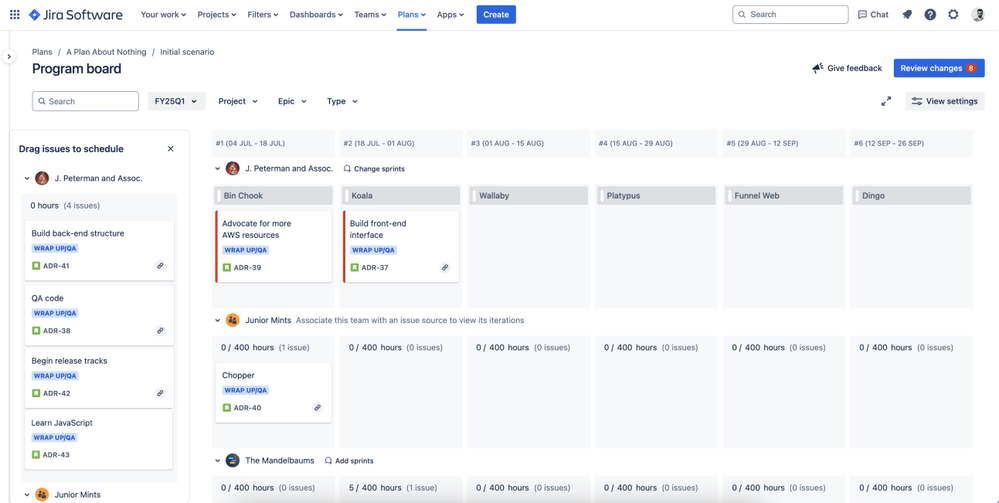
- each column spans two weeks based on the start date you chose when you created your board
- each team included in your plan has their own row
- unplanned work items show in the left column under the label Drag issues to schedule
To schedule issues, drag them from the column labeled Drag issues to schedule to the appropriate column. When you do, the issue inherits that sprint assignment and is assigned to the team (if you move it to a new team’s row). From here, you can quickly schedule work for the next 12 weeks, and before you know it, you’re making large-scale changes to multiple teams' sprints at one time.
The Program board only shows issues that are configured at the level 1 and level 0 hierarchy levels (commonly referred to as the Epic and Story levels). Sub-tasks and custom hierarchy levels above Epic, such as Initiative, won’t currently show on this view.
Before you use the Program board
Before you start planning with the Program board, there are a few things that we recommend doing to make for a smoother experience.
- Teams are required to use the Program board - Create or add your teams, and configure them in your plan before you start planning.
- Create sprints for the coming quarter for all of your scrum teams - When you add a team’s sprints to your board, you’ll need to add a team’s sprints to all of the columns at one time. You won’t be able to add three then come back later to add the rest.
- Add a custom field or label to the work you want to plan - By default, your Program board includes all future work from your plan with To do or In progress statuses. To declutter the planning view, planners should tag the work (both parent and child issues) they want to include for the upcoming iteration using either a custom field (single-select or multi-select) or the Label field. You can then use this field as a filter when you create your Program board.
See why we recommend you do these before you use the Program board.
What are the limitations of the Beta version?
The Program board that’s coming to your site is an early build. We’ve released it to the world because we want to hear what you have to say about it, and how we can improve it in the future.
That said, it doesn’t have all the bells and whistles yet though we have more features planned for the future. In the meantime, there are a few caveats you should know about:
- The Program Board isn’t designed for real-time collaborative planning sessions (such as Big Room Planning). It doesn't accommodate a large number of inputs like you’d find in a Big Room Planning session. For now, we recommend using a white-boarding tool such as Confluence Whiteboards alongside the Program board.
- The Program board represents a 12-week period. When you create your Program board, Jira creates six columns that each represent an iteration lasting two weeks. The length of the quarter and the number of columns can’t be changed yet.
- Each plan can support two active program boards. A Program board is considered active if its end date is in the future. Once a Program board’s end date passes, the board is completed and no longer counts against your allotment of active boards.
All that’s left is to have fun with it!


