Hi,
I have 2 sets of start/end date fields. Target Start/end and Actual Start/end
I'd like to copy the Target start/end custom fields into the Start /due date fields in jira, unless there is a value in Actual Start
Rule runs when any of target/actual start/end date fields are edited
Let me know if I should be doing one automation per field too.
Branch 1 - For when Target start is changed
Actual Start is blank
And Target start != Start date
input it into the Start date (field used by the backlog timeline functionality)
Branch 2 - If Actual Start is populated
And Actual Start != Start date
input it into the Start date (field used by the backlog timeline functionality)
Branch 3 - For when Target end is changed
And Actual End is blank
And Target end != Due Date
input it into the Due Date (field used by the backlog timeline functionality)
Branch 2 - If Actual End is populated
And Actual End != Due Date
input it into the Due Date (field used by the backlog timeline functionality)
Target start = customfield_13328 and Target end = customfield_13329, Actual start = customfield_14936
I've tried a few different things, converting to datetime, changing to custom fields etc. and I get this error with the below automation, when I edit target end
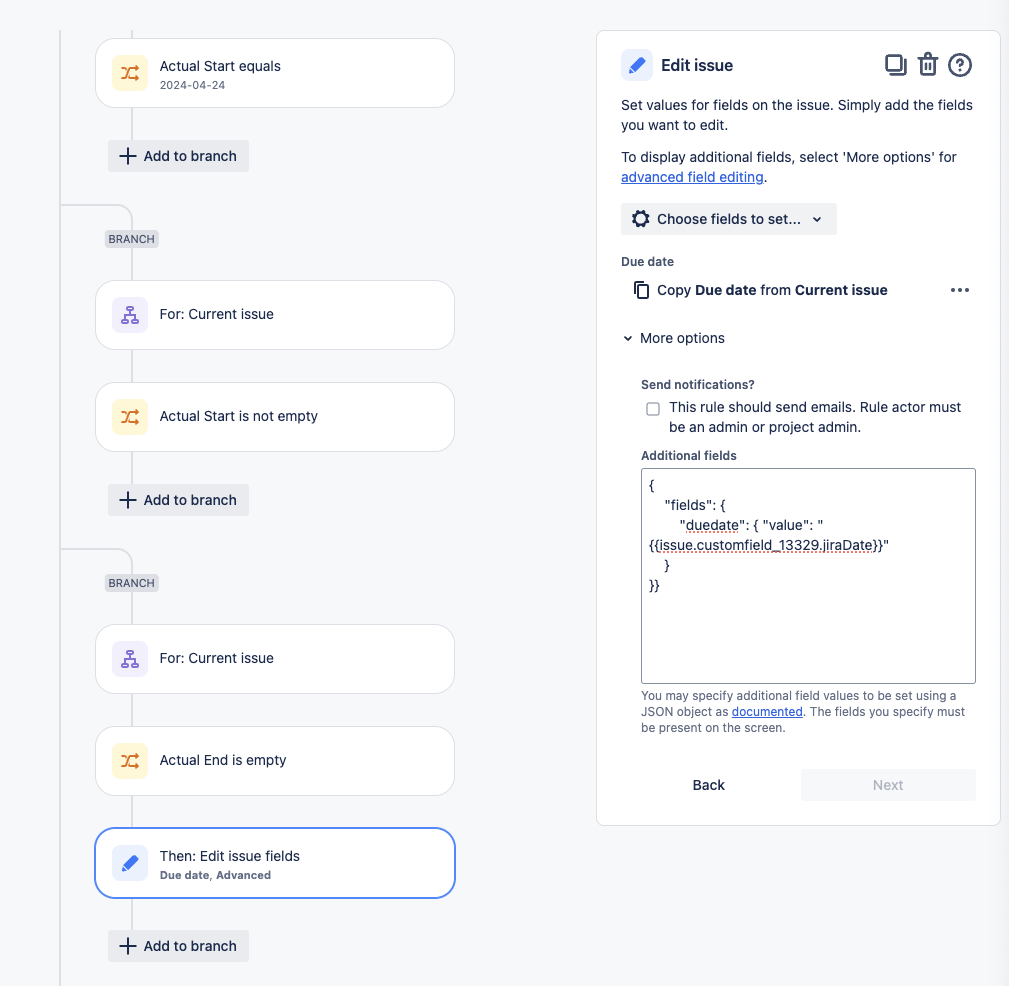
Error editing issues: (The duedate must be a string (duedate)).
Happy to hear alternatives to advanced too.
The above screenshot is missing the edit steps for the rest, but I'm assuming they will work similar, so thats why I haven't added til I fix it.


