Related app: Azure DevOps for Jira
Summary:
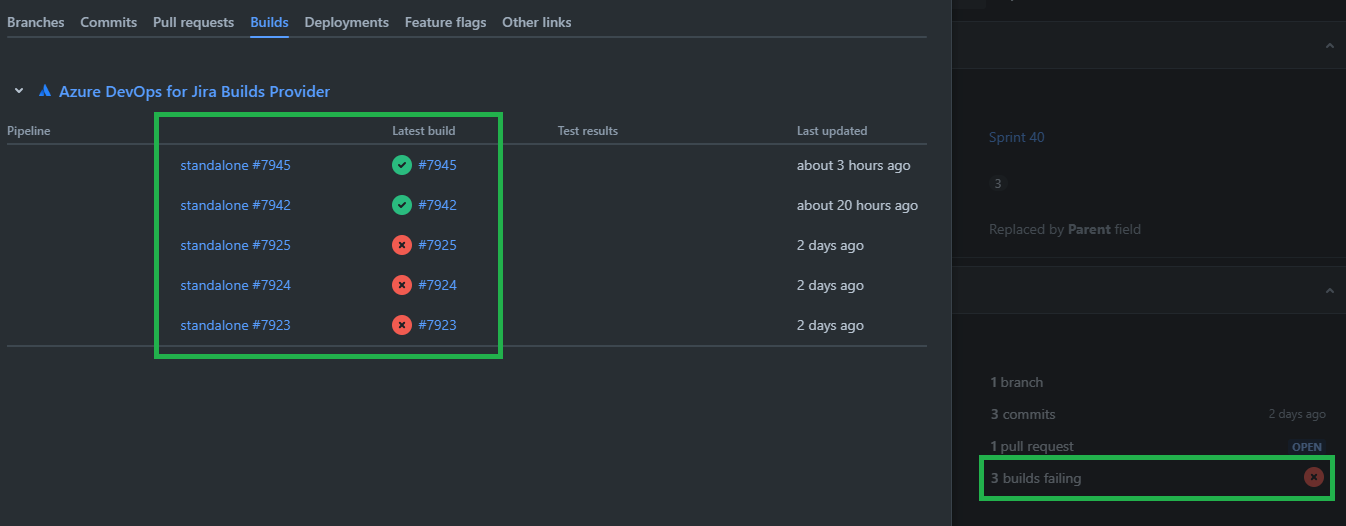
If a feature branch with related Jira issue id is built in Azure DevOps, then the history of all associated builds are shown in the Jira issue. All previous build failures (and successes) are listed in the Details -> Development section of the issue. It would be preferable for only the most recent run of each associated build to be included in the failed builds section.
Consider:
Azure DevOps BuildA and BuildB triggered by a commit to the related feature branch.
BuildA fails and BuildB fail.
Azure DevOps BuildA and BuildB are triggered by a second commit.
BuildA succeeds and BuildB fails.
In this scenario the Details -> Development section would list "3 builds failing", but it would make more sense to show "1 build failing" as BuildA is now in a state of success.
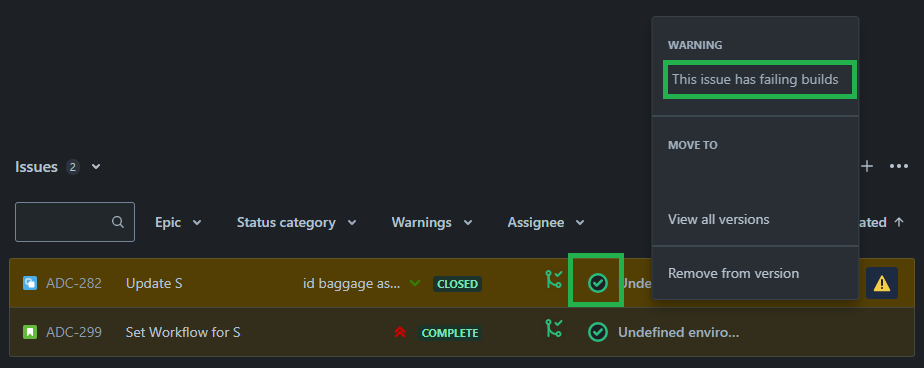
When using Releases in Jira, this also triggers warnings as even though the most recent builds may be successful, the issues are tagged with a warning because they have previous build failures.
Questions:
- Is it possible to only show the most recent build status for a given build?
- Is it possible to ignore previous failures, if the most recent build is successful?
- Is it done this way because the Azure DevOps for Jira cannot distinguish the difference between 2 triggers of BuildA vs. 1 trigger of BuildA and 1 trigger of BuildB?
Ref:
Jira Issue Screen:
Release Screen: