Hi everyone,
I'm facing a bit of a challenge with my Kanban board setup, and I hope someone can help me out. Here's the breakdown:
Setup:
I have a Kanban board consisting of 6 columns: Hidden backlog, Planned, Analysis, Development, Test, and Deploy. Within three of these columns (Analysis, Development, and Test), tasks can exist in two different states: "In XXX" and "Done XXX".
Problem:
While my workflow is mostly functional, there's a peculiar issue that's been bothering me. Allow me to illustrate with an example:
Let's say I have a task in the "Planned" column. I can seamlessly drag it to "In Analysis" - no problem there. However, when attempting to drag it to "Done Analysis," I encounter a visual obstacle. Unlike the smooth transition I expect, I'm unable to visually drag it to the "Done Analysis" state. Instead, I have to manually open the task and change its state to "Done Analysis" using the dropdown menu.
Question:
Why am I unable to visually drag tasks between these two states within the workflow? Is there a fix for this issue or perhaps a workaround that someone knows of?
My workflow is as following:
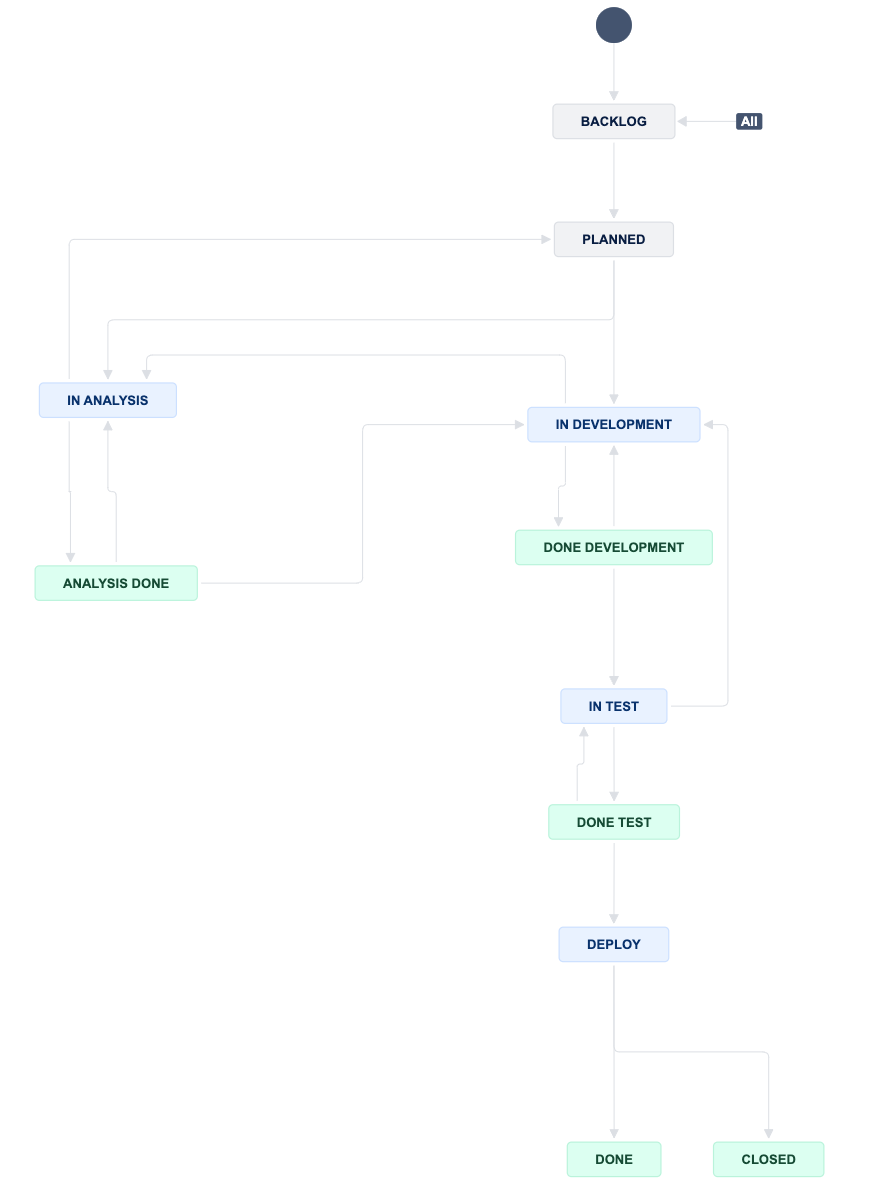
I'd greatly appreciate any insights or solutions you might have on this matter.
Thanks in advance!


