I have an active sprint with a start date of 8th April and end date of 6th May (below):

However, when I view a plan timeline for this same project in 'sprint capacity management view' (below), the projected sprint dates do not match the active sprint dates (23rd Apr - 13th May):
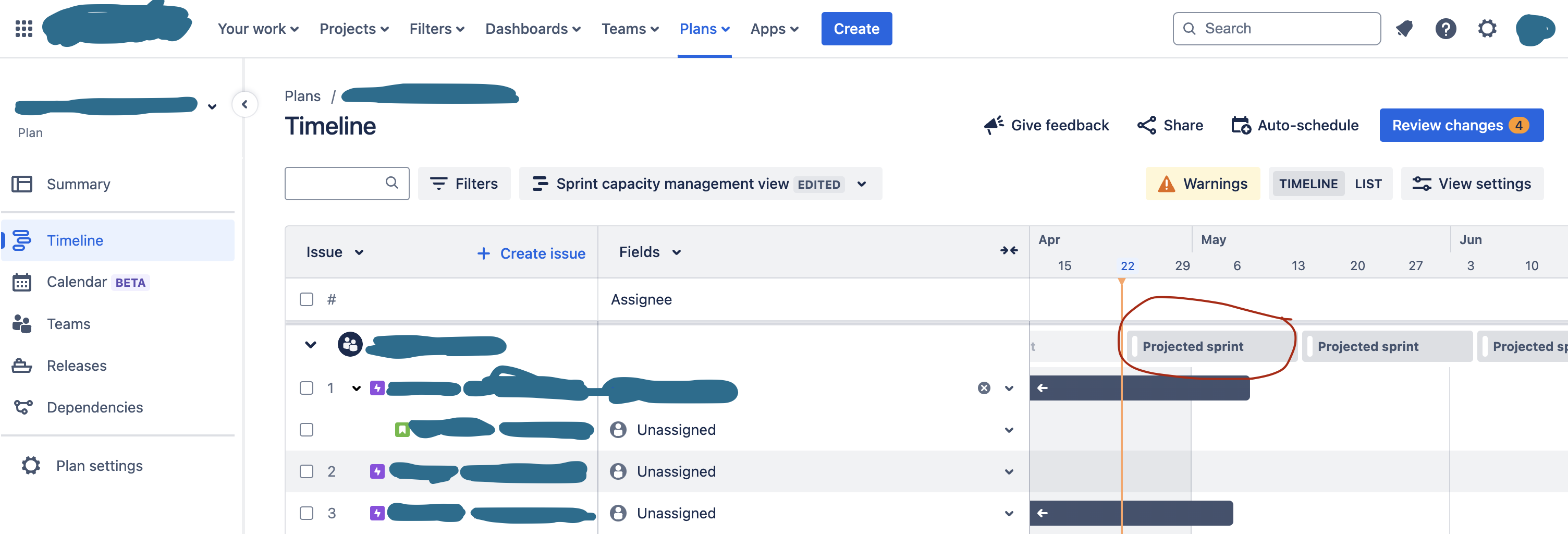
When configuring this plan after it was created by someone else, I added sprint lengths via Teams (from the left panel - it's not visible when I navigate to the Teams menu at the top) > Team settings > Sprint length (weeks).
The sprints in this plan view seem to start from today (22nd Apr), and there doesn't seem to be any way to change this to make the sprints in this view align with the active sprint I have. We have extended our active sprint so it's a week longer than usual, which is why I want to update the projected sprints in the plan.
I've checked and 'sprint dates' is already selected in Plan settings > Scheduling > Inferred dates, and my issue source is definitely a scrum board that uses sprints so I'm stumped.
Is there a way to change the projected sprint dates in this view? Thanks in advance!
Other potentially useful info:
- Company managed project
- I am an admin, but I did not create the plan
- auto-scheduler did not pick up the correct sprint dates, I'm possibly using this incorrectly
- the 4 changes under 'review changes' are just issue dependencies done by another user

