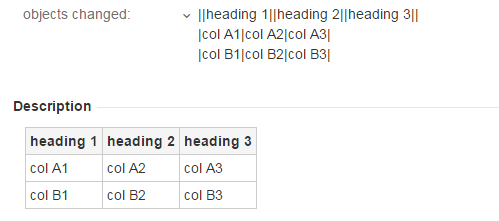
Hi, i have a custom field
it is Text Field, and according to https://confluence.atlassian.com/display/JIRA/Configuring+Renderers - this type is supported by Wiki Style RenderersRenderer for this tickets is set as
However, somehow it does not support wiki syntax while Description field does(same text for 2 fields in 1 ticket)
Vladimir,
It looks as this custom field is configured to use the Default Text Renderer. To configure this, simply navigate to Administration » Projects » "Your project", select Fields and edit the Field Configuration for this issue type.
You'll see a "Renderer" option next to the custom field name.
Cheers,Matheus
thanks
it seems does not work custom fields. there are options only for default fields.
It's applicable for custom fields as well. You have to edit the default field configuration and change the renderer type as mentioned above
Despite this is marked as "Solved", I spent quite a few hours trying to understand how to fix this. Here a video tutorial on how actually do it in 5 minutes...
https://youtu.be/QCNHPy88iKA
Enjoy.
Tomasz Grochowski's Second option worked for me. Thank you.
2. Go first to your project and in project settings go to Fields configuration and there is renderer config. This way worked in my cane.
Life saver, thanks!
Knight this man!
It looks like you're new here. Sign in or register to get started.