Hi,
New here and I'm not a coder so please bare with me.
I'm trying to create a Structure to show in a column if some of our Features have dependencies with other Features (marked with 'blocks' and/or 'is blocked by' relation).
So far, I've extended my Structure with Linked Issues extender (Link type: Blocks, Link direction: parent issues is blocked by or blocks sub-issue), and I've also added a JQL filter with issueLinkType in (blocks, "is blocked by").
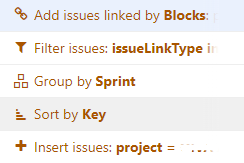
After comparing my JIRA query and the list now in Structure, these actions give me the correct number & list of Features in my project that have issues with either 'is blocked by', 'blocks' or with both relations mentioned in their Linked issues section.
Next step would be to add a view to see if the Features mentioned in the Structure are providers or receivers when it comes to dependencies. For that I thought of adding the 'Linked Issues' column that already exists, the one with this formula:
/* Displays all linked issues and the link types using markdown language.
*/
WITH markdown(issue) = CONCAT(
"[", IF issue.status.category == "Done": "~", issue.key,
IF issue.status.category == "Done": "~", "](", issue.url, ")"
):
issueLinks
.GROUP(IF $.source.key = key: $.type.outward ELSE : $.type.inward)
.MAP(CONCAT($.group, " ", $.elements.MAP(IF $.source.key = key :markdown($.destination) ELSE :markdown($.source))))
Now, the problem / question is, how can I filter the results of this formula query to only show 'blocks' and 'is blocked by' relations and their respective issue links in the column?
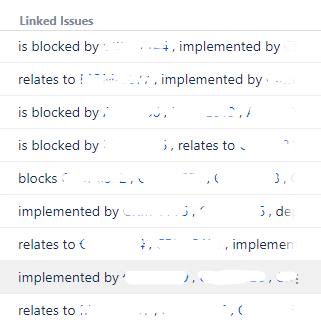
And secondary question is, can I edit the 'Linked Issues' column formula without causing changes to everyone else in the company using the same column in their own Structures, or should I copy the column / formula somehow and make changes to the copied column / formula? I've tried to duplicate the formula already few times, but for some reason my version doesn't show any linked issues even though the formulas are identical.


